14
Connections
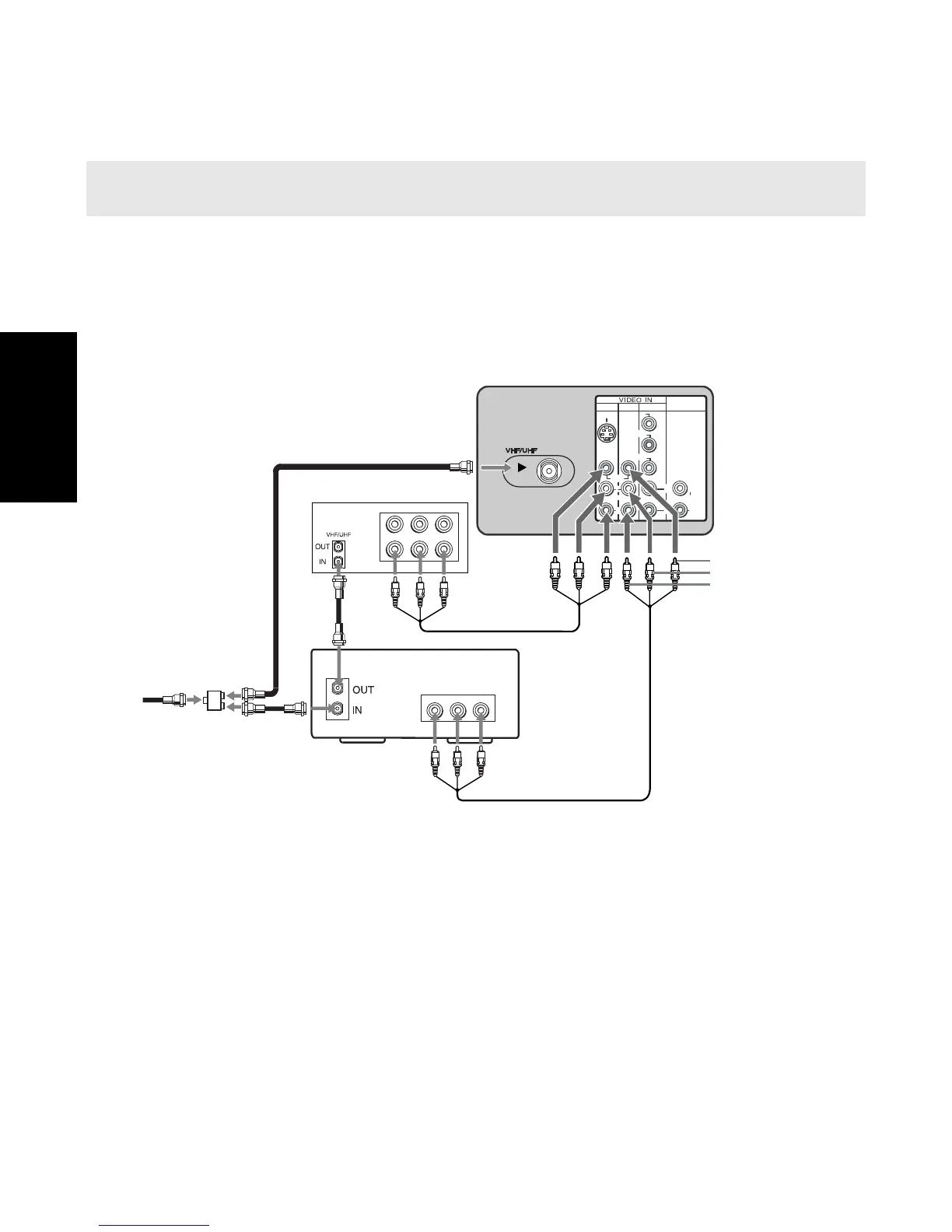
Connecting a TV, VCR, and Cable Box
Use this connection if you subscribe to a cable system that scrambles some channels (pay
channels), but not all of them. This setup allows you to:
❏ change channels through your cable box or VCR when you are receiving a
scrambled signal
❏ change channels through your TV
1 Connect the single input jack of the splitter (not supplied) to your incoming cable
connection.
2 Using coaxial cables (not supplied), connect the two output jacks of the splitter
(not supplied) to:
a) the IN jack on your cable box
b) the VHF/UHF jack on the TV
3 Using a coaxial cable (not supplied), connect the OUT jack on your cable box to the IN jack
on your VCR.
4 Using the audio/video cables (not supplied), connect the AUDIO VIDEO OUT on your
VCR to the AUDIO/VIDEO IN on your TV.
5 Using the audio/video cables (not supplied), connect the AUDIO VIDEO OUT on your
cable box to the AUDIO/VIDEO IN on your TV.
✍ DIGITAL CABLE BOX USERS: If you are connecting a digital cable box, you will need a special bi-
directional splitter (5-900 Mhz mininum) that is designed to work with your digital cable box.
VIDEO
LINE
IN
LINE
OUT
AUDIO L AUDIO R
VIDEO
LINE
OUT
AUDIO L AUDIO R
1
3
4
AUDIO OUT
(VAR/FIX)
VIDEO
L
(MONO)
R
L
R
(MONO)
S VIDEO
Y
P B
P
R
L
R
VCR
Rear of TV
2a
1
4
Video (yellow)
Audio L (white)
Audio R (red)
Cable
3
2b
Splitter
5
Cable box












 To Next Page