34
KV-27FA310/27FS120/29FA310/29FS120
KV-27FA310/27FS120/29FA310/29FS120
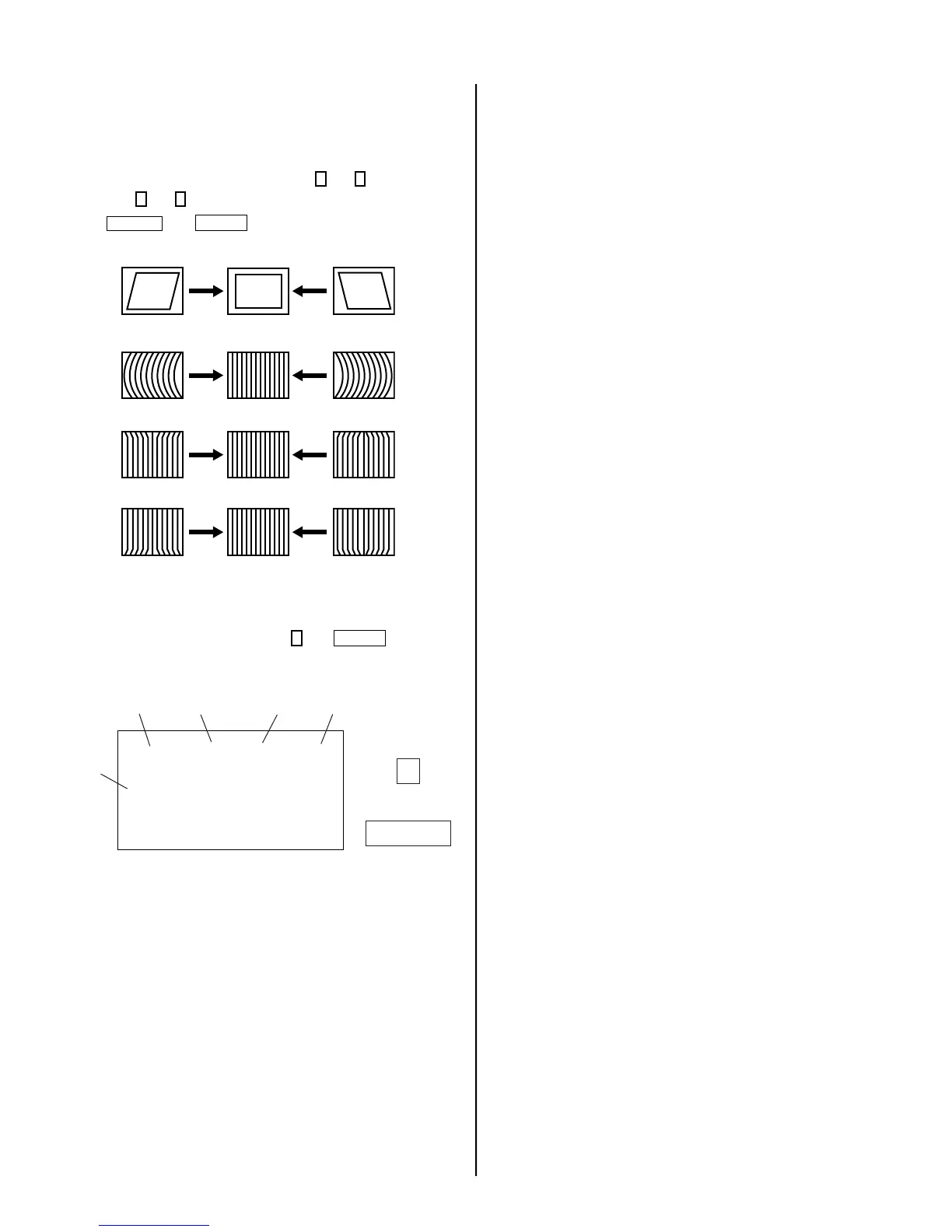
V. Angle (VANG), V. Bow (VBOW), Upper PIN
(UPIN) and Low PIN (LPIN) Adjustments
1. Input a crosshatch signal.
2. Activate the Service Adjustment Mode.
3. Select VANG, VBOW, UPIN, and LPIN with
1
and
4
.
4. Adjust with
3
and
6
for the best picture.
5. Press
MUTING
then
ENTER
to save into the memory.
V ANGLE (VANG)
V BOW (VBOW)
UPPER PIN (UPIN)
LOW PIN (LPIN)
Service Adjustment Mode Memory
1. After completing all adjustments, press
0
then
ENTER
.
Read From Memory
Green
Red
ENTER
0
service defl vbow
ntsc
vchp
Category
Display
Item
Mode
Item
Data
Signal
Type
00000000 00000000
7












 To Next Page