39
Menus
Using the Timer Menu
Current Time Set your TV to the current day and time. Press
to open the Current
Time menu:
1 Use the F or f buttons to enter the correct day and time,
then press .
2 Press to exit the menu.
Timer 1 and
Timer 2
Scheduled
viewing
Use the timers to program your TV to turn on and off by day, time,
duration, and channel. The timer duration is a maximum of six hours.
When the channel is fixed, it is not necessary to set the channel.
1 Use the
F or f
buttons
to highlight Timer 1 or Timer 2,
then press .
2 Use the
F or f
buttons
to enter the desired day, start time, duration,
and channel, then press . The timer status should be On when the
Timer has been set, and the timer light on the front panel of the TV
should be on.
3 Press to exit the menu.
✍ When you perform Auto Program, Timer 1 and Timer 2 settings will be cleared. Also, in the event of
any loss of power, Current Time, Timer 1, and Timer 2 settings will be cleared.
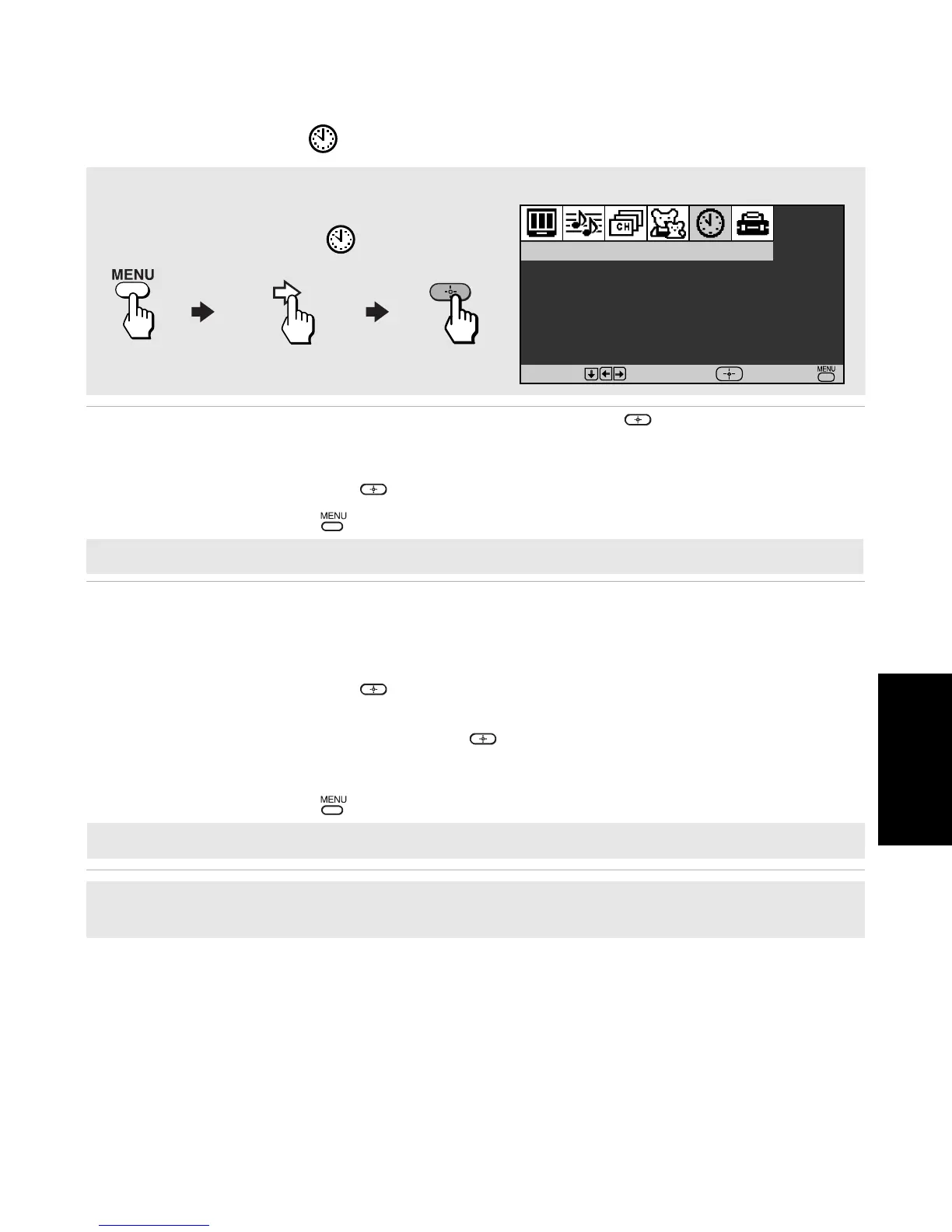
To access the Timer menu, use the following steps:
To Display To Highlight To Select
Timer 1
:
Set
Timer 2
:
Set
Current Time
Timer
Move
Select
End
✍ You must set the Current Time before you can use Timer 1 or Timer 2.
✍ Select Off to turn off the Timer. Your previous settings will be saved.











 To Next Page