29
Menus
Using the Audio Menu
Treble Press G to
decrease the higher pitched sounds. Press
g to increase the higher
pitched sounds.
Bass Press G to decrease the lower pitched sounds. Press g to increase the lower
pitched sounds.
Balance Press G to
emphasize the left speaker. Press
g to emphasize the right speaker.
Steady Sound
Stabilizes volume
Press
F or f to select one of the following options:
On: Select to stabilize the volume when changing channels.
Off:
Select to turn Steady Sound off.
Effect Use the F or f buttons to highlight one of the following options, then press
to select it.
Simulated: Simulates theater quality sound for mono programs.
SRS: Produces a dynamic three-dimensional sound for stereo programs.
Off: Normal stereo or mono reception.
Options Use these features to change your Audio setting.
MTS
Multi-Channel
TV Sound
Use the
F or f buttons to highlight one of the following
options, then press
to select it.
Stereo: Select when viewing a broadcast in stereo.
Auto SAP: Select to have the TV automatically switch to a
Second Audio Program (SAP) when a signal is
received.
Mono: Select to reduce noise in areas of poor reception.
Speaker
Custom selection
of audio output
source
Use the
F or f buttons to highlight one of the following
options, then press
to select it.
On:
Select to listen to the sound from the TV speakers
with or without a separate stereo system.
Off: Select to turn off the TV speakers and listen to
the TV’s sound only through external audio
system speakers.
Audio
Options
Effect
:
SRS
Steady Sound: Off
Balance
Treble
Bass
Move
Select
End
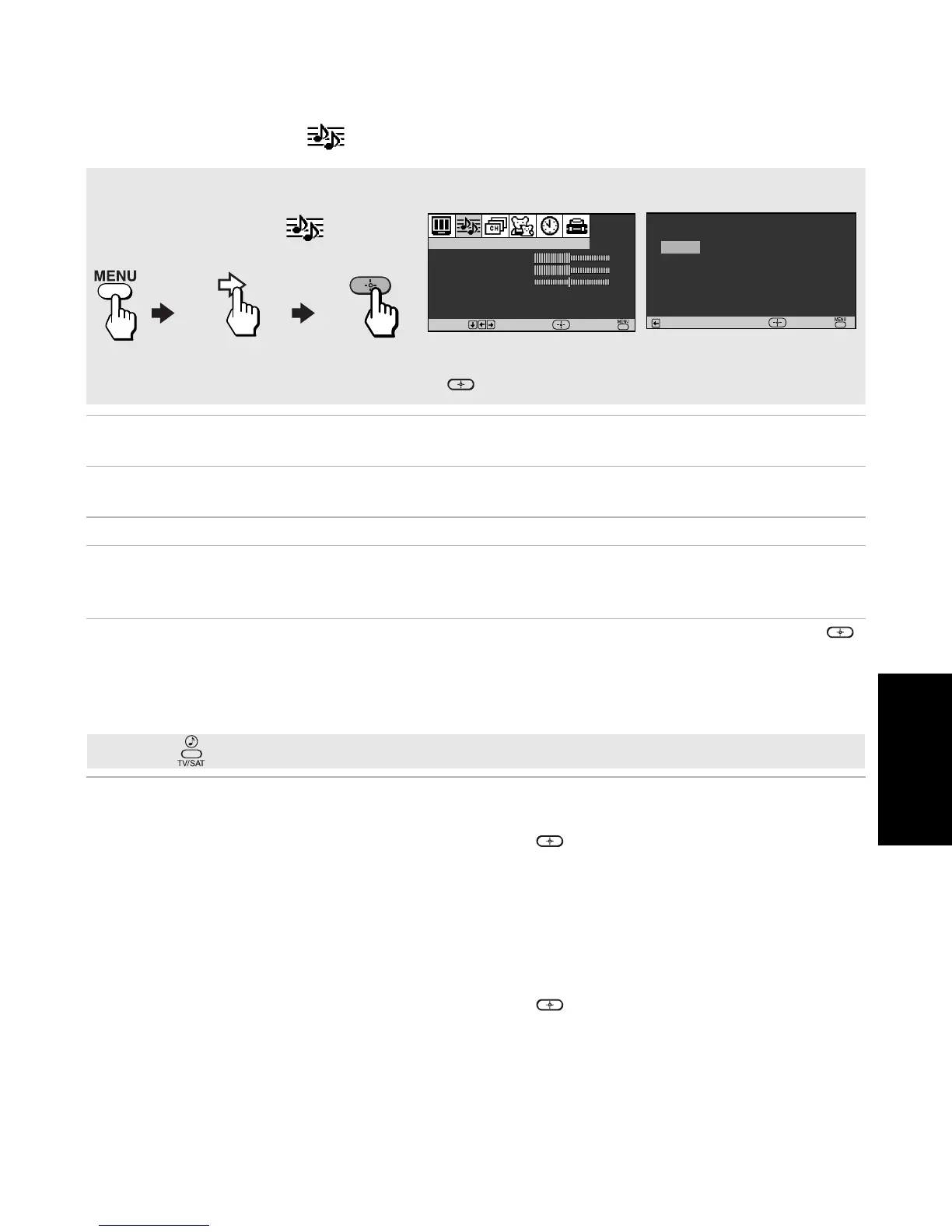
To access the Audio menu, use the following steps:
To Display To Highlight To Select
Press f to highlight an option; then press .
Options
Speaker: On
Audio Out: Fixed
Return
MTS: Stereo
Select
End
✍ Press to directly select Effect settings (Simulated, SRS, Off).













 To Next Page