EasyManua.ls Logo

Sony Trinitron KV-32TW77 - Manual Channel Adding

Sony Trinitron KV-32TW77
79 pages
Print Icon
To Next Page IconTo Next Page
To Previous Page IconTo Previous Page
Loading...
=
iS
0:
Fa
a 2
|.
a]
0
(©
@6
Uj
©©6®
J
<
fey
ie
cH
le
iS
0
ic
=
(0
é
[9
RM-Y118
To
return
to
the
normal
screen
Press
MENU.
When
you
erase.a
VHF
of.UHF
channel,
the
cable.
TV
channel
with
the
same
number
is
also
erased,
and
viee
versa.
24
20
Chapter
1;
Setting.Up
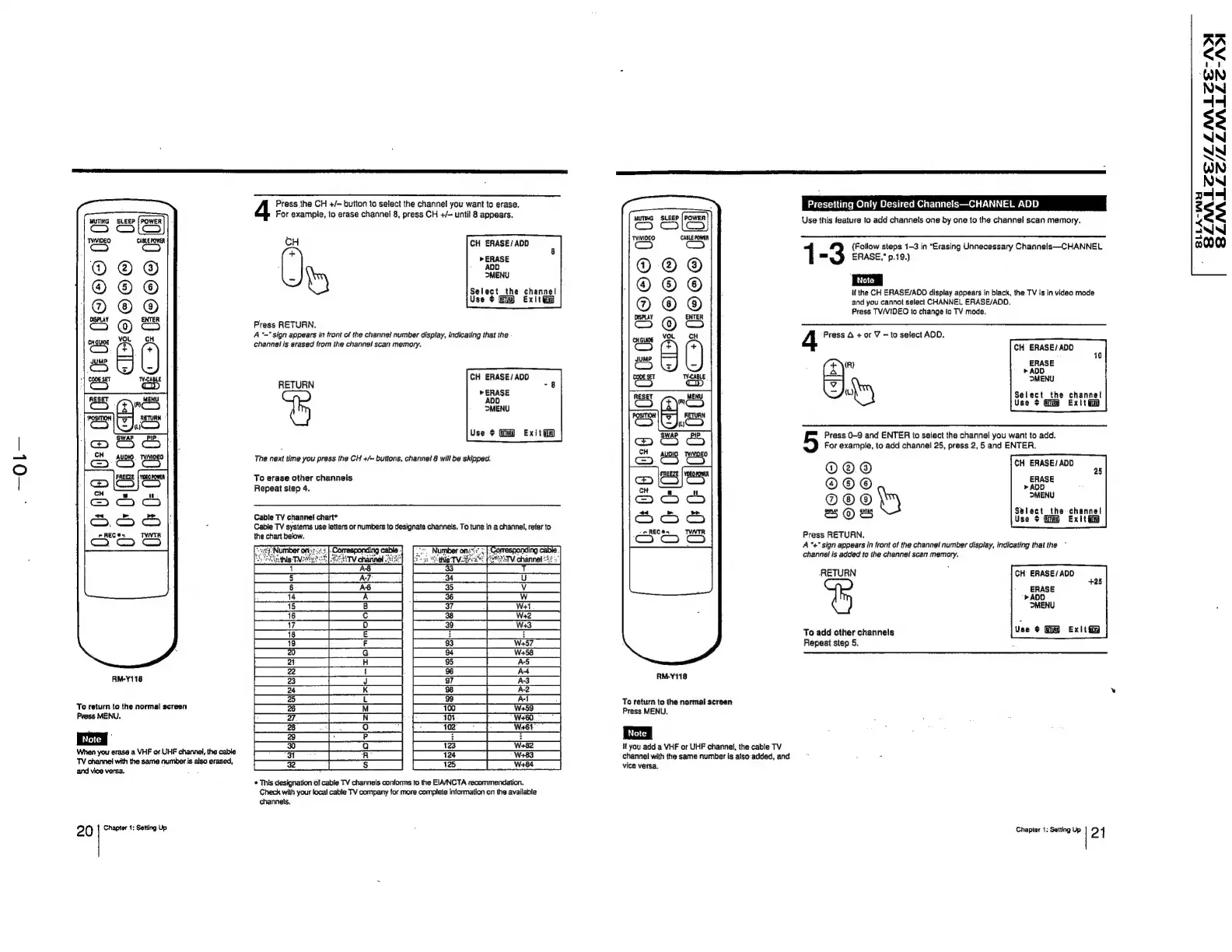
Press
the
CH
+/-
button
to
select
the
channel
you
want
to
erase.
For
example,
to
erase
channel
8,
press
CH
+/—
until
8
appears.
CH
CH
ERASE/
ADD
ty
Select
the
channel
Use
$
exitG
Press
RETURN.
“~"
sign
appears
in
front
of
the
channel
number
display,
indicating
that
the
channel
is
erased
from
the
channel
scan
memory.
CH
ERASE/ADD
ERASE
RETURN
Exitia
The
next
time
you
press
the
CH
+/~
buttons,
channel
8
will
be
skipped.
To
erase
other
channels
Repeat
step
4.
Cable
TV
channel
chart*
Cable
TV
systems
use
letters
or
numbers
to
designate
channels.
To
tune
in
a
channel,
refer
to
the
chart
below.
*
This
designation
of
cable
TV
channels
conforms
to
the
EIAANCTA
recommendation.
Check
with
your
local
cable
TV
company
for
more
complete
information
on
the
available
channels,
0;
(FO
0
(f
2
fe
0
&
®
©
©
o
a
J)
RM-Y118
To
return
to
the
normal
screen
Press
MENU.
If
you
add
a
VHF
or
UHF
channel,
the
cable
TV
channel
with
the
same
number
is
aiso
added,
and
vice
versa.
Presetting
Only
Desired
Channels—CHANNEL
ADD
Use
this
feature
to
add
channels
one
by
one
to
the
channel
scan
memory.
1
(Follow
steps
1-3
in
“Erasing
Unnecessary
Channels—CHANNEL
=
ERASE,"
p.19.)
It
the
CH
ERASE/AOO
display
appears
in
black,
the
TV
is
in
video
mode
and
you
cannot
select
CHANNEL
ERASE/AOD.
Press
TV/VIDEO
to
change
to
TV
mode.
CH
ERASE/ADO
4
Press
A
+
or
V
—
to
select
AOD.
1
(eye
ERASE
»
ADD
I
MENU
ery
Select
the
channel
Use
+
Exit
ti
Press
0-9 and
ENTER
to
select
the
channel
you
want
to
add.
For
example,
to
add
channel
25,
press
2,
5
and
ENTER,
@
®
®
CH
ERASE/
ADD
@®
»ADD
@ ©
MENU
Setect
the
channel
:
‘
Bs
@es
Use
$
Gm
Ex!
Press
RETURN.
A
"+"
sign
appears
in
front
of
the
channel
number
display,
indicating
that
the
~
channel
is
added
to
the
channel
scan
memory.
RETURN
;
CH
ERASE/ADD
ERASE
>
ADO
>MENU
To
add
other
channels
Use
¢
Exit
Repeat
step
5.
Chapter
1:
Setting
Up
2
1
SLINALZE/LLIALZE-ADI
SLA
LLE/LLMLLZ-ANYI
a
s
<
od
=
0