EasyManua.ls Logo

Sony Trinitron KV-32TW77 - Set-Up Adjustments (Continued); G2 (Screen) and White Balance Calibration

Sony Trinitron KV-32TW77
79 pages
Print Icon
To Next Page IconTo Next Page
To Previous Page IconTo Previous Page
Loading...
KV-27TW77/27TW78
KV-32TVW7
W32TW78
;
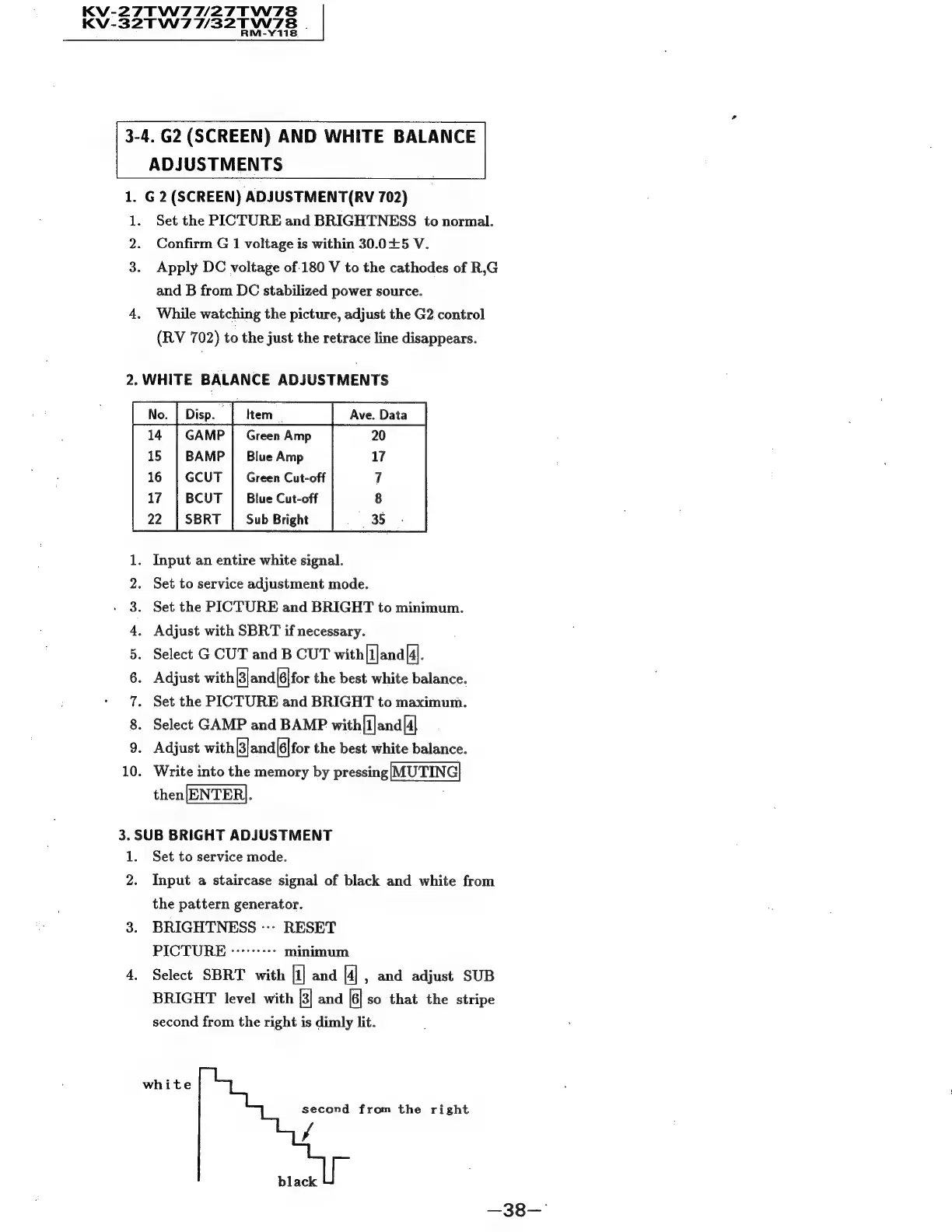
3-4.
G2
(SCREEN)
AND
WHITE
BALANCE
ADJUSTMENTS
1.
G2
(SCREEN)
ADJUSTMENT(RV
702)
1.
Set
the
PICTURE
and
BRIGHTNESS
to
normal.
2.
Confirm
G
1
voltage
is
within
30.0£5
V.
Apply
DC
voltage
of-180
V
to
the
cathodes
of
R,G
and
B
from
DC
stabilized
power
source.
4.
While
watching
the
picture,
adjust
the
G2
control
(RV
702)
to
the
just
the
retrace
line
disappears.
2.
WHITE
BALANCE
ADJUSTMENTS
Ce
a
Green.
Amp
Blue
Amp
Green
Cut-off
Blue
Cut-off
Sub
Bright
Input
an
entire
white
signal.
Set
to
service
adjustment
mode.
Set
the
PICTURE
and
BRIGHT
to
minimum.
Adjust
with
SBRT
if
necessary.
Select
G
CUT
and
B
CUT
with{lana[4].
Adjust
with|3]and|6|for
the
best
white
balance.
Set
the
PICTURE
and
BRIGHT
to
maximum.
Select
GAMP
and
BAMP
with[1]and[4]
Adjust
with|3|and|6|for
the
best
white
balance.
Write
into
the
memory
by
pressing|MUTING|
then
3.
SUB
BRIGHT
ADJUSTMENT
1.
Set
to
service
mode.
SOP
SOC
Oe
ONS
6
Ses
ha
sS
ray
2
2.
Input
a
staircase
signal
of
black
and
white
from
the
pattern
generator.
3.
BRIGHTNESS
---
RESET
PICTURE
---------
minimum
4.
Select
SBRT
with
[1]
and
[4]
,
and
adjust
SUB
BRIGHT
level
with
[3]
and
|6|
so
that
the
stripe
second
from
the
right
is
dimly
lit.
white
second
from
the
right
A
black
—38—"