EasyManua.ls Logo

Sony Trinitron KV-32TW77 - Using the On-Screen Menus

Sony Trinitron KV-32TW77
79 pages
Print Icon
To Next Page IconTo Next Page
To Previous Page IconTo Previous Page
Loading...
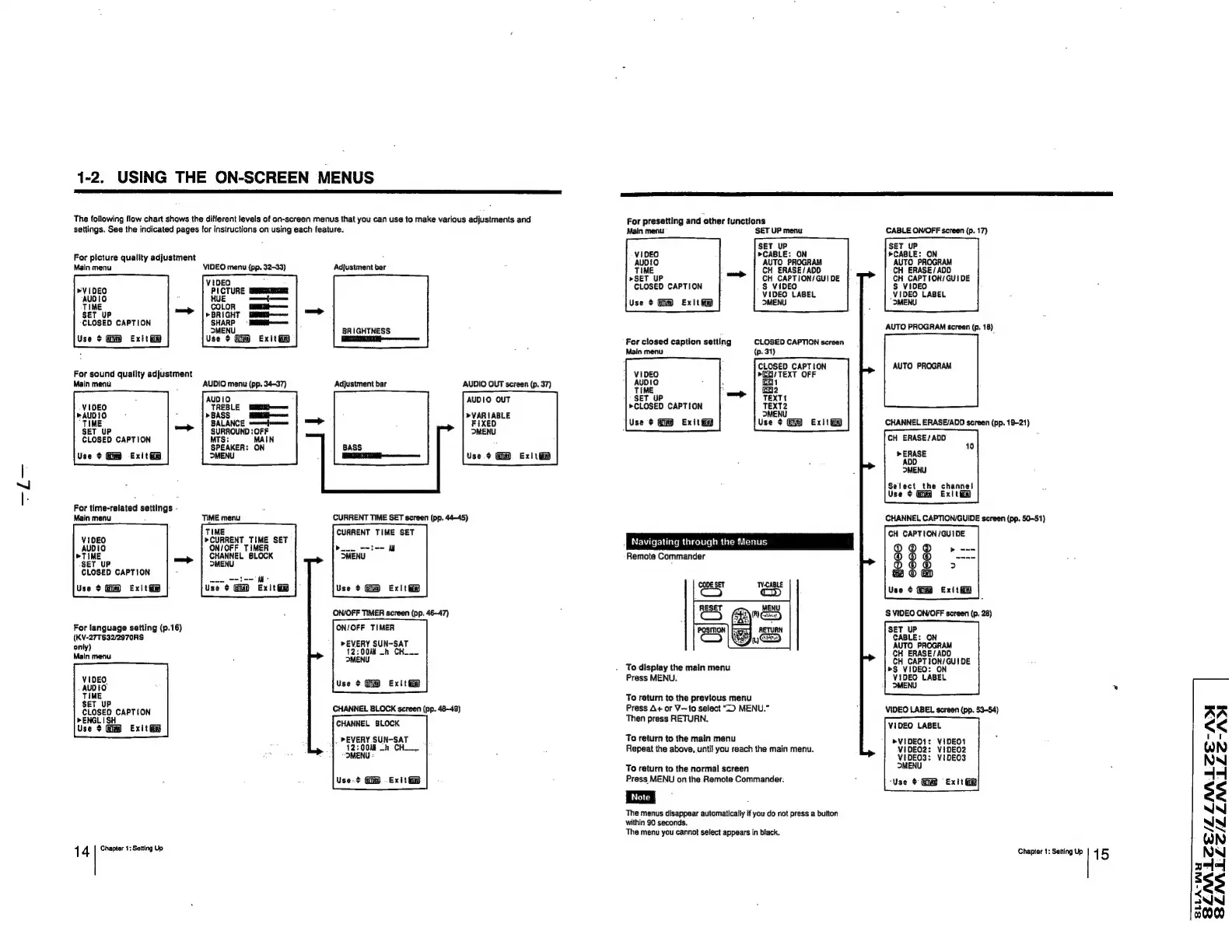
1-2,
USING
THE
ON-SCREEN
MENUS
The
following
flow
chart
shows
the
different
levels
of
on-screen
menus
that
you
can
use
to
make
various
adjustments
and
settings.
See
the
indicated
pages
for
instructions
on
using
each
feature.
For
picture
quality
adjustment
Main
menu
VIDEO
menu
(pp.
32-33)
COLOR
»BRIGHT
SHARP
°
MENU
Use
¢
Exit
@
BEE
ee
me
SET
UP
wie
aan
CLOSED
CAPTION
|
a
nme
Use
¢
Gi
Exit
For
sound
quality
adjustment
Main
menu
-
AUDIO
menu
(pp.
34-37)
AUDIO
Lema
BALANCE
swonenfonemen
SURROUND
:
OFF
MTS:
MAIN
SPEAKER:
ON
MENU
SET
uP
CLOSED
CAPTION
Use
¢
Exit@
For
time-related
settings
-
Main
menu
:
TIME
menu
TIME
»CURRENT
TIME
SET
ON/OFF
TIMER
CHANNEL
SLOCK
MENU
VIDEO
AUDIO
>TIME
SET
UP
CLOSED
CAPTION
Use
+
Exit
Exité
For
language
setting
(p.16)
(KV-27TS32/2970RS
only)
Main
menu
VIDEO.
AUDIO
TIME
SET
UP
CLOSED
CAPTION
>ENGL
ISH
Use
>
Gm
Exitt@
1
4
Chapter
1;
Setting
Up
Adjustment
bar
BRIGHTNESS
Adjustment
bar
AUDIO
OUT
screen
(p.
37)
AUDIO
OUT
>VARIABLE
FIXED
MENU
BASS
Use
¢
Ex|
tio
CURRENT
TIME
SET
screen
(pp.
44-45)
CURRENT
TIME
SET
|
al
tate
||
MENU
Use
¢
Exit
ON/OFF
TIMER
screen
(pp.
46-47)
ON/OFF
TIMER
»>EVERY
SUN-SAT
12:00
_h
CHW
>MENU
Use
+
Exiti®
CHANNEL
BLOCK
screen
(pp.
48-49)
CHANNEL
BLOCK
,
PEVERY
SUN-SAT
12:00M
-h
CH.
|
“MENU
-
Use-?
Gi
.
Exitt
For
presetting
and
other
functions
Main
menu
SET
UP
menu
CABLE
ON/OFF
screen
(p.
17)
SET
UP
VIDEO
>CABLE:
ON
*CABLE:
ON
AUDIO
AUTO
PROGRAM
AUTO
PROGRAM
TIME
CH
ERASE/ADD
CH
ERASE/
AOD
»SET
UP
CH
CAPTION/
GUIDE
CH
CAPTION/GUI
DE
§
VIDEO
S$
VIDEO
CLOSED
CAPTION
VIDEO
LABEL
VIOEO
LABEL
Use
¢
Exitiip
MENU
MENU
AUTO
PROGRAM
screen
(p.
18)
For
closed
caption
setting
CLOSED
CAPTION
screen
{p.31)
CLOSED
CAPTION
AUTO
PROGRAM
wECVTEXT
OFF
(a1
fen2
TEXT1
TEXT2
>MENU
Use
+
Exit
i
SET
UP
»CLOSED
CAPTION
Use
¢
Exit
CHANNEL
ERASE/ADD
screen
(pp.
19-21)
CH
ERASE/ADD
>
ERASE
he
channel
ms
Ex|t
i
CHANNEL
CAPTION/GUIDE
screen
(pp.
50-51)
CH
CAPTION
/GUIDE
Navigating
through
the
Menus
g
@@
»
®
©
>
Remote
Commander
§ §
®
Use
¢
Exithe
S
VIDEO
ON/OFF
screen
(p.
28)
SET
UP
CABLE:
ON
AUTO
PROGRAM
CH
ERASE/
ADD
CH
CAPTION/GUi
DE
To
display
the
main
menu
>S
VIDEO:
ON
Press
MENU.
mend
LABEL
To
return
to
the
previous
menu
Press
A+
or
V—to
select
“D
MENU.”
Then
press
RETURN.
VIDEO
LABEL
screen
(pp.
53-54)
VIDEO
LABEL
To
return
to
the
main
menu
>VIDEO1:
ViDEO1
Repeat
the
above,
until
you
reach
the
main
menu.
ViDEO2:
ViDEO2
VIDEO3:
ViDEOS
MENU
To
return
to
the
normal
screen
Press
MENU
on
the
Remote
Commander.
3
‘Use
¢
Exit
Ge
The
menus
disappear
automatically
if
you
do
not
press
a
button
within
90
seconds.
The
menu
you
cannot
select
appears
in
black.
Chapter
1:
Setting
Up
1
5
AR
<<
WN
NN
44
$s
NIN
NN
QN
NN
44
$3
AN
00
SLLA-WY

Related product manuals