EasyManua.ls Logo

Sony Trinitron KV-32TW77 - Connecting Other Equipment

Sony Trinitron KV-32TW77
79 pages
Print Icon
To Next Page IconTo Next Page
To Previous Page IconTo Previous Page
Loading...
—LbL-
1-5.
CONNECTING
OTHER
EQUIPMENT
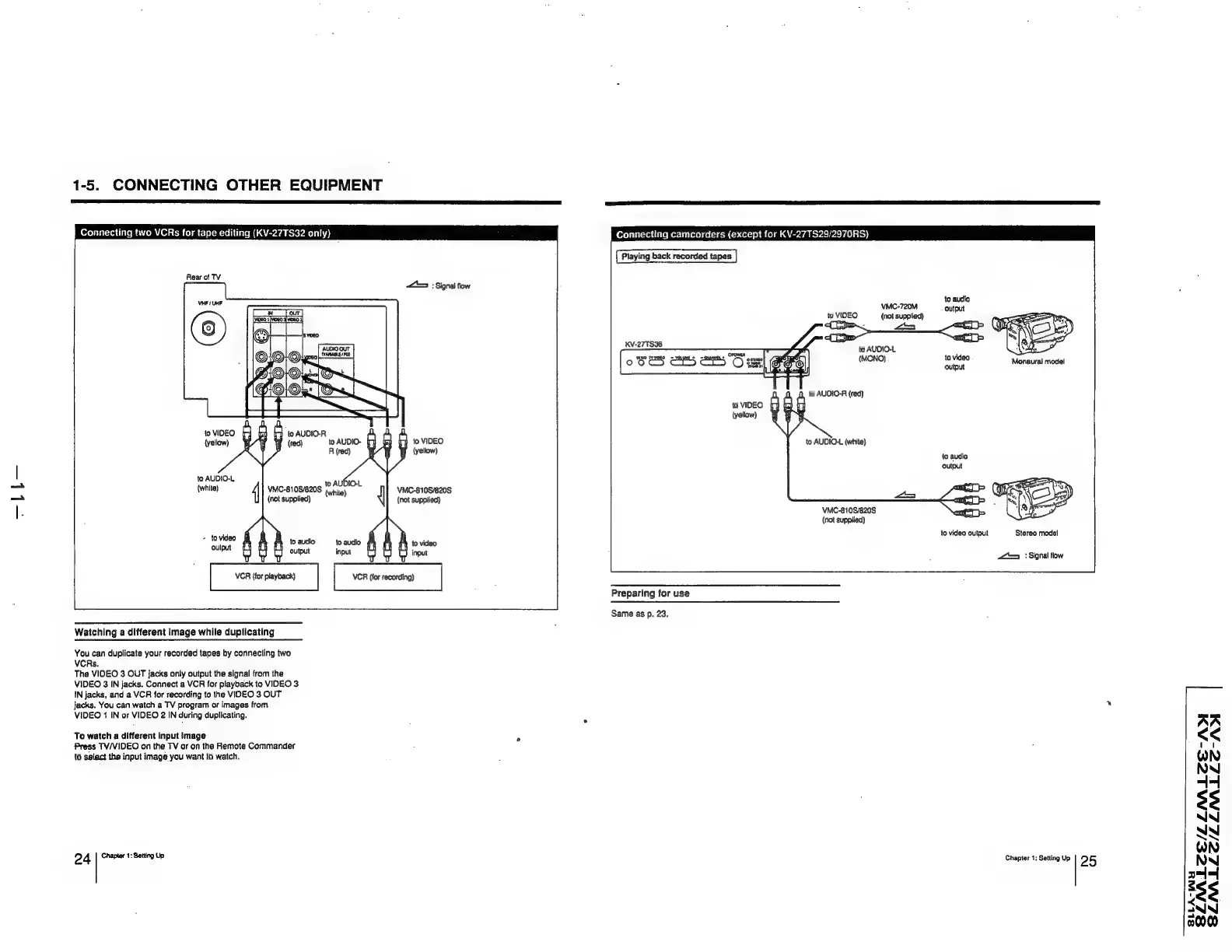
Connecting
two
VCRs
for
tape
editing
(KV-27TS32
only)
Rear
of
TV
to
VIDEO
(yellow)
f}
to
VIDEO
(yellow)
to
AUDIO-L
(white)
4
+
to
video
oulput
to
AUBIOL
VMC-810S/820S
(rite)
(not
supplied)
VMC-810S/820S
(not
supplied)
to
audio
to
audio
output
input
bei
Watching
a
different
image
while
duplicating
You
can
duplicate
your
recorded
tapes
by
connecting
two
VCRs.
The
VIDEO
3
OUT
jacks
only
output
the
signal
from
the
VIDEO
3
IN
jacks.
Connect
a
VCR
for
playback
to
VIDEO
3
IN
jacks,
and
a
VCR
for
recording
to
the
VIDEO
3
OUT
jacks.
You
can
watch
a
TV
program
or
images
from
VIDEO
1
IN
or
VIDEO
2
IN
during
duplicating.
To
watch
a
different
input
Image
Press
TV/VIDEO
on
the
TV
or
on
the
Remote
Commander
to
salact
the
input
image
you
want
to
watch.
24
Chapter
1:
Setting
Up
<5
:
Signal
flow
Connecting
camcorders
(except
for
KV-27TS29/2970RS)
Playing
back
recorded
tapes
VMC-720M
to
VIDEO
(not
supplied)
:
a
to
AUDIO-L
onan
A
we
pea
pone
pouean
OOS"
ae]
ea
a
00S
655
S55
Cis|
OOS)
)
fo
AUDIO-A
(red)
to
VIDEO
to
AUDIO-L
(white)
VMC-810S/820S
(not
supplied)
Preparing
for
use
Same
as
p.
23.
Monaural
model
lo
audio
to
video
output
Stereo
model
9
::
Signal
flow
Chapter
1;
Setting
Up
2
5
AA
<<
WN
NN
4-4
$3
NN
ny
NN
44
38
NN
00
SLLA-WH