EasyManua.ls Logo

Sony Trinitron KV-32TW77 - Using Convenient Features; Using Closed Caption

Sony Trinitron KV-32TW77
79 pages
Print Icon
To Next Page IconTo Next Page
To Previous Page IconTo Previous Page
Loading...
—vlL—-
1-7.
USING
CONVENIENT
FEATURES
03
(loee
Of
OF
aps
<
iS
=
0
8
i
raw
|
RM-Y118
QQ
|
Cramer
2:
Using
Basic
Feaures
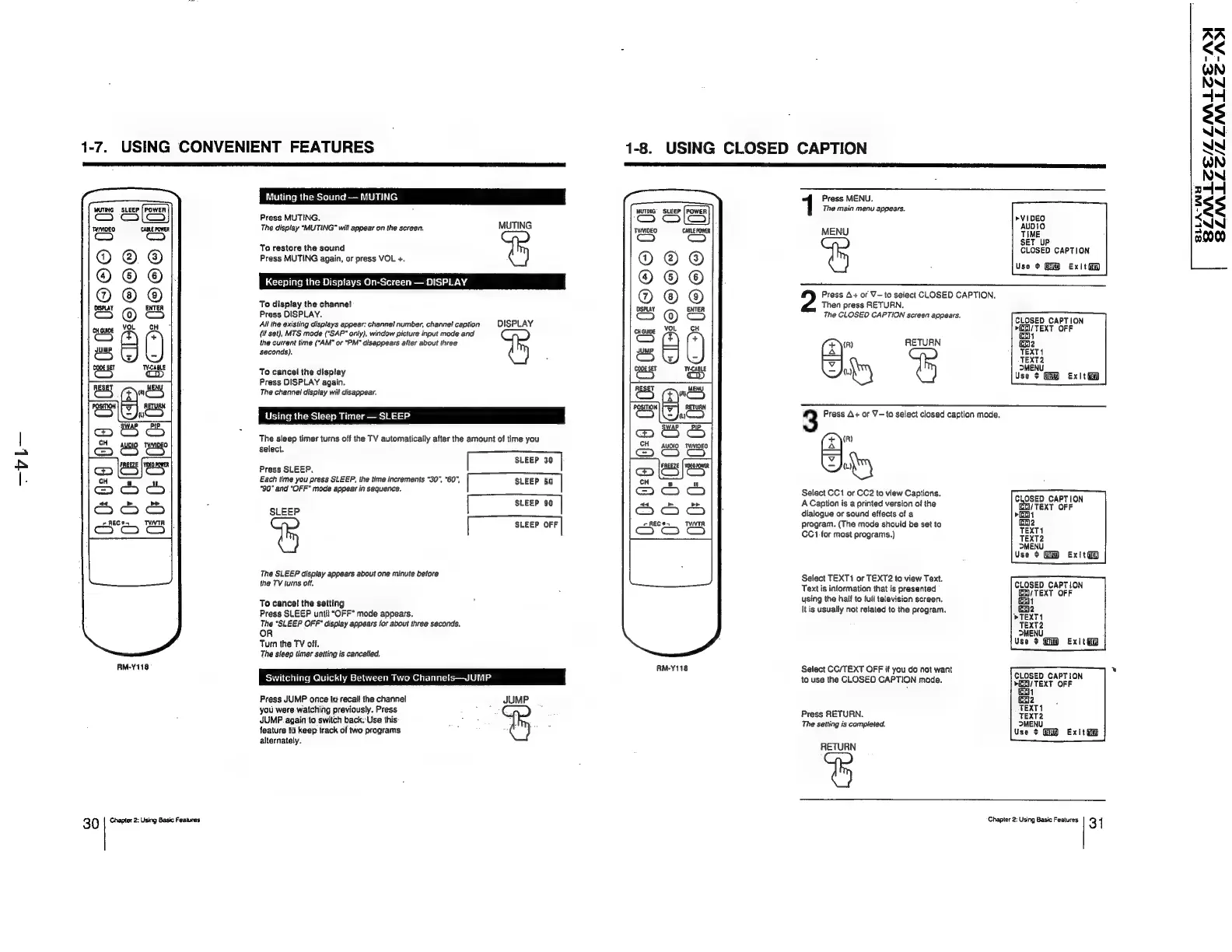
Muting
the
Sound
—
MUTING
Press
MUTING.
The
display
“MUTING*
will
appear
on
the
screen.
MUTING
To
restore
the
sound
Press
MUTING
again,
or
press
VOL
+.
Keeping
the
Dispiays
On-Screen
—
DISPLAY
©O©eC®
To
display
the
channel
Press
DISPLAY.
All
the
existing
displays
appear:
channel
number,
channel
caption
DISPLAY
(if
set),
MTS
mode
("SAP*
only),
window
picture
input
mode
and
the
current
time
(“AM"
or
"PM"
disappears
alter
about
three
seconds).
To
cancel
the
display
Press
DISPLAY
again.
The
channel
display
will
disappear.
Using
the
Sleep
Timer
—
SLEEP
The
sleep
timer
turns
off
the
TV
automatically
after
the
amount
of
time
you
select.
[Steer
30
|
Press
SLEEP,
Each
time
you
press
SLEEP,
the
time
increments
"30",
"60",
SLEEP
60
|
"90"
and
“OFF”
mode
appear
in
sequence.
[suser
80
|
SLEEP
SLEEP
OFF
The
SLEEP
display
appears
about
one
minute
before
the
TV
turns
off.
To
cancel
the
setting
Press
SLEEP
untit
“OFF”
mode
appears.
The
“SLEEP
OFF"
display
appears
for
about
three
seconds.
OR
Turn
the
TV
off.
The
sleep
timer
setting
is
cancelled.
Switching
Quickly
Between
Two
Channels—JUMP
Press
JUMP
once
to
recall
the
channel
JUMP
you
were
watching
previously.
Press
:
JUMP.
again'to
switch
back.
Use
this
feature
to
keep
track
of
two
programs
alternately.
1-8.
USING
CLOSED
CAPTION
<
fs]
pd
cH
aes
CH
AUDIO
TVIMIOEO
joan
i
am)
RM-Y118
The
main
menu
appears.
1
Press
MENU.
MENU
Press
A+
or
V-to
select
CLOSED
CAPTION.
Then
press
RETURN.
The
CLOSED
CAPTION
screen
appears.
RETURN
(x)
(R)
OS
3
Press
A+
or
V—to
select
closed
caption
mode.
(R)
—
2)
Ny
Select
CC1
or
CC2
to
view
Captions.
A
Caption
is
a
printed
version
of
the
dialogue
or
sound
effects
of
a
program.
(The
mode
should
be
set
to
CC1.for
most
programs.)
Select
TEXT1
or
TEXT2
to
view
Text.
Text
is
information
that
is
presented
using
the
half
to
full
television
screen.
It
is
usually
not
related
to
the
program.
Select
CC/TEXT
OFF
if
you
do
not
want
to
use
the
CLOSED
CAPTION
made.
Press
RETURN.
The
setting
is
completed.
RETURN
>VIDEO
AUDIO
TIME
SET
UP
CLOSED
CAPTION
Use
+
ExitGy
CLOSED
CAPTION
»(CO/
TEXT
OFF
CoH
C2
TEXT
TEXT2
>MENU
Use
+
Exit
CLOSED
CAPTION
//
TEXT
OFF
>t
a2
TEXT1
TEXT2
MENU
Use
¢
Exit@d
CLOSED
CAPTION
(a)
TEXT
OFF
Col
a2
»TEXTI
TEXT2
MENU
Use
+
Exit)
CLOSED
CAPTION
>t
TEXT
OFF
a
co2
TEXT1
TEXT2
MENU
Use
¢
Exitt®?
Chapter
2:
Using
Basic
Features
3
{
BSZLAALECE/LZLNLCE-ADI
BSLMLLE/LENLLE-ANI
SLLA-WH