EasyManua.ls Logo

Sony Trinitron KV-32TW77 - Circuit Adjustments; Electrical Adjustment via Remote Commander

Sony Trinitron KV-32TW77
79 pages
Print Icon
To Next Page IconTo Next Page
To Previous Page IconTo Previous Page
Loading...
RV-S2TW4
FAST
78
SECTION
5
CIRCUIT
ADJUSTMENTS
5-1.
ELECTRICAL
ADJUSTMENT
BY
REMOTE
COMMANDER
Use
of
Remote
Commander
can
be
performed
circuit
adjustments
about
this
model.
NOTE:
Test
Equipment
Required.
1.
Pattern
Generator
2.
Frequency
counter
3.
Digital
multimeter
4.
Audio
OSC
1.
METHOD
OF
SETTING
THE
SERVICE
ADJUSTMENT
MODE
SERVICE
MODE
PROCEDURE
1.
Standby
mode.(Power
off)
2
[DISPLAY]
—-B]
—-[VOL.
CH]
POWER)
on
tne
Remote
Commander.
(Press
each
button
within
a
second.)
SERVICE
ADJUSTMENT
MODE
IN
Item
data
Disp.
(Item)
SERVICE
AFC
°
1000
3.
The
CRT
displays
the
item
Being
adjusted.
4.
Press
|1|
or
[al
on
the
Remote
Commander
to
select
the
item.
5.
Press
[3]
or
[6
on
the
Remote
Commander
to
change
the
data.
6.
Press
|MUTING|
then
ENTER)
to
write
into
memory.
SERVICE
ADJUSTMENT
MODE
MEMORY
Green
i
Red
SERVICE
1000
WRITE
7.
Press
|8]
then
|ENTER]
on
the
Remote
Commander
to
initialize.
Carry
out
step
7)
when
adjusting
IDs
0
to
4
and
when
replacing
and
adjusting
C102.
SERVICE
1000
RESET
Factory
original
setting
8.
Turn
set
off
and
on
to
exit.
2.
MEMORY
WRITE
CONFIRMATION
METHOD
1.
After
adjustment,
pull
out
the
plug
from
AC
outlet,
and
next
place,
plug
in
AC
outlet
again.
nw
.
Turn
the
power
switch
ON
and
set
to
Service
Mode.
.
Call
the
adjusted
items
again,
confirm
they
were
i)
adjusted.
3.
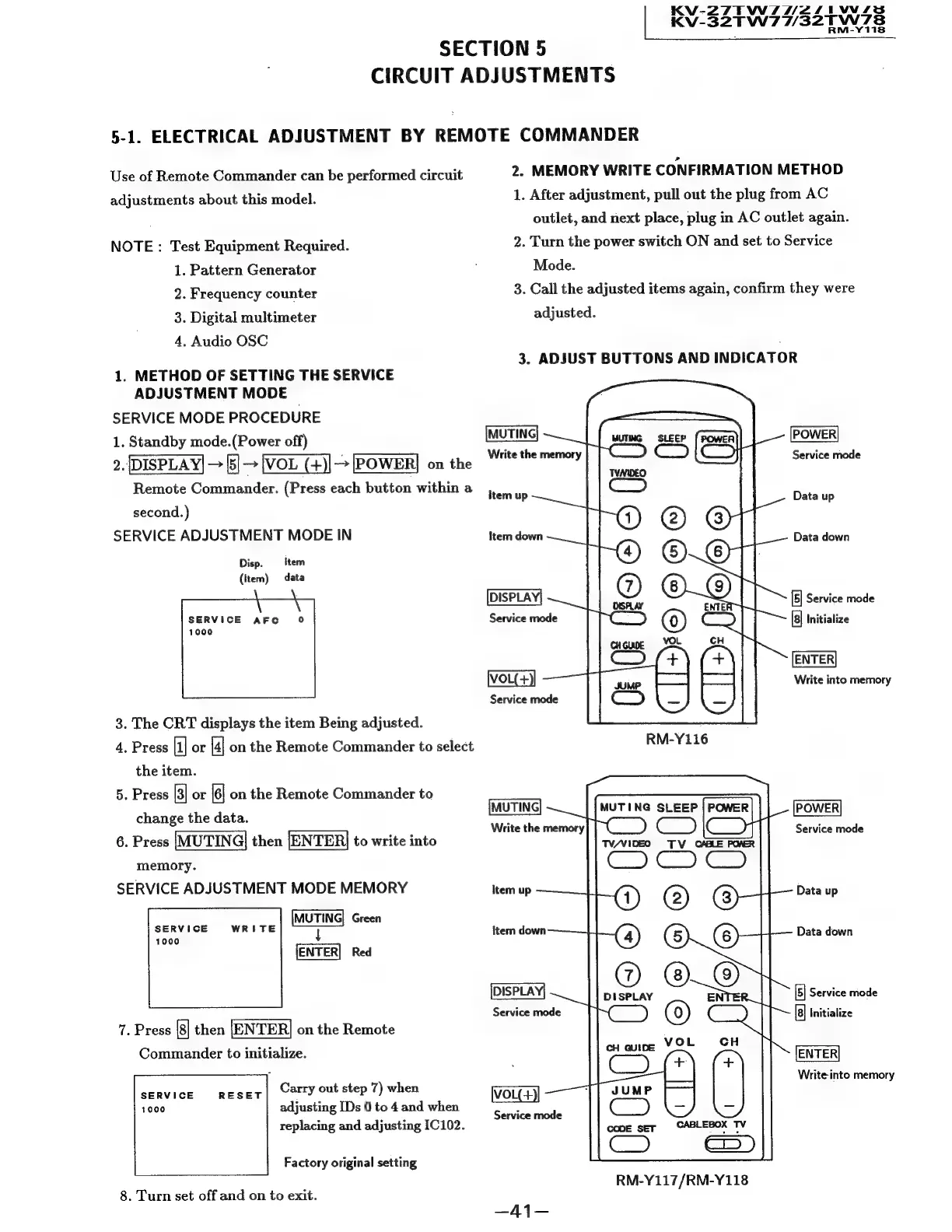
ADJUST
BUTTONS
AND
INDICATOR
Write
the
memory
Service
mode
Item
up
Data
up
Item
down
Data
down
DISPLAY|
[5]
Service
mode
Service
mode
Initialize
ENTER
IVOL(+
Write
into
memory
Service
mode
MUTING
Write
the
memory
POWER
Service
mode
Item
up
Data
up
item
down
Data
down
DISPLAY!
Service
mode
[5]
Service
mode
[a]
Initialize
ENTER
Write
into
memory
Service
mode
RM-Y117/RM-Y118

Related product manuals