EasyManua.ls Logo

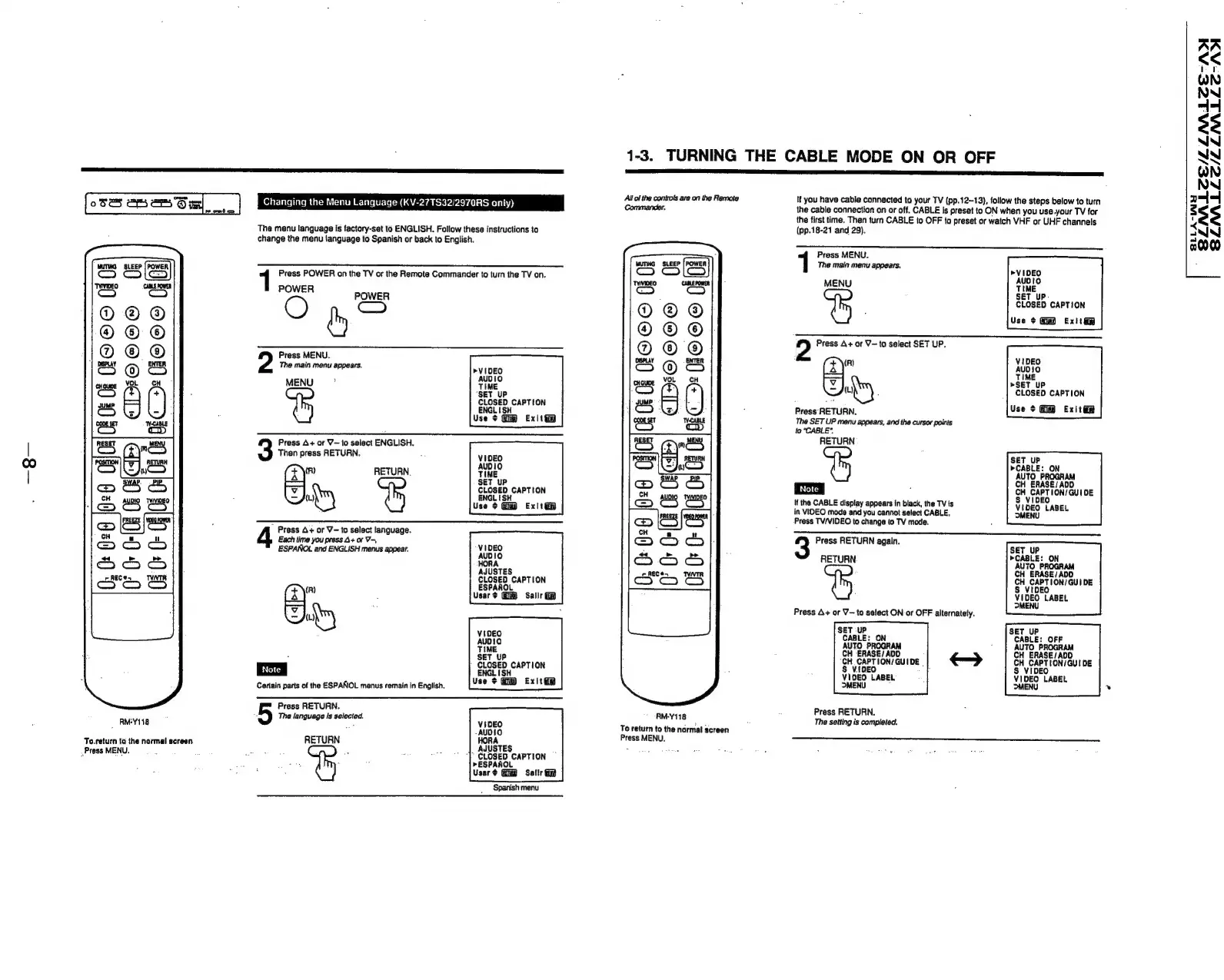
Sony Trinitron KV-32TW77 - Turning the Cable Mode on or off

Sony Trinitron KV-32TW77
79 pages
Print Icon
To Next Page IconTo Next Page
To Previous Page IconTo Previous Page
Loading...
oSes
ery
eSOm
|
Changing
the
Menu
Language
(KV-27TS32/2970RS
only)
©6060
fous)
to
RMY118
To.return
ta
the
normal!
screen
Press
MENU.
The
menu
language
is
factory-set
to
ENGLISH.
Follow
these
instructions
to
change
the
menu
language
to
Spanish
or
back
to
English.
1
Press
POWER
on
the
TV
or
the
Remote
Commander
to
turn
the
TV
on.
rons
POWER
On?
Press
MENU.
The
main
menu
appears.
VIDEO
MENU”
Tine
SET
UP
CLOSED
CAPTION
ENGLISH
Use
¢
Exit
Press
A+
or
V—
to
select
ENGLISH.
Then
press
RETURN.
(x\")
RETURN.
——
SET
uP
CLOSED
CAPTION
{L)
ENGLISH
Use
¢
Exit@
4
Press
4+
or
V-to
select
language.
Each
time
you
press
4+
or
V-,
ESPANOL
and
ENGLISH
menus
appear.
VIDEO
JUSTES
CLOSED
CAPTION
FV)
ESPANOL
Usar
+
Salir
b=
AN)
VIDEO
AUDIO
TIME
SET
UP
|
CLOSED
CAPTION
ENGLISH
Use
$
Exit
Certain
parts
of
the
ESPANOL
menus
remain
in
English.
Press
RETURN.
The
language
Is
selected.
reer
aa
VIDEO
-AUDIO
RETURN
HORA
|
AJUSTES
‘|’
CLOSED
CAPTION
>ESPANOL
Usar¢
Sallr
ey
1-3.
TURNING
THE
CABLE
MODE
ON
OR
OFF
Allol
the
controls
are
on
the
Remote
Commander,
:
:
0
©©6®@
JO
Oe
0
<
fe}
=
fe]
x=
EO
Hf
OOo
HO
26
0
j<2)
ck
j<—2)
“«
co
RM-Y118
To
return
to
the
normal
screen
Press
MENU.
If
you
have
cable
connected
to
your
TV
(pp.12-13),
follow
the
steps
below
to
turn
the
cable
connection
on
or
off.
CABLE
is
preset
to
ON
when
you
use.your
TV
for
the
first
time.
Then
turn
CABLE
to
OFF
to
preset
or
watch
VHF
or
UHF
channels
(pp.18-21
and
29).
Press
MENU.
Th
i
k
@
main
menu
appears.
VIDEO
MEN
we
SET
UP-
CLOSED
CAPTION
Use
¢
Exit
2
Press
A+
or
V—
to
select
SET
UP.
(R)
VIDEO
(x)
AUDIO
-—
TIME
»>SET
UP
{Ly
:
CLOSED
CAPTION
Press
RETURN.
Use
¢
Guid
Exit
ie
The
SET
UP
menu
appears,
and
the
cursor
points
to
CABLE".
RETURN
SET
UP
>CABLE:
ON
AUTO
PROGRAM
CH
ERASE/ADD
CH
CAPTION/GUIDE
VIDEO
S
vl
VIDEO
LABEL
MENU
If
the
CABLE
display
appears
in
black,
the
TV
is
in
VIDEO
mode
and
you
cannot
select
CABLE,
Press
TV/VIDEO
to
change
to
TV
mode.
Press
RETURN
again.
SET
UP
>CABLE:
ON
HETUBN
AUTO
PROGRAM
CH
ERASE/
ADD
CH
CAPTION/GUIDE
S
VIDEO
VIDEO
LABEL
MENU
Press
A+
or
V—to
select
ON
or
OFF
alternately.
SET-UP
CABLE:
ON
AUTO
PROGRAM
CH
ERASE/
ADD
“CH
CAPTION/GUIDE
|
$
V{DEO
.
VIDEO
LABEL
MENU
SET
UP
CABLE:
OFF
AUTO
PROGRAM
CH
ERASE/
ADD
CH
CAPTION/GUI
DE
S
VIDEO
VIDEO
LABEL
MENU
Press
RETURN.
The
setting
is
completed.
SLAALCE/LZLMLEE-AD
SLMLLC/LLNALLE-AI
BLLA-WH

Related product manuals