EasyManua.ls Logo

Sony Trinitron KV-32TW77 - Watching TV Programs

Sony Trinitron KV-32TW77
79 pages
Print Icon
To Next Page IconTo Next Page
To Previous Page IconTo Previous Page
Loading...
—-El-
HOGS
00
©©G®
fk
<
jo
12
cH
05
ab
ic
Ex
a]
ti:
fan
ee
so
if
oon
fem
RM-Y118
To
return
to
the
normal
screen
Press
MENU.
Note
-
O00
HO
Watching
a
Video
with
Your
S
Video-Equipped
VCR
(except
for
KV-27TS29/2970RS)
Use
this
feature
to
set
S
VIDEO
to
ON
or
OFF
depending
on
the
kind
of
video
equipment
you
have
connected
to.
ihe
TV.-For
instructions
on
connecting
video
equipment,
see
pp.22-25.
tt
the
TV
is
in
TV,
VIDEO
2
or
VIDEO
3
mode,
the
S
VIDEO
display
appears
in
biack
and
cannot
be
selected.
Press
TV/VIDEO
to
change
to
VIDEO
1
mode.
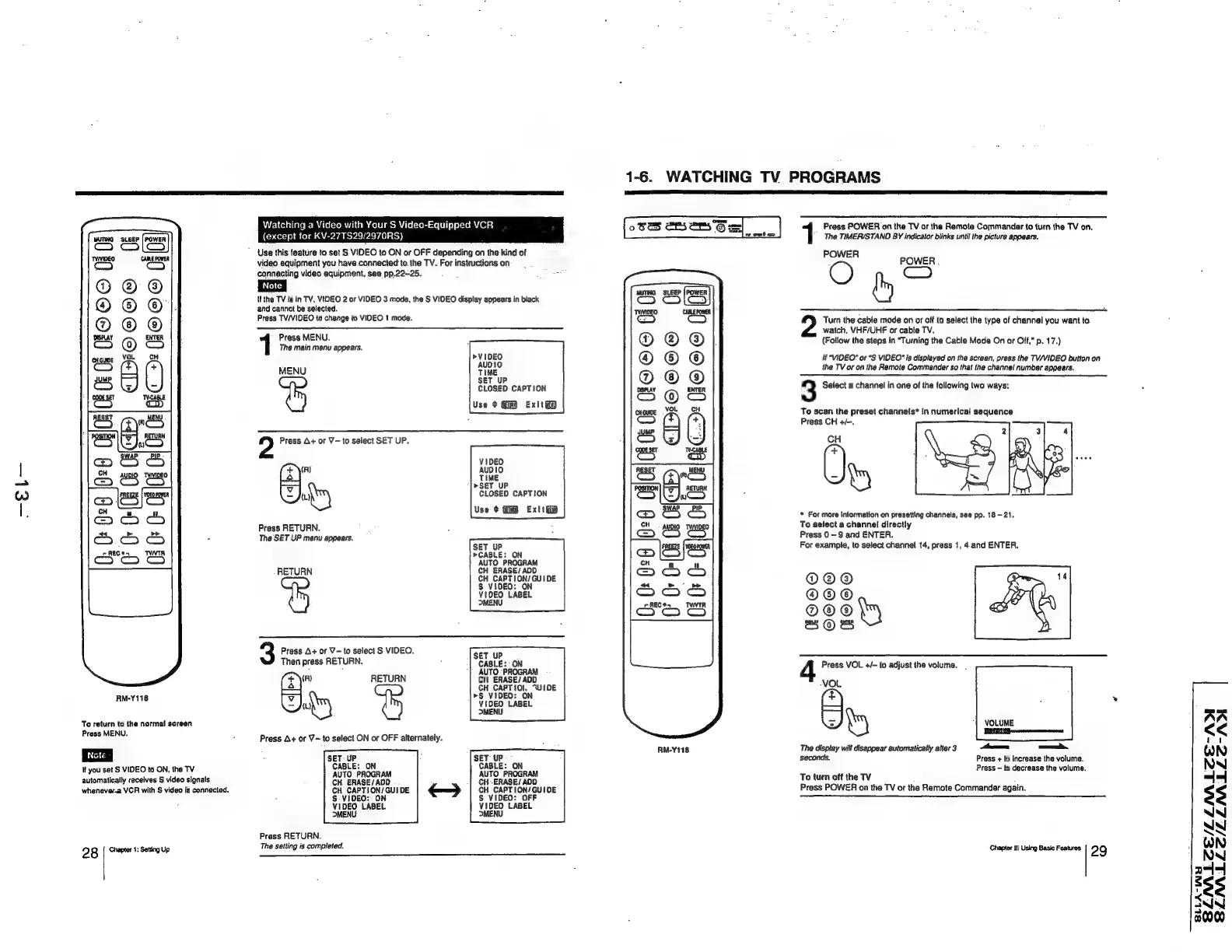
Press
MENU.
The
main
menu
appears.
"1iBie
MENU
TIME
SET
UP
CLOSED
CAPTION
Use
+
Gm
Exit
ae
A+
or
V-to
select
SET
UP.
VIDEO
>SET
UP
Wu
CLOSED
CAPTION
Use
¢
Exit
i
Press
RETURN.
The
SET
UP
menu
appears.
SET
UP
»CABLE:
ON
RETUR
ay
eneSe
ass
N
u
CH
CAPTION/
GUIDE
S$
VIDEO:
ON
VIDEO
LABEL
MENU
3
Prass
A+
or
V=
to
select
S
VIDEO.
SET
UP
Then
press
RETURN.
:
CABLE:
ON
AUTO
-PROGRAM
RETURN
CH
ERASE/
ADD
(4\")
CH
CAPTIO,
“UI
DE
<a
>§
VIDEO:
ON
Zu
VIDEO
LABEL
MENU
Press
A+
or
V~
to
select
ON
or
OFF
alternately.
SET-UP
:
SET
UP
CABLE:
ON
CABLE:
ON
Wt
you
set
S
VIDEO
to
ON,
the
TV
automatically
receives
S
video
signals
whenever-2
VCR
with
S
video
is
connected.
28
|
Chapter
4:
Setting
Up
Press
RETURN.
AUTO
PROGRAM
CH.
ERASE/
ADD
CH
CAPTION/GU!DE
S-VIDEO:
ON
VIDEO
LABEL
MENU
The
salting
is
completed.
AUTO
PROGRAM
CH
-ERASE/
AOD
CH
CAPTION/GUIDE
S
VIDEO:
OFF
VIDEO
LABEL
MENU
1-6.
WATCHING
TV
PROGRAMS
easel]
bd
m
.
CP©©68
0
we
Tete
®
®
M4
(ons)
co
os)
S
ion
=
j<29)
S
}
S
fon)
cost
RM-Y118
Press
POWER
on
the
TV
or
tha
Remote
Commander
to
turn
the
TV
on.
The
TIMER/STAND
BY
indicator
blinks
until
the
picture
appears,
POWER
Turn
the
cable
Ga
on
or
off
to
select
the
type
of
channel
you
want
to
watch,
VHF/UHF
or
cable
TV.
(Follow
the
steps
in
“Turning
the
Cable
Mode
On
or
Off,"
p.
17.)
foun
ie
if
“VIDEO”
or
“S
VIDEO"
is
displayed
on
the
screen,
press
the
TV/VIDEO
button
on
the
TV
or
on
the
Remote
Commander
so
that
the
channel
number
appears.
3
Select
a
channel
in
one
of
the
following
two
ways:
To
scan
the
preset
channels*
in
numerical
sequence
Press
CH
+/-.
CH
+
*
For
more
information
on
presetting
channels,
see
pp.
18
-
21.
To
select
a
channel
directly
Press
0-9
and
ENTER.
For
example,
to
select
channel
14,
press
1,
4
and
ENTER,
O@O®@
"
4r
VOL
+/-
to
adjust
the
volume.
Ave
5
hy
‘|
VOLUME
Pe
The
display
will
disappear
automatically
atter
3
—a
—
seconds.
Press
+
to
increase
the
volume.
Press
—
to
decrease
the
volume.
To
turn
off
the
TV
:
Press
POWER
on
the
TV
or
the
Remote
Commander
again.
Chapter
2:
Using Basic
Features.
29
«
SLNALZE/LLNALZE-AD
BSLNLLC/LLAALLS-A
SLLA-WY