EasyManua.ls Logo

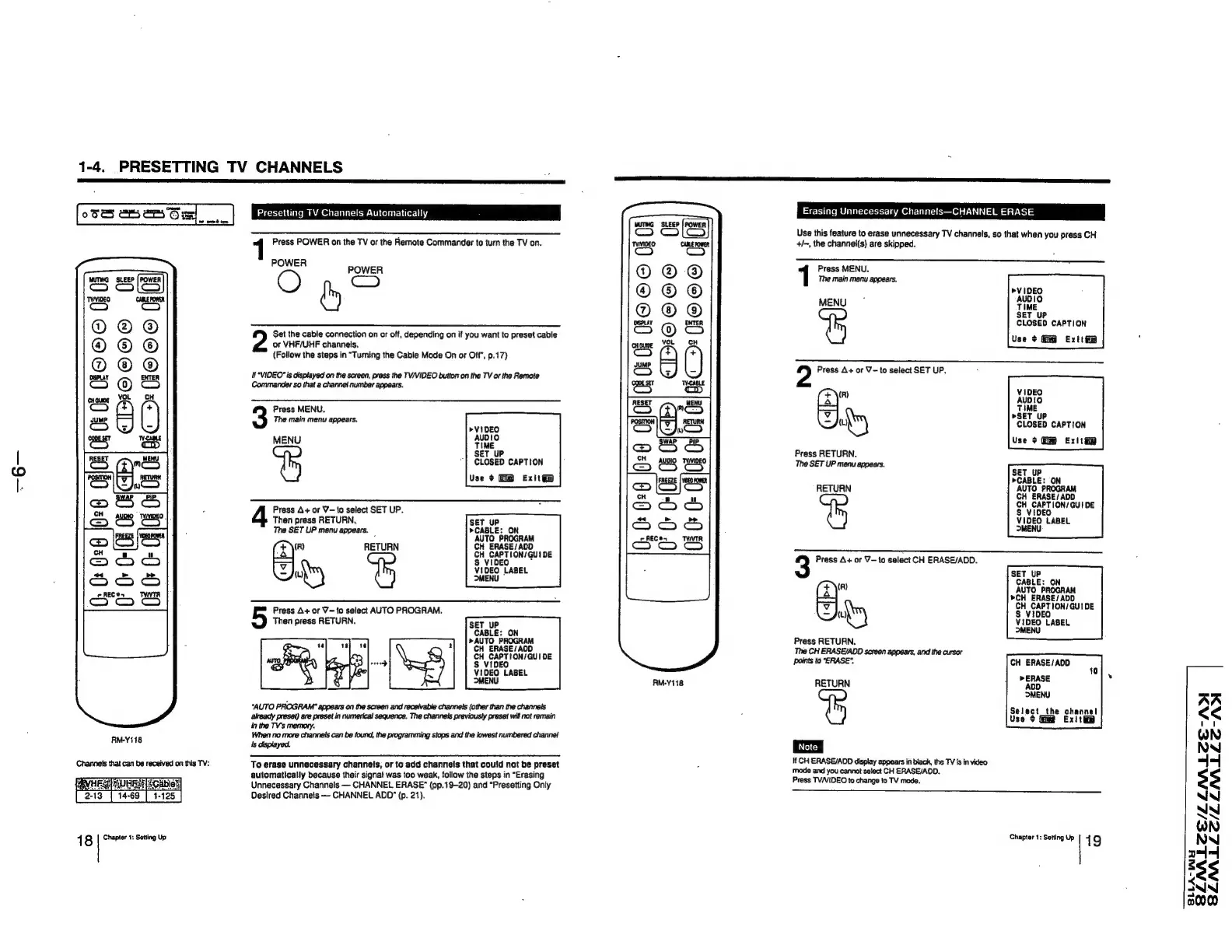
Sony Trinitron KV-32TW77 - Automatic Channel Presetting; Channel Erase Function

Sony Trinitron KV-32TW77
79 pages
Print Icon
To Next Page IconTo Next Page
To Previous Page IconTo Previous Page
Loading...
1-4.
PRESETTING
TV
CHANNELS
oSSS
a
24'S
mz
Presetting
TV
Channels
Automatically
a
03
=
HO
CO
fi
2
i
CIO
©268
0
Gi
RM-Y118
Channels
that
can
be
received
on
this
TV:
18
Chapter
1:
Setting
Up
Set
the
cable
connection
on
or
off,
depending
on
if
you
want
to
preset
cable
or
VHF/UHF
channels.
(Follow
the
steps
in
“Turning
the
Cable
Mode
On
or
Off”,
p.17)
i
*VIDEO"
is
displayed
on
the
screen,
press
the
TV/VIDEO
button
on
the
TV or
the
Remote
Commander
so
that
a
channel
number
appears.
Press
MENU.
The
main
menu
appears.
"YBis
MENU
TIME
SET
UP
CLOSED
CAPTION
Use
¢
Exit@@
Press
A+
or
V—to
select
SET
UP.
Then
press
RETURN,
SET
UP
The
SET
UP
menu
appears.
»CABLE:
ON
5
AUTO
PROGRAM
(4\"
RETURN
CH
ERASE/
ADD
CH
CAPTION/
GU!
DE
<a
§
VIDEO
\Z)
ku
VIDEO
LABEL
MENU
Press
A+
or
V-to
select
AUTO
PROGRAM.
Then
press
RETURN.
SET
_UP
CABLE:
ON
»AUTO
PROGRAM
CH
ERASE/A0O
CH
CAPTION/GUI
DE
S$
VIDEO
VIDEO
LABEL
MENU
“AUTO
PROGRAM”
appears
on
the
screen
and
receivable
channels
(other
than
the
channels
already
preset)
are
preset
in
numerical sequence.
The
channels
previously
preset
will
not
remain
Jn
the
TV's
memory.
When ne
more
channels
can
be
found,
the
programming
stops
and
the
lowest
numbered
channet
is
displayed.
To
erase
unnecessary
channels,
or
to
add
channels
that
could
not
be
preset
automatically
because
their
signa!
was
too
weak,
follow
the
steps
in
“Erasing
Unnecessary
Channels
CHANNEL
ERASE”
(pp.19-20)
and
“Presetting
Only
Desired
Channeis
——
CHANNEL
ADD”
(p.
21).
0:
ooo
Ff
2
8
:
HOE
0
LFO©COe
0
0
le
:
C
|
GC»
0
6
0
:
GD
aos
Kaus
J
fa)
CH
>)
fas)
cH
=
=
f4
°
°
a
Or
O-(08
05 08
0
AM-Y118.
Erasing
Unnecessary
Channels—CHANNEL
ERASE
Use
this
feature
to
erase
unnecessary
TV
channels,
so
that
when
you
press
CH
+/~,
the
channel(s)
are
skipped.
Press
MENU.
The
main
menu
appears,
»VIDEO
MeN
ne
SET
UP
CLOSED
CAPTION
Use
¢
Ext
2
Press
A+
or
V-to
select
SET
UP.
(R)
V1DEO
AUDIO
mo
TIME
»SET
UP
(uy
CLOSED
CAPTION
Use
>
Gm
Exitte
Press
RETURN.
The
SET
UP
menu
appears.
SET
UP
RETURN
RASE
/
A\
CH
CAPTION/
GUIDE
S
VIDEO
VIDEO
LABEL
>MENU
3
Press
A+
or
V—to
select
CH
ERASE/ADD.
SET
UP
(z\")
7]
CH
CAPTION/GUIDE
tu)
8
VIDEO
VIDEO
LABEL
MENU
Press
RETURN.
The
CH
ERASE/ADD
screen
appears,
and
the
cursor
points
to
"ERASE".
CH
ERASE/
ADD
RETURN
Select
the
channel
Use
¢
Exit
i
If
CH
ERASE/AOD
display
appears
in
black,
the
TV
Is in
video
mode
and
you
cannot
select
CH
ERASE/ADD.
Press
TVNVIDEO
to
change
to
TV
mode.
CE/LZLNALZE-ADI
SZNALLC/LLNLLZ-AM
Chapter
1:
Setting
Up
|
9
SZLAAL
SLLA-NIY

Related product manuals