EasyManua.ls Logo

Sony Trinitron KV-32TW77 - Setting the Internal Clock

Sony Trinitron KV-32TW77
79 pages
Print Icon
To Next Page IconTo Next Page
To Previous Page IconTo Previous Page
Loading...
—-8lL—-
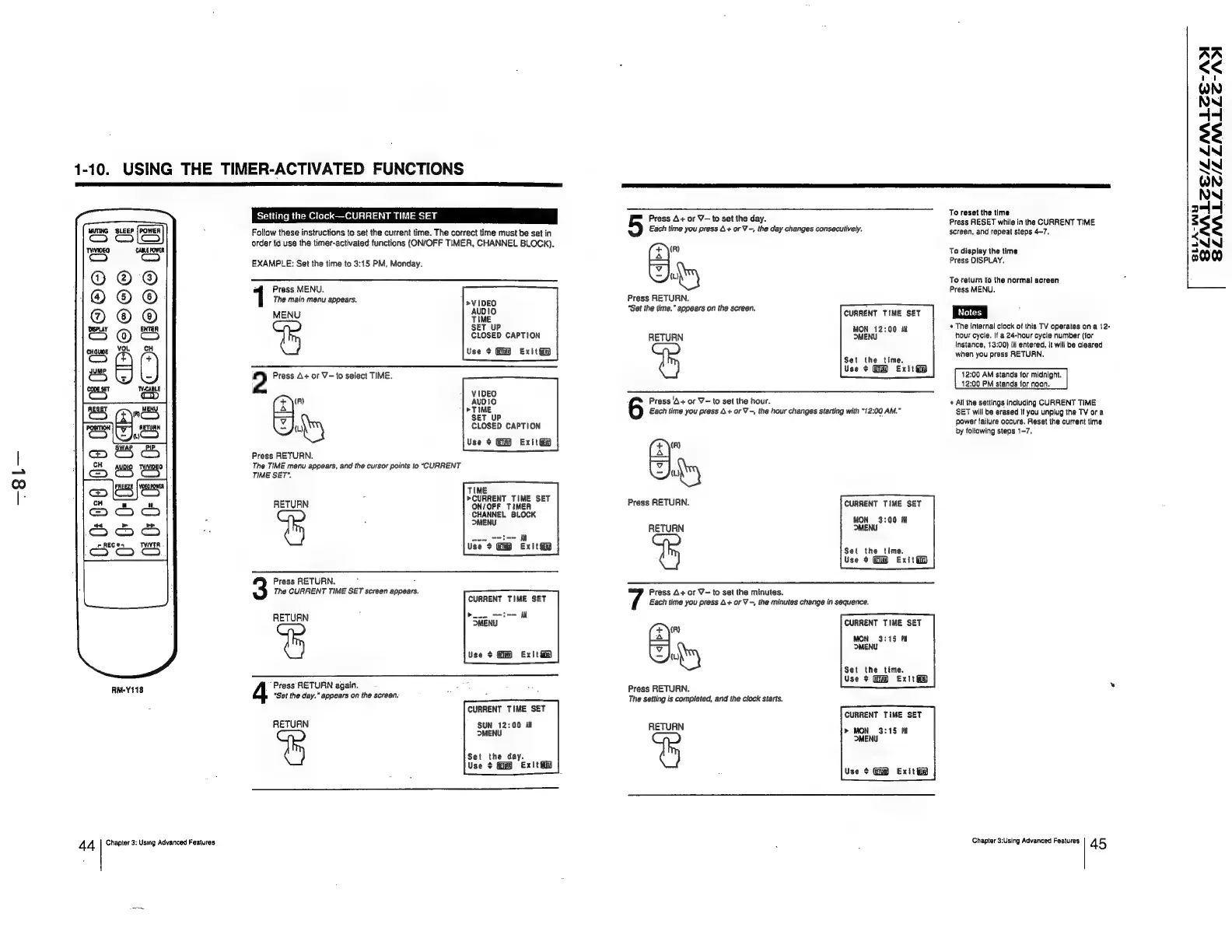
1-10.
USING
THE
TIMER-ACTIVATED
FUNCTIONS
¢
The
internal
clock
of
this
TV
operates
on
a
12-
hour
cycle.
If
a
24-hour
cycle
number
(for
instance,
13:00)
is
entered,
it
will
be
cleared
when
you
press
RETURN.
12:00
AM
stands
for
midnight.
12:00
PM
stands
for
noon.
VIDEO
(x)
(R)
AUDIO
Press
‘A+
or
V-to
set
the
hour.
«
All
the
settings
including
CURRENT
TIME
Lo}
>TIME
Each
time
you
press
4+
or
V-,
the
hour
changes
starting
with
"12:00
AM.”
SET
will
be
erased
if
you
unplug
the
TV
ora
“Ny
SET
UP
CLOSED
CAPTION
RETURN
Use
+
Exit
ii
MON
12:00
dt
MENU
:
i
T
t
the
ti
Setting
ihe
Clock
CURRENT
TIME
SET
Press
A+
or
V—
to
set
the
day.
Press
RESET
while
in
the
CURRENT
TIME
MUTING
SLEEP
Follow
these
instructions
to
set
the
current
time.
The
correct
time
must
be
set
in
Each
time
you
press
A+
or
V-,
the
day
changes
consecutively,
screen,
and
repeat
steps
4-7,
Co
C1
order
to
use
the
timer-activated
functions
(ON/OFF
TIMER,
CHANNEL
BLOCK).
TYMWEO
CABLE
POWER
(R)
To
display
the
time
EXAMPLE:
Set
the
time
to
3:15
PM,
Monday.
-—
Press
DISPLAY.
oO
® ®
J
s\y
To
return
to
the
normal
screen
Press
MENU.
Press
MENU.
|
@)
® ©
The
main
menu
appears.
>VIDEO
Press
RETURN.
@
®
MENU
Auplo
“Set
the
time.”
appears
on
the
screen,
CURRENT
CLINE
SET
Notes
|
DISPLAY
=
©
0
cH
2
Ey
5
<
72
0
Set
the
time.
Use
+
Exit
—
ic
=
0
2
Press
A+
or
V—to
select
TIME.
e
z]
0
SET
UP
i
:
power
failure
occurs.
Reset
the
current
time
CLOSED
CAPTION
by
following
steps
1-7.
Use
¢
Gm
ExitGy
(x\")
Press
RETURN.
ij
The
TIME
menu
appears,
and
the
cursor
points
to
“CURRENT
(2)
TIME
SET".
()
.
TIME
RETURN
er
ae
A
Press
RETURN.
CURRENT
TIME
SET
CHANNEL
BLOCK
MON
3:00
fi
MENU
RETURN
MENU
ae
OS
vse?
GB
Exige
Set
the
time
Use
¢
Exité?)
Press
RETURN.
=
The
CURRENT
TIME
SET
screen
appears.
Press
A+
or
V~
to
set
the
minutes.
CURRENT
TIME
SET
Each
time
you
press
4+
or
V-,
the
minutes
change
in
sequence.
blo
et-=
il
RETURN
DMENU
z
fm
CURRENT
TIME
SET
———I
MON
3:15
Pil
MENU
Use
$
GD
Exit
iy
Set
+e
ime.
ee
Fi
say
Use
>
Gi
Ex!t
ey
RM-Y118
Press
RETURN
again.
ae
Press
RETURN.
‘Set
the
day.”
appears
on
the
screen.
The
setting
is
completed,
and
the
clock
starts.
CURRENT
TIME
SET
RETURN
SUN
12:00
Jil
MENU
RETURN
CURRENT
TIME
SET
>»
MON
3:15
Pil
MENU
Set
the
day.
Use
+
Exit
Use
¢
Exitta
4
4
Chapter
3:
Using
Advanced
Features
:
Chapter
3:Using
Advanced
Features
45
SLNALEE/LLNALSCE-ADI
SLNMLLC/LZLMLLE-AOI
SLLA-WY