EasyManua.ls Logo

Sony Trinitron KV-32TW77 - ON;OFF Timer Programming

Sony Trinitron KV-32TW77
79 pages
Print Icon
To Next Page IconTo Next Page
To Previous Page IconTo Previous Page
Loading...
-61L—
:
0
i
©©6®@
0
©
0
:
HO
©@
§
Ss
Ss
CH
:
0
agp
08|
08
0:
joss
fc)
CH
S
=)
cH
f=)
S
e
REC
Ss
RM-Y118
46
Chapter
3:
Using
Advanced
Features
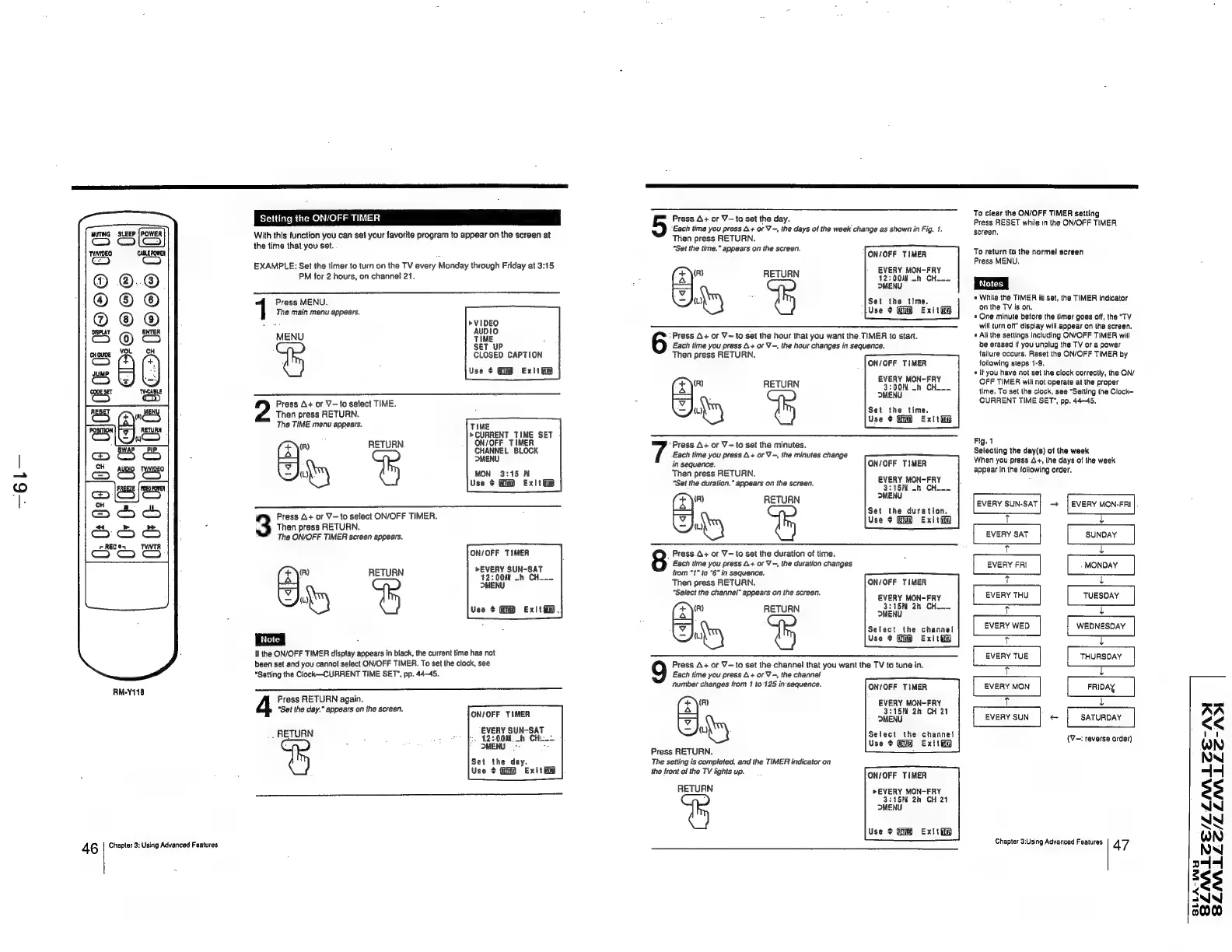
Setting
the
ON/OFF
TIMER
With
this
function
you
can
set
your
favorite
program
to
appear
on
the
screen
at
the
time
that
you
set.
EXAMPLE:
Set
the
timer
to
turn
on
the
TV
every
Monday
through
Friday
at
3:15
PM
for
2
hours,
on
channel
21,
The
main
menu
appears.
1
Press
MENU.
7
>VIDEO
MENU
Ae
SET
UP
;
CLOSED
CAPTION
Use
¢
Exli
Then
press
RETURN,
2
Press
A+
or
V-
to
select
TIME.
The
TIME
menu
appears.
TIME
“reer
ts
2
(zy)
ati
CHANNEL
BLOCK
—
MENU
Du
MON
3:45
W
Use
¢
Exit
Press
A+
or
V—to
select
ON/OFF
TIMER.
3
Then
press
RETURN.
The
ON/OFF
TIMER
screen
appears.
ON/OFF
TIMER
EVERY
SUN-SAT
12:
00M
—h
CH_._
(R)
RETURN
I
DMENU
ot)
Use
$
Exit
i.
If
the
ON/OFF
TIMER
display
appears
in
black,
the
current
time
has
not
been
set
and
you
cannot
select
ON/OFF
TIMER.
To
set
the
clock,
see
“Setling
the
Clock—CURRENT
TIME
SET~,
pp.
44-45.
4
Press
RETURN
again.
“Set
the
day.”
appears
on
the
screen.
ON/OFF
TIMER
EVERY
SUN-SAT
-
RETURN
-
s 2
Ps
42-000
of
CHE.
>
MENU
|-
ey
Set
the
day.
Use
+
Exit
Press
A+
or
V—to
set
the
day.
5
Each
time
you
press
A+
or
V-,
the
days
of
the
week
change
as
shown
in
Fig.
1.
Then
press
RETURN.
“Set the
time.”
appears
on
the
screen.
ON/OFF
TIMER
EVERY
MON-FRY
12:
00d
-h
CH.--
(R)
RETURN
|
DMENU
fy
:
Set
the
time.
Use
¢
Exittiy
6
‘Press
A+
or
V~
to
set
the
hour
that
you
want
the.
TIMER
to
start.
Each
time
you
press
A+
or
V-,
the
hour
changes
in
sequence.
Then
press
RETURN.
ON/OFF
TIMER
EVERY
MON-FRY
3:00?
-h
CH_.
(x)")
RETURN
—
f
MENU
{L);
Set
the
time.
Use
¢
Exit
ii
“Press
A+
or
V~
to
set
the
minutes.
Each
time
you
press
A+
or
V-,
the
minutes
change
in
sequence.
ON/OFF
TIMER
Then
press
RETURN.
“Set
the
duration.”
appears
on
the
screen.
striae
-b
Che
xy
RETURN
OMENU
—
Set
the
duration.
ly
Use
¢
Exit
8
Press.A+
or
V-to
set
the
duration
of
time.
Each
time
you
press
A+
or
V
-,
the
duration
changes
from
"1"
ta
"6"
in
sequence.
Then
press
RETURN.
“Select
the
channel”
appears
on
the
screen.
ON/OFF
TIMER
EVERY
MON-FRY
(x)
RETURN
BA
Neh
alae
—
es
Select
the
channel
{L)
Use
+
Exit@
9
Press
A+
or
Y—to
set
the
channel
that
you
want
the
TV
to
tune
in.
Each
time
you
press
A+
orV
-,
the
channel
number
changes
from
1
to'125
in-sequence.
+
\(F)
4
—
hy)
Press
RETURN.
The
setting
is
completed,
and
the
TIMER
indicator
on
the
front
of
the
TV
lights
up.
ON/OFF
TIMER
EVERY
MON-FRY
3:15PM
2h
CH
21
MENU
Seiect
the
channel
Use
+
Exit
ON/OFF
TIMER
RETURN
»EVERY
MON~ERY
3:15?
2h
CH
24
MENU
Use
+
Exit
To
clear
the
ON/OFF
TIMER
setting
Press
RESET
while
in
the
ON/OFF
TIMER
screen.
To
return
to
the
normal!
screen
Press
MENU.
+»
While
the
TIMER
is
set,
the
TIMER
indicator
on
the
TV
is
on.
«
One
minute
before
the
timer
goes
off,
the
"TV
will
turn
of”
display
will
appear
on
the
screen.
«
All
the
settings
including
ON/OFF
TIMER
will
be
erased
if
you
unplug
the
TV
or
a
power
failure
occurs.
Reset
the
ON/OFF
TIMER
by
following
steps
1-9.
+
[fyou
have
not
set
the
clock
correctly,
the
ON/
OFF
TIMER
wilt
not
operate
at
the
proper
time.
To
set
the
clock,
see
“Setting
the
Clock—
CURRENT
TIME
SET’,
pp.
44-45.
Fig.
1
Selecting
the
day(s)
of
the
week
When
you
press
4+,
the
days
of
the
week
appear
in
the
following
order.
EVERY
SUN-SAT
T
EVERY
SAT
T
EVERY
FRI
Tt
EVERY
THU
T
EVERY
WED
T
EVERY
TUE
T
EVERY
MON
i
EVERY
SUN
Chapter
3:Using
Advanced
Features.
-—_—__
EVERY
MON-FRI
|
SUNDAY
L
.
MONDAY
L
TUESDAY
WEDNESDAY
i
THURSDAY
FRIDAY
NALZE-ADI
NMALLZE-/A)I
SATURDAY
(V—:
reverse
order)
47
SLLA-INY
BSLZNALCE/LL
BSLMILLC/LL