EasyManua.ls Logo

Sony Trinitron KV-32TW77 - Channel Blocking Configuration

Sony Trinitron KV-32TW77
79 pages
Print Icon
To Next Page IconTo Next Page
To Previous Page IconTo Previous Page
Loading...
—O0c—
mn Ea
E
i
S©O©COO
J
1©©©@
0
Cf
HO
OO
010;
ic
ic
=
joms)
cy)
C0
AM-Y118
4
8
Chapter
3:
Using
Advanced
Features
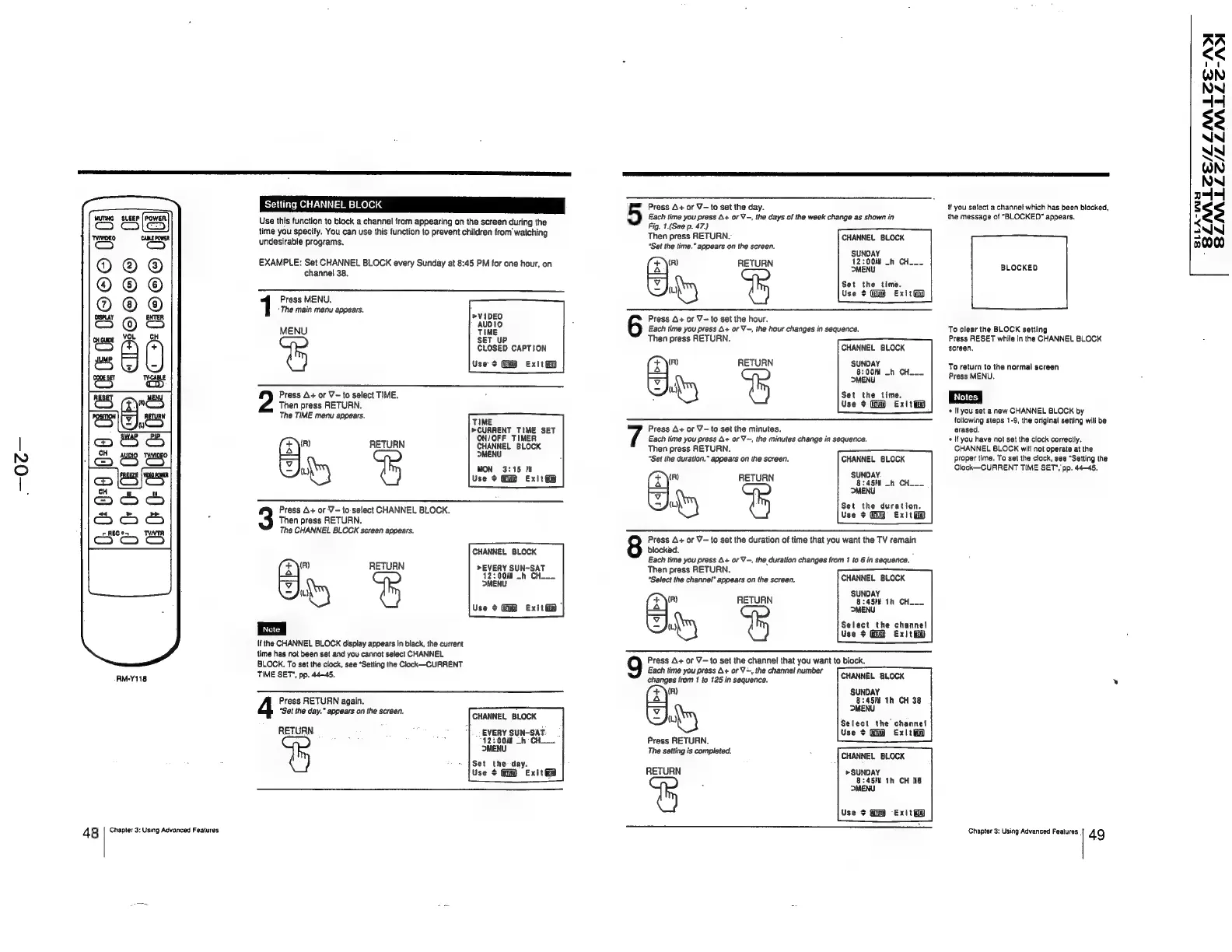
Setting
CHANNEL
BLOCK
Use
this
function
to
block
a
channel
from
appearing
on
the
screen
during
the
time
you
specify.
You
can
use
this
function
to
prevent
children
from’
watching
undesirable
programs.
EXAMPLE:
Set
CHANNEL
BLOCK
every
Sunday
at
8:45
PM
for
one
hour,
on
channel
38.
Press
MENU.
‘The
main
menu
appears.
MENU
SET
UP
CLOSED
CAPTION
Use
$
Exit
ii
Then
press
RETURN.
2
Press
A+
or
V~to
select
TIME.
The
TIME
menu
appears.
TIME
»CURRENT
TIME
SET
ON/OFF
TIMER
(x\"
RETURN
CHANNEL
BLOCK
=
MENU
(L)
MON
3:15
MM
Use
¢
Exit
iio
Press
A+
or
V—
to
select
CHANNEL
BLOCK.
Then
press
RETURN.
The
CHANNEL
BLOCK
screen
appears.
CHANNEL
BLOCK
RETURN
>EVERY
SUN~SAT
12:004¥
_~h
CH__
MENU
Use
¢
Exitt
if
the
CHANNEL
BLOCK
display
appears
in
biack,
the
current
time
has
not
been
set
and
you
cannot
select
CHANNEL
BLOCK.
To
set
the
clock,
see
“Setting
the
Clock—-CURRENT
TIME
SET,
pp.
44-45.
(R)
(x)"
a
=
Press
RETURN
again.
“Set
the
day.”
appears
on
the
screen.
CHANNEL
BLOCK
_-EVERY
SUN-SAT.
“12:00
-h
CH
MENU
Set the
day.
Use
$
Exit
RETURN.
Each
time
you
press
A+
or
V-,
the
days
of
the
week
change
as
shown
in
Fig.
1.(See
p.
47.)
Then
press
RETURN.
“Set
the
lime.”
appears
on
the
screen.
5
Press
A+
or
V-to
set
the
day.
CHANNEL
BLOCK
SUNDAY
12:004
_h
CH___
or
RETURN
12200)
4
(¥)
Set
the
time.
a
Use
¢
Gi
ExitGD
Press
A+
or
Y=
to
set
the
hour.
Each
time
you
press
4+
or
V-,
the
hour
changes
in
sequence.
Then
press
RETURN.
CHANNEL
BLOCK
(R)
RETURN
he
Per
re
|
OMENU
.
7
Set
the
time.
Use
¢
Gm
Exit
Each
time
you
press
A+
or
V~,
the
minutes
change
in
sequence.
Then
press
RETURN.
“Set
the
duration.”
appears
on
the
screen,
SUNDAY.
fn)
RETURN
@:45fl
-h
CH
—
MENU
hry
Set
the
duration.
Use
+
Exit
ii
7
Press
A+
or
V—to
set
the
minutes.
CHANNEL
BLOCK
8
Press
A+
or
V—to
set
the
duration
of
time
that
you
want
the
TV
remain
blocked.
.
Each
time
you
press
+
or
V-,
the
duration
changes
from
1
to
6
in
sequence.
Then
press
RETURN.
“Select
the
channel”
appears
on
the
screen.
SUNDAY
(R)
RETURN
8:457K
1h
CH___
p44
MENU
ud
Select
the
channel
Use
+
Exit
9
Press
A+
or
Y—to
set
the
channel
that
you
want
to
block.
Each
time
you
press
A+
or
V-,.the
channel
number
changes
from
1
to
125
in
sequence.
CHANNEL
BLOCK
Fag
ire
th
CH
38
34
yu
MENU
)
Select
the
channel
Use
¢
Exlté
CHANNEL
BLOCK
Press
RETURN.
The
setting
is
completed.
CH,
ANNEL
BLOCK
RETURN
>SUNDAY
8:45°E
1h
CH
38
MENU
Use
¢
Exit
if
you
select
a
channel
which
has
been
blocked,
the
message
of
“BLOCKED”
appears.
BLOCKED
To
clear
the
BLOCK
setting
Press
RESET
while
in
the
CHANNEL
BLOCK
screen,
To
return
to
the
normal
screen
Press
MENU.
*
If
you
set
a
new
CHANNEL
BLOCK
by
following
steps
1-9,
the
original
setting
will
be
erased.
«
If
you
have
not
set
the
clock
correctly,
CHANNEL
BLOCK
will
not
operate
at
the
proper
time.
To
set
the
clock,
see
“Setting
the
Clock—CURRENT
TIME
SET’,
pp.
44-45,
Chapter
3:
Using
Advanced
Features
_
49
2
$
<
oy
—_
0
AA
<<
WN
NN
4-
$3
AN
NN
WN
NN
4
$s
NN
e000