EasyManua.ls Logo

Sony Trinitron KV-32TW77 - General Information (Continued)

Sony Trinitron KV-32TW77
79 pages
Print Icon
To Next Page IconTo Next Page
To Previous Page IconTo Previous Page
Loading...
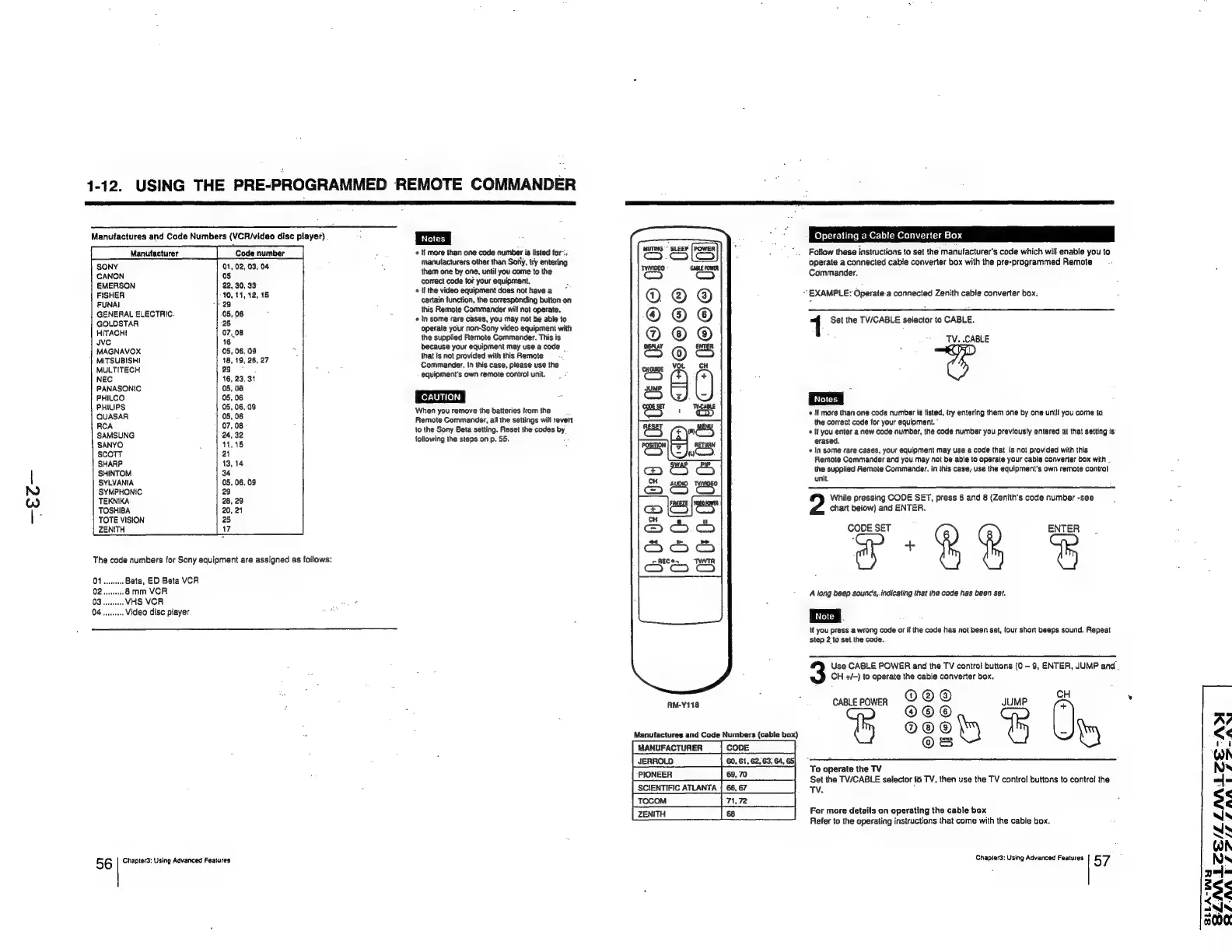
1-12.
USING
THE
PRE-PROGRAMMED
REMOTE
COMMANDER
Manufactures
and
Code
Numbers
(VCR/video
disc
player)
.
Manufacturer
SONY
01,
02,03,
04
CANON
05
EMERSON
22,
30,
33
FISHER
10,
11,
42,
18
FUNAI
-}
29
GENERAL
ELECTRIC.
05,.08
GOLDSTAR
28
HITACHt
07,08
uve
16
MAGNAVOX
05,
06,
09
MITSUBISHI
18,
19,
26,
27
MULTITECH
29
;
NEC
16,
23,
31
PANASONIC
05,
06
PHILCO
05,
06
PHILIPS
05,
06,-09
QUASAR
05,
06
RCA
07,
08
SAMSUNG
24,
32
SANYO
|
atas
scott
21
SHARP
13,
14
|
SHINTOM
34
SYLVANIA
05, 06,
09
NO
SYMPHONIC
23
Ww
TEKNIKA
28,
29
:
TOSHIBA
20,21
|
TOTE
VISION
25
ZENITH
17
The
code
numbers
for
Sony
equipment
are
assigned
as
follows:
56
Chapter3:
Using
Advanced
Features
«
If
more
than
one
code
number
is
listed
for’,
manufacturers
other
than
Soily,
try
entering
them
one
by
one,
until
you
come
to
the
correct
code
for
your
equipment.
If
the
video
equipment
does
not
have
a
certain
function,
the
corresponding
button-on
this
Remote
Commander
will
not
operate.
«
In
some
rare
cases,
you
may
not
be
able
to
operate
your
non-Sony
video
equipment
with
the
supplied
Remote
Commander.
This
is
because
your
equipment
may
use
a
code
that
is
not
provided
with
this
Remote
Commander.
in this
case,
please
use
the
equipment’s
own
remote
control
unit.
When
you
remove
the
batteries
trom
the
Remote
Commander,
all
the
settings
will
revert
to
the
Sony
Beta
setting.
Reset
the
codes
by
following
the
steps
on
p.
55.
:
(i
ooo
HOF
is
:
Co
Se
s
@
©
2
@
iz)
0;
Ot
820 028
O08
0
AM-Y118
Manufactures
and
Code
Numbers
(cable
box)
MANUFACTURER
a
Operating
a
Cable
Converter
Box
Follow
these
instructions
to
set
the
manufacturer's
code
which
will
enable
you
to
operate
a
connected
cable
converter
box
with
the
pre-programmed
Remote
Commander.
EXAMPLE:
Operate.a
connected
Zenith
cable
converter
box.
1
Set
the
TW/CABLE
selector
to
CABLE.
TV.
CABLE
«
If
more
than
one
code
number
is
listed,
try
entering
them
one
by
one
until
you
come
to
the
correct
code
for
your
equipment.
'
¢
If
you
enter
a
new
code
number,
the
code
number
you
previously
entered
at
that
setting
is
erased,
*
In
some
rare
cases,
your
equipment
may
use
a
code
that
is
not
provided
with
this
Remote
Commander
and
you
may
not
be
able
to
operate
your
cable
converter
box
with
.
the
supplied
Remote
Commander.
In
this
case,
use
the
equipment's
own
remote
control
unit.
While
pressing
CODE
SET,
press
6
and
8
(Zenith’s
code
number
-see
chart
below)
and
ENTER.
A
long
beep
sounc's,
indicating
that
the
code
has
been
set.
lf
you
press
a
wrong
code
or
if
the
code
has
not
been
set,
tour
short
beeps
sound.
Repeat
Step
2
to
set
the
code.
Use
CABLE
POWER
and
the
TV
control
buttons
(0
-
9,
ENTER,
JUMP
and.
CH
+/-)
to
operate
the
cable
converter
box.
©@®@
CH
"ay
“‘®
See
&
J
:
Os
ty
To
operate
the
TV
Set
the
TV/CABLE
selector
to
TV,
then
use
the
TV
control
buttons
to
control
the
Tv.
,
For
more
details
on
operating
the
cable
box
Refer
to
the
operating
instructions
that
come
with
the
cable
box.
Chapter3:
Using
Advanced
Features
57

Related product manuals