EasyManua.ls Logo

Sony Trinitron KV-32TW77 - Page 22

Sony Trinitron KV-32TW77
79 pages
Print Icon
To Next Page IconTo Next Page
To Previous Page IconTo Previous Page
Loading...
—Co—
=
<2)
—s
cS)
Pay
S
|
cS
03
i
i
:
a
HE
Ge
0
COOH
JQ
Oi
aps
iS
a7
0:
LC
©
©
9
0
RM-Y118
52
Chapter
3:
Using
Advanced
Features
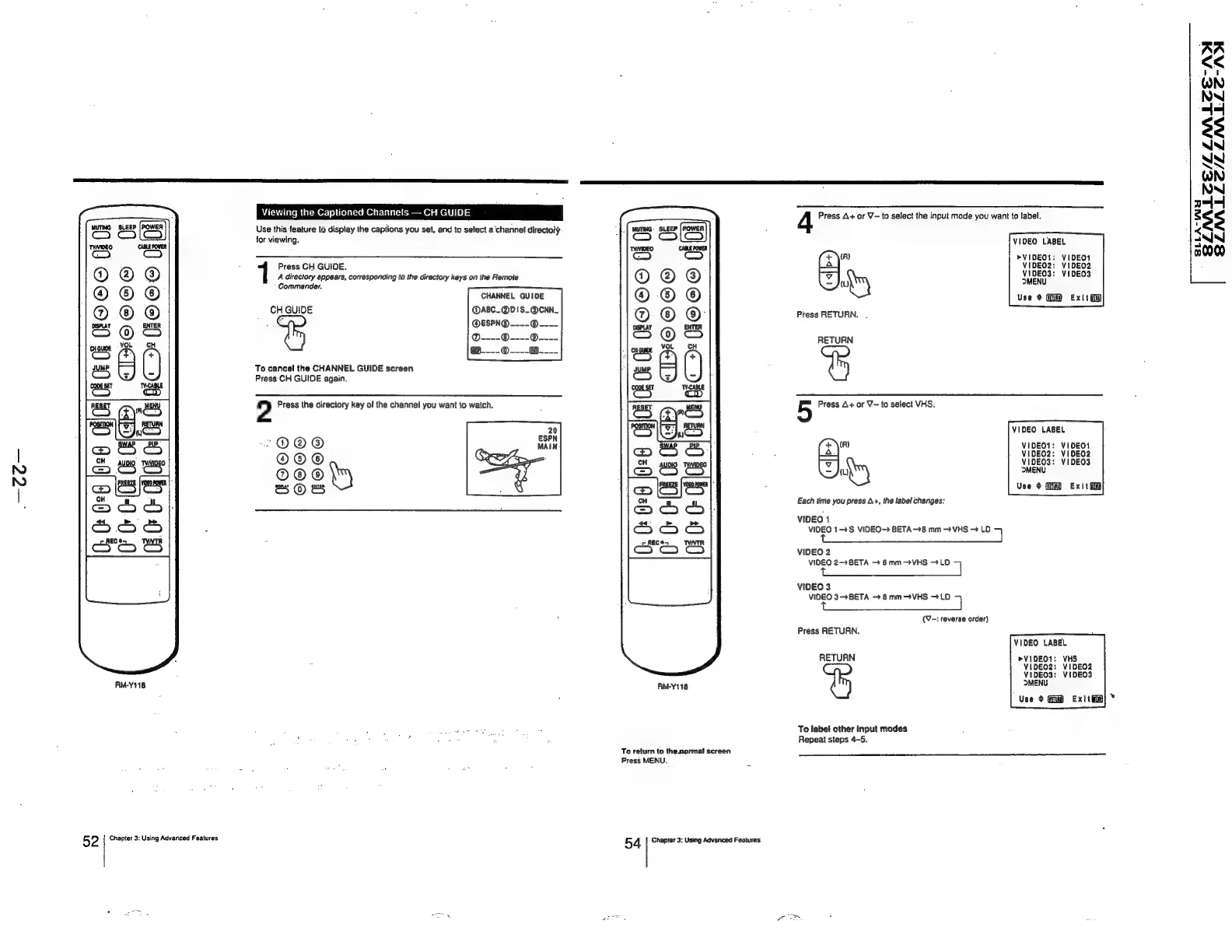
Viewing
the
Captioned
Channels
CH
GUIDE
Use
this
feature
to
display
the
captions
you
set,
and
to
select
a
channel
directory
for
viewing.
Press
CH
GUIDE.
A
directory
appears,
corresponding
to
the
directory
keys
on
the
Remote
Commander,
CHANNEL
GUIDE
CH
GUIDE
@ABC_@D!S_@CNN_
To
cancel
the
CHANNEL
GUIDE
screen
Press
CH
GUIDE
again.
2
Press
the
directory
key
of
the
channel
you
want
to
watch.
‘O@®@
FOO
©©0
GOO
d
3
2
HOS
G0
° =
0
OSS
HO
ic
Ic
=
i
CHO
©Ge
RM-Y118
To
return
to
the
normal
screen
Press
MENU.
5
4
Chapter
3:
Using
Advanced
Features
4
Press
A+
or
V-
to
select
the
input
mode
you
want
to
label.
VIDEO
LABEL
aye
"ype
vee
u
VIDEOS:
VIDEO3
uy
MENU
Use
¢
Exitt
Press
RETURN.
.
RETURN
5
Press
A+
or
V~
to
select
VHS.
VIDEO
LABEL
ae
Gia
ee
Ff
VIDEO3:
VIDEOS
iy
MENU
Use
+
Exit
ii
Each
time
you
press
A+,
the
label
changes:
VIDEO
1
VIDEO
1S
VIDEO
BETA—8
mm
VHS
>
LD
VIDEO
2
VIDEO
2
BETA
8mm-VHS
>
LD
7
VIDEO
3
VIDEO
3-4BETA
8
mm
>
VHS
>
LD
7
(V-:
reverse
order)
Press
RETURN.
VIDEO
LABEL
RETURN
>VIDEO1:
VHS
VIDEO2:
VIDEO2
VIDEO3:
VIDEO3
MENU
Use
¢
Exit
Ga}
*
To
label
other
input
modes
Repeat
steps
4-5.
SLNLEE/LLMALEE-AI
SZLNALLZ/LZLNMLLOE-AY
SLLA-WYH

Related product manuals