EasyManua.ls Logo

Sony Trinitron KV-32TW77 - Picture-in-Picture (PIP) Operation

Sony Trinitron KV-32TW77
79 pages
Print Icon
To Next Page IconTo Next Page
To Previous Page IconTo Previous Page
Loading...
—GlL—
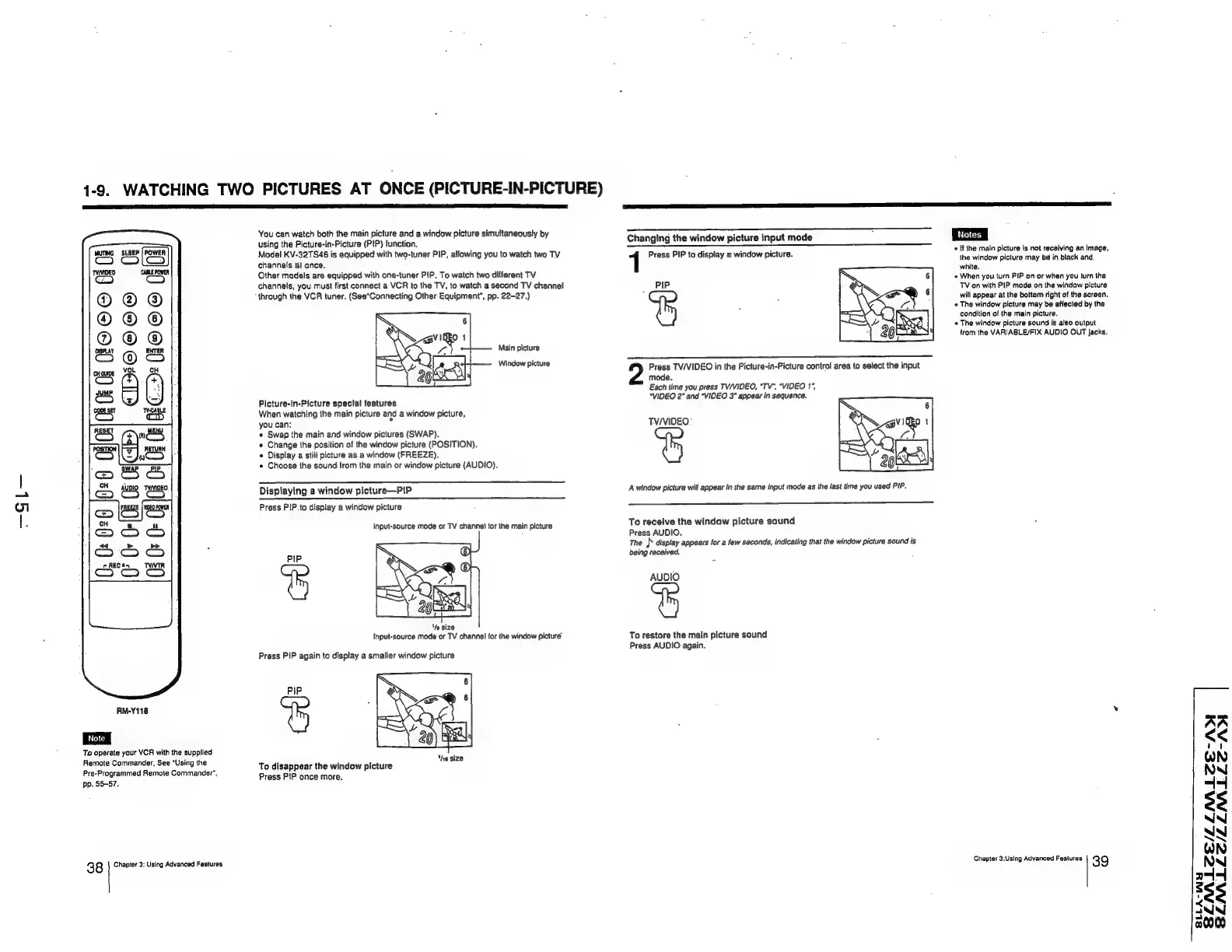
1-9.
WATCHING
TWO
PICTURES
AT
ONCE
(PICTURE-IN-PICTURE)
You
can
watch
both
the
main
picture
and
a
window
picture
simultaneously
by
m7
ahin
casio
Srp
nee
-
f ‘
“in-Pi
i
Changing
the
window
picture
input
mode
MENG.
OLE
Model
eyenva4e
ie
eau
uals
jee
ee
PIP,
allowing
you
to
watch
two
TY
Pr
PIP
to
displ.
ind
i
+
iL
ae
male
picture
18
not
receiving
an
image;
Cc)
qQuIpP!
:
oy
:
ress
PIP
to
display
a
window
picture.
the
window
picture
may
be
in
black
and
channels
at
once.
white.
«
When
you
turn
PIP
on
of
when
you
turn
the
TV
on
with
PIP
mode
on
the
window
picture
will
appear
at
the
bottom
right
of
the
screen.
¢
The
window
picture
may
be
attected
by
the
condition
of
the
main
picture.
*
The
window
picture
sound
is
also
output
trom
the
VARIABLE/FIX
AUDIO
OUT
jacks.
i
©O©o6®@
Other
models
are
equipped
with
one-tuner
PIP.
To
watch
two
different
TV
channels,
you
must
first
connect
a
VCR
to
the
TV,
to
watch
a
second
TV
channel
PIP
“through
the
VCR
tuner.
(See“Connecting
Other
Equipment",
pp.
22-27.)
Main
picture
Window
picture
Press
TV/VIDEO
in
the
Picture-in-Picture
control
area
to
select
the
input
mode.
Each
time
you
press
TV/VIDEO,
“TV”,
“VIDEO
1”,
“VIDEO
2°
and
“VIDEO
3”
appear
in
sequence.
<
iS
eo
cH
Picture-in-Picture
special
features
When
watching
the
main
picture
and
a
window
picture,
you
can:
«
Swap
the
main
and
window
pictures
(SWAP).
Change
the
position
of
the
window
picture
(POSITION).
Display
a
still
picture
as
a
window
(FREEZE).
Choose
the
sound
from
the
main
or
window
picture
(AUDIO).
00
08
KO
©O©
8
TV/VIDEO°
A
window
picture
will
appear
in
the
same
input
mode
as
the
last
time
you
used
PIP.
Displaying
a
window
picture—PIP
Press
PIP.
to
display
a
window
picture
To
receive
the
window
picture
sound
Press
AUDIO.
The
Py
display
appears
for
a
few
seconds,
indicating
that
the
window
picture
sound
is
being
received,
{nput-source
mode
or
TV
channel
far
the
main
picture
PIP
AUDIO
‘ts
size
Input-source
mode
or
TV
channel
for
the
window
picture
To
restore
the
main
picture
sound
Press
AUDIO
again.
Press
PIP
again
to
display
a
smaller
window
picture
PIP
RN-Y118
‘
To
operate
your
VCR
with
the
supplied
ah
glee
:
“Je,
16
Remote
Commander,
See
“Using
the
To
disappear
the
window
picture
Pre-Programmed
Remote
Commander’,
Press
PIP
once
more
pp.
55-57,
ZLNALCE-
LNALLE/LLNMLLS-
3
8
Chapter
3;
Using
Advanced
Features
Chapter
3:Using
Advanced
Fealures
39
SLAALCE/L
8
SLLA-WH