EasyManua.ls Logo

Sony Trinitron KV-32TW77 - Page 16

Sony Trinitron KV-32TW77
79 pages
Print Icon
To Next Page IconTo Next Page
To Previous Page IconTo Previous Page
Loading...
—-9lL-
Oe
(i
©C©G®8®
J
<
[ey
tad
fe bd
RM-Y118
40
Chapter
3:
Using
Advanced
Features
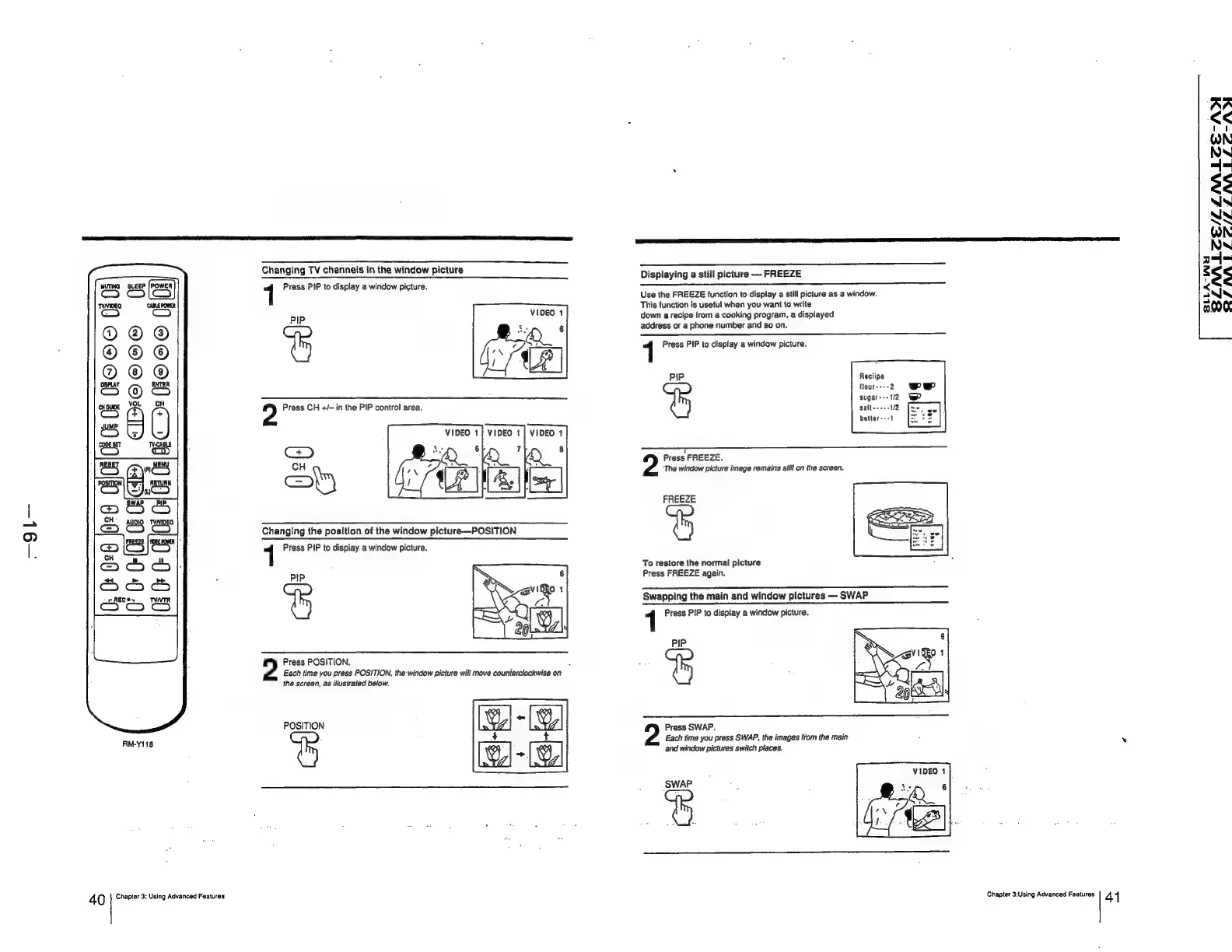
Changing
TV
channels
in
the
window
picture
1
Press
PIP
to
display
a
window
picture.
VIDEO
1
PIP
%
2
Press
CH
+/—
in
the
PIP
control
area.
VIDEO
1}
VIDEO
1}
VIDEO
1
Changing
the
position
of
the
window
picture—POSITION
1
Press
PIP
to
display
a
window
picture.
PIP
%
2
Press
POSITION.
Each
time
you
press
POSITION,
the-window
picture
will
move
counterclockwise
on
the
screen,
as
illustrated
below.
POSITION
Displaying
a
still
picture
—
FREEZE
Use
the
FREEZE
function
to
display
a
still
picture
as-a
window.
This
function
is
useful
when
you
want
{o
write
down
a
recipe
from
a
cooking
program,
a
displayed
address
or
a
phone
number
and
so
on.
1
Press
PIP
to
display
a
window
picture.
PIP
Reciipe
Hourss--2
Wp
sugar---
2
@wP
salt
=
bulter---1
7
Press
FREEZE.
“The
window
picture
image
remains
still
on
the
screen.
FREEZE
To
restore
the
normal
picture
Press
FREEZE
again.
Swapping
the
main
and
window
pictures
—
SWAP
1
Press
PIP
to
display
a
window
picture.
PIP
%
Press
SWAP.
Each
time
you
press
SWAP,
the
images
from
the
main
and
window
pictures
switch
places.
VIDEO
1
SWAP
5
Chapter
3:Using
Advanced
Features
41
SINLZE/LLMALZE-ADI
RSJINALSIZ/ISSNALSZC-AX
SLLA-WH