EasyManua.ls Logo

Sony Trinitron KV-32TW77 - Page 17

Sony Trinitron KV-32TW77
79 pages
Print Icon
To Next Page IconTo Next Page
To Previous Page IconTo Previous Page
Loading...
—-LI-
ee
eSSeeeeSFSseSe
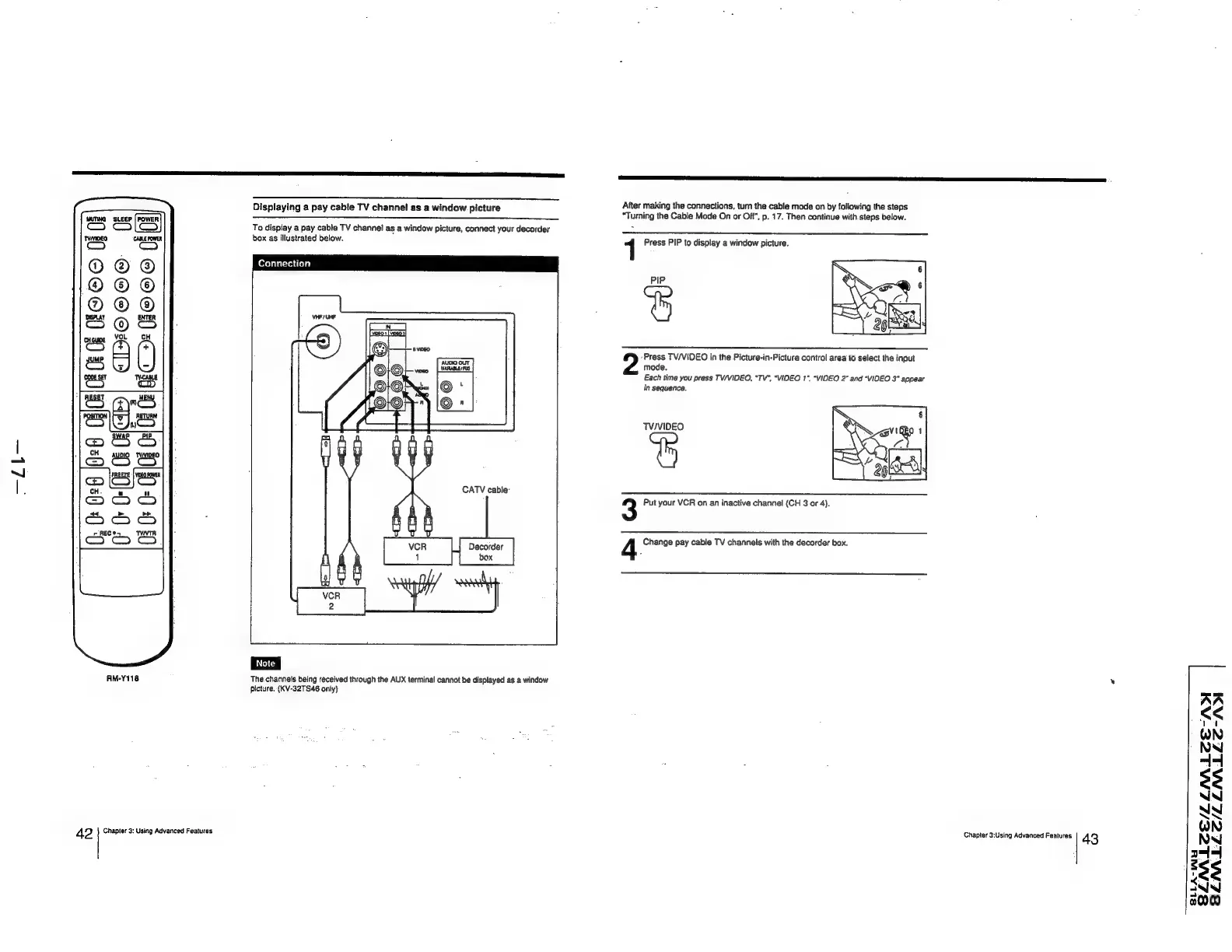
Displaying
a
pay
cable
TV
channel
as
a
window
picture
—_————
After
making
the
connections,
turn
the
cable
mode
on
by
following
the
steps
“Turning
the
Cable
Mode
On
or
Off",
p.
17.
Then
continue
with.steps
below.
MUTING
ce
ce
To
display
a
pay
cable
TV
channel
as
a
window
picture,
connect
your
decorder
as
Tyonnee
ras
box
as
illustrated
below.
1
Press
PIP
to
display
a
window
picture.
®@®©
©
a
splay
ENTER
O@®
©
CHGWDE
ot
t—~
’Press
TV/VIDEO
in
the
Picture-in-Picture
control
area
to
select
the
input
JUMP
Sw
mode.
COE
SET
TABLE
Each
time
you
press
TV/VIDEO,
“TV”,
“VIDEO
1°.
“VIDEO
2”
and
“VIDEO
3°
appear
[ana
}
cD
in
sequence.
TV/VIDEO
CATV
cable:
3
Put
your
VCR
on
an
inactive
channel
(CH
3
or
4).
4
Change
pay
cable
TV
channels
with
the
decorder
box.
bax
:
7
AM-Y118
The.channels
being
received
through
the
AUX
terminal
cannot
be
displayed
as
a
window
picture.
(KV-32TS46
only)
MALEE-AD
42
Chapter
3:
Using
Advanced
Features
Chapter
3:Using
Advanced
Features
43
LNALEZE/LL
SENALLC/LLINANLLSE-ADI
8LLA-wu
3
3