EasyManua.ls Logo

Sony Trinitron KV-35V35 - Page 26

Sony Trinitron KV-35V35
42 pages
Print Icon
To Next Page IconTo Next Page
To Previous Page IconTo Previous Page
Loading...
.
Fe
Pa
a
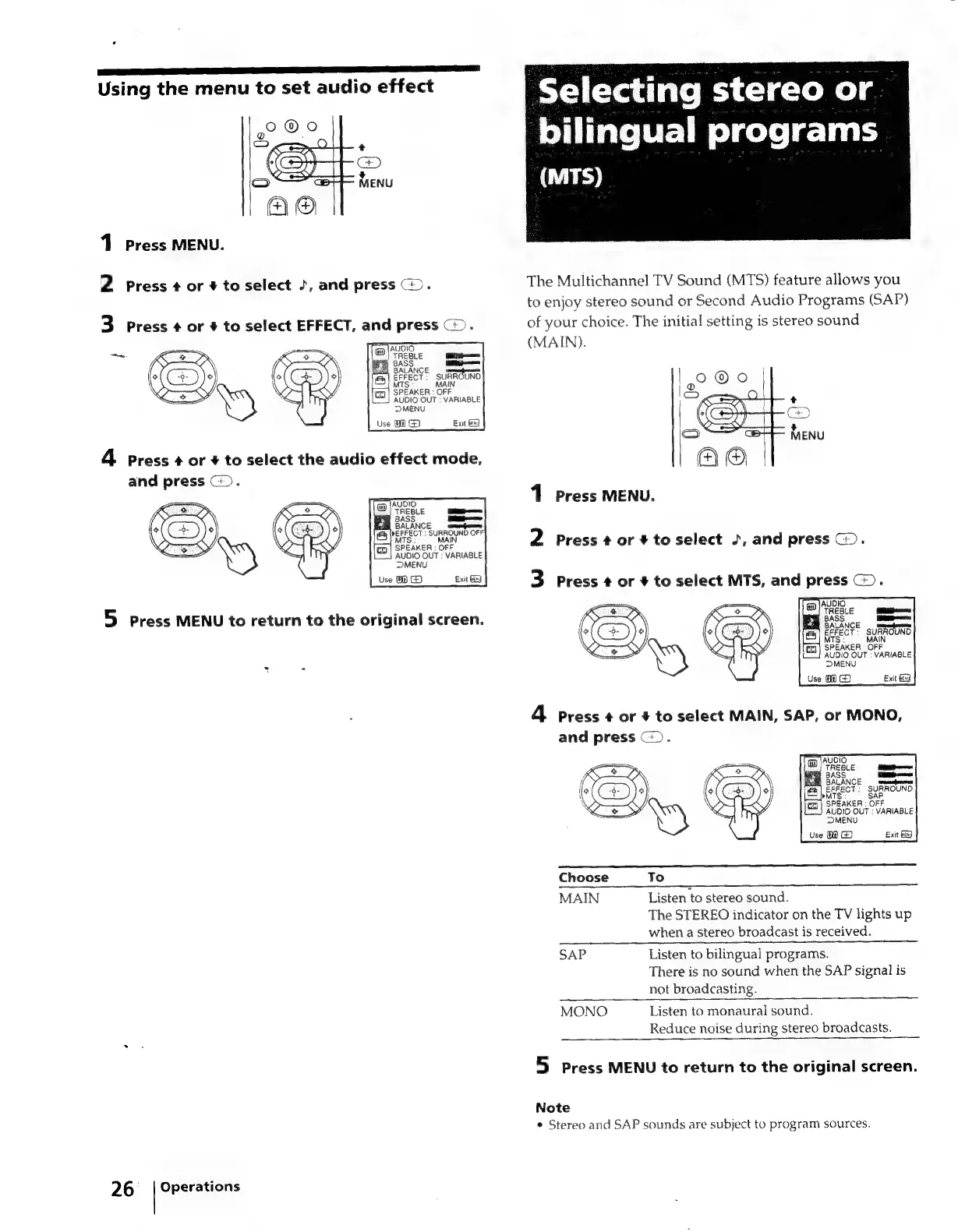
Using
the
menu
to
set
audio
effect
1
Press
MENU.
2
Press
¢
or
+
to
select
2,
and
press
@.
3
Press
¢
or
+
to
select
EFFECT,
and
press
@).
F
AUDIO
OUT
:
VARIABLE
DMENU
Use
@)
G@)
Exit
Gd
4
press
¢
or
#
to
select
the
audio
effect
mode,
and
press
(>.
5
Press
MENU
to
return
to
the
original
screen.
26
_
|
Operations
Selecting
stereo
or
bilingual
programs
(MTS)
The
Multichannel
TV
Sound
(MTS)
feature
allows
you
to
enjoy
stereo
sound
or
Second
Audio
Programs
(SAP)
of
your
choice.
The
initial
setting
is
stereo
sound
(MAIN).
1
Press
MENU.
2
Press
+
or
¥
to
select
J,
and
press
©).
3
Press
+
or
+
to
select
MTS,
and
press
©).
MW
SPEAKER
:
OFF
AUDIO
OUT
:
VARIABLE
DMENU
Use
OG
Exit
Gy
4
Press
¢
or
+
to
select
MAIN,
SAP,
or
MONO,
and
press
©).
NCE
rereamadpreinen
:
SURROUND
SAP
OFF
AUDIO
OUT
:
VARIABLE
MENU
Use
0
Exit
9
Choose
To
MAIN
Listen
to
stereo
sound.
The
STEREO
indicator
on
the
TV
lights
up
when
a
stereo
broadcast
is
received.
SAP
Listen
to
bilingual
programs.
There
is
no
sound
when
the
SAP
signal
is
not
broadcasting.
MONO
Listen
to
monaural
sound.
Reduce
noise
during
stereo
broadcasts.
5
Press
MENU
to
return
to
the
original
screen.
Note
¢
Stereo
and
SAP
sounds
are
subject
to
program
sources.

Related product manuals