EasyManua.ls Logo

Sony Trinitron KV-35V35 - Page 35

Sony Trinitron KV-35V35
42 pages
Print Icon
To Next Page IconTo Next Page
To Previous Page IconTo Previous Page
Loading...
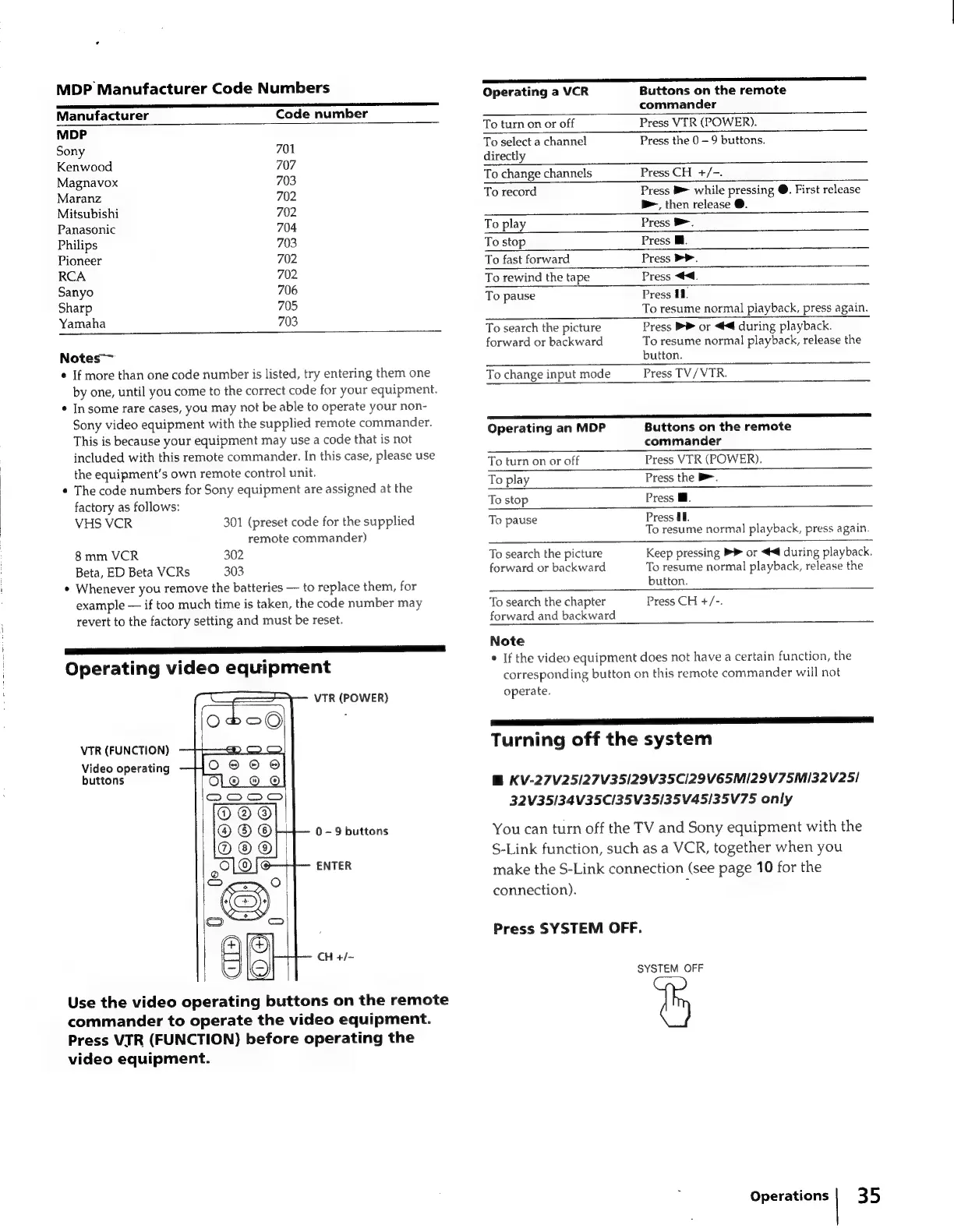
MDP
Manufacturer
Code
Numbers
Manufacturer
Code
number
MDP
Sony
701
Kenwood
707
Magnavox
703
Maranz
702
Mitsubishi
702
Panasonic
704
Philips
703
Pioneer
702
RCA
702
Sanyo
706
Sharp
705
Yamaha
703
Notes
¢
If
more
than
one
code
number
is
listed,
try
entering
them
one
by
one,
until
you
come
to
the
correct
code
for
your
equipment.
*
In
some
rare
cases,
you
may
not
be
able
to
operate
your
non-
Sony
video
equipment
with
the
supplied
remote
commander.
This
is
because
your
equipment
may
use
a
code
that
is
not
included
with
this
remote
commander.
In
this
case,
please
use
the
equipment’s
own
remote
control
unit.
*
The
code
numbers
for
Sony
equipment
are
assigned
at
the
factory
as
follows:
VHS
VCR
301
(preset
code
for
the
supplied
remote
commander)
8mm
VCR
302
Beta,
ED
Beta
VCRs
303
*
Whenever
you
remove
the
batteries
to
replace
them,
for
example
if
too
much
time
is
taken,
the
code
number
may
revert
to
the
factory
setting
and
must
be
reset.
Operating
video
equipment
VTR
(POWER)
VTR
(FUNCTION)
Video
operating
buttons
0
-
9
buttons
ENTER
CH
+/-
Use
the
video
operating
buttons
on
the
remote
commander
to
operate
the
video
equipment.
Press
VIR
(FUNCTION)
before
operating
the
video
equipment.
Operating
a
VCR
Buttons
on
the
remote
commander
Press
VIR
(POWER).
Press
the
0
9
buttons.
To
turn
on
or
off
To
select
a
channel
directly
To
change
channels
Press
CH
+/-.
To
record
Press
B>
while
pressing
@.
First
release
bm,
then
release
@.
To
play
Press
®.
To
stop
Press
Ml.
To
fast
forward
Press
>>.
To
rewind
the
tape
Press
<<.
To
pause
Press
11.
To
resume
normal
playback,
press
again.
Press
PP
or
4
during
playback.
To
resume
normal
playback,
release
the
button.
Press
TV/VTR.
To
search
the
picture
forward
or
backward
To
change
input
mode
PED
Operating
an
MDP
Buttons
on
the
remote
commander
To
turn
on
or
off
Press
VTR
(POWER).
To
play
Press
the
B.
To
stop
Press
@.
To
pause
Press
UI.
To
resume
normal
playback,
press
again.
To
search
the
picture
Keep
pressing
PY
or
4
during
playback.
forward
or
backward
To
resume
normal
playback,
release
the
button.
i
To
search
the
chapter
Press
CH
+/-.
forward
and
backward
Note
*
If
the
video
equipment
does
not
have
a
certain
function,
the
corresponding
button
on
this
remote
commander
will
not
operate.
aa AT
ET
Turning
off
the
system
B
KV-27V25/27V35/29V35C/29V65M/29V75M132V25/
32V35/34V35C/35V35/35V45/35V75
only
You
can turn
off
the
TV
and
Sony
equipment
with
the
S-Link
function,
such
as
a
VCR,
together
when
you
make
the
S-Link
connection
(see
page
10
for
the
connection).
:
Press
SYSTEM
OFF.
SYSTEM
OFF
Operations
|
35

Related product manuals