EasyManua.ls Logo

Sony UP-897MD - Page 11

Sony UP-897MD
68 pages
Print Icon
To Next Page IconTo Next Page
To Previous Page IconTo Previous Page
Loading...
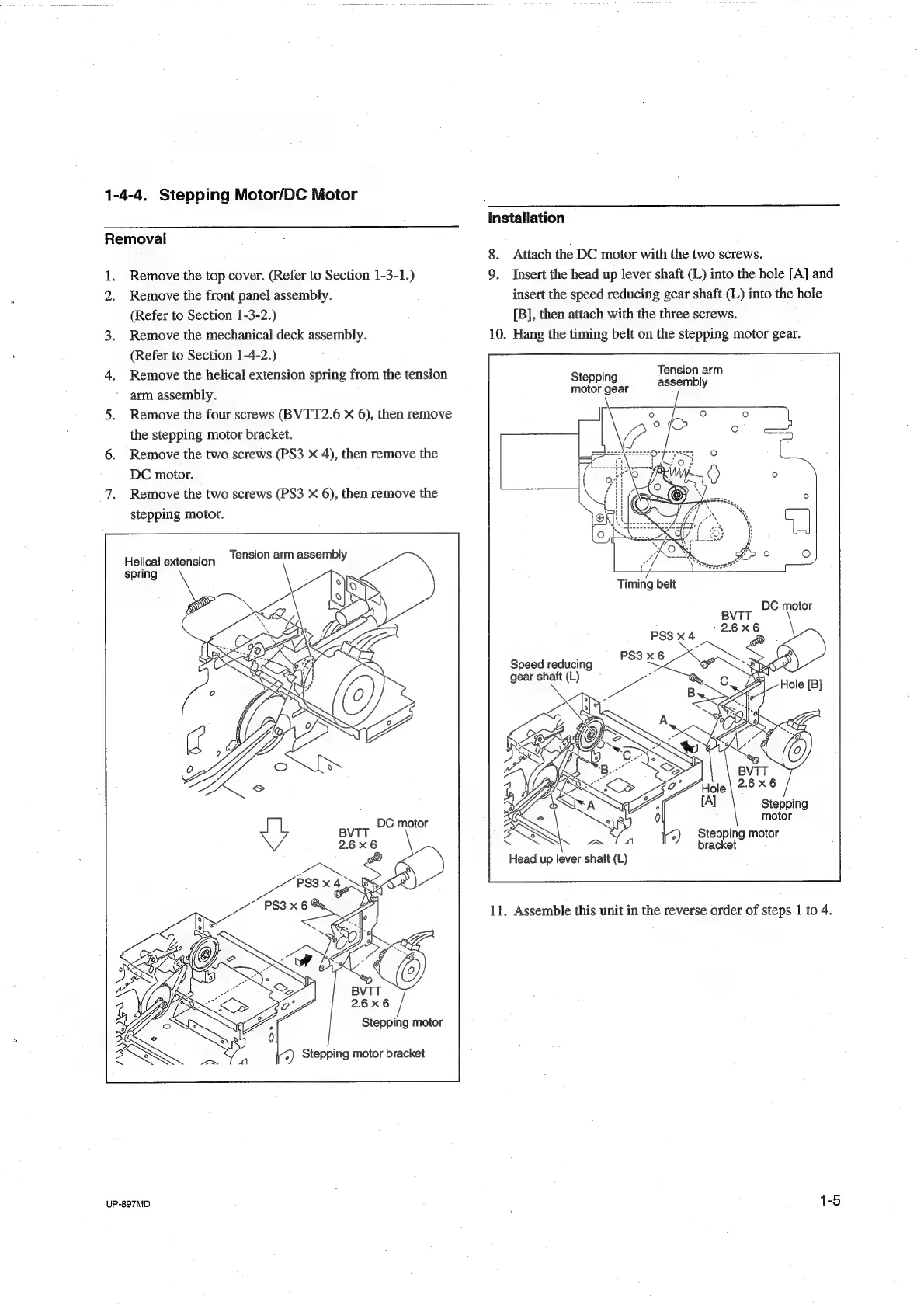
1-4-4,
Stepping
Motor/DC
Motor
Removal
1.
Remove
the
top
cover.
(Refer
to
Section
1-3-1.)
Remove
the
front
panel
assembly.
(Refer
to
Section
1-3-2.)
3.
Remove
the
mechanical
deck
assembly.
(Refer
to
Section
1-4-2.)
4.
Remove
the
helical
extension
spring
from
the
tension
arm
assembly.
5.
Remove
the
four
screws
(BVTT2.6
X
6),
then
remove
the
stepping
motor
bracket.
6.
Remove
the
two
screws
(PS3
X
4),
then
remove
the
DC
motor.
7.
Remove
the
two
screws
(PS3
X
6),
then
remove
the
stepping
motor.
Tension
arm
assembly
Helical
extension
UP-897MD
Installation
8.
Attach
the
DC
motor
with
the
two
screws.
9.
Insert
the
head
up
lever
shaft
(L)
into
the
hole
[A]
and
insert
the
speed
reducing
gear
shaft
(L)
into
the
hole
[B],
then
attach
with
the
three
screws.
10.
Hang
the
timing
belt
on
the
stepping
motor
gear.
Tension
arm
Stepping
assembly
motor
gear
Speed
reducing
gear
shaft
(L)
Stepping
motor
Stepping
motor
eget
biel
:
bracket
;
Head
up
lever
shaft
(L)
11.
Assemble
this
unit
in
the
reverse
order
of
steps
1
to
4.

Table of Contents

Other manuals for Sony UP-897MD

Related product manuals