EasyManua.ls Logo

Sony UP-897MD - Brightness, Contrast, and Head Voltage Adjustment

Sony UP-897MD
68 pages
Print Icon
To Next Page IconTo Next Page
To Previous Page IconTo Previous Page
Loading...
2-3.
Brightness
and
Contrast
Adjustment
After
replacing
the
MA-132
board,
perform
the
following
adjustment
procedure.
Required
equipment
*
Monitor
*
Digital
voltmeter
*
10
step
signal
generator
(Equivalent
to
Tektronix
1410
(NTSC
signal))
Connection
*
Input
signal:
10
step
signal
*
Connect
this
unit
and
the
monitor.
Procedure
1.
Reset
this
unit
to
the
factory
setting.
(Refer
to
Section
2-1-3.)
2.
Rotate
the
jog
dial
to
display
“VOLME”
on
LCD,
and
then
press
the
button.
The
adjustment
mode
starts.
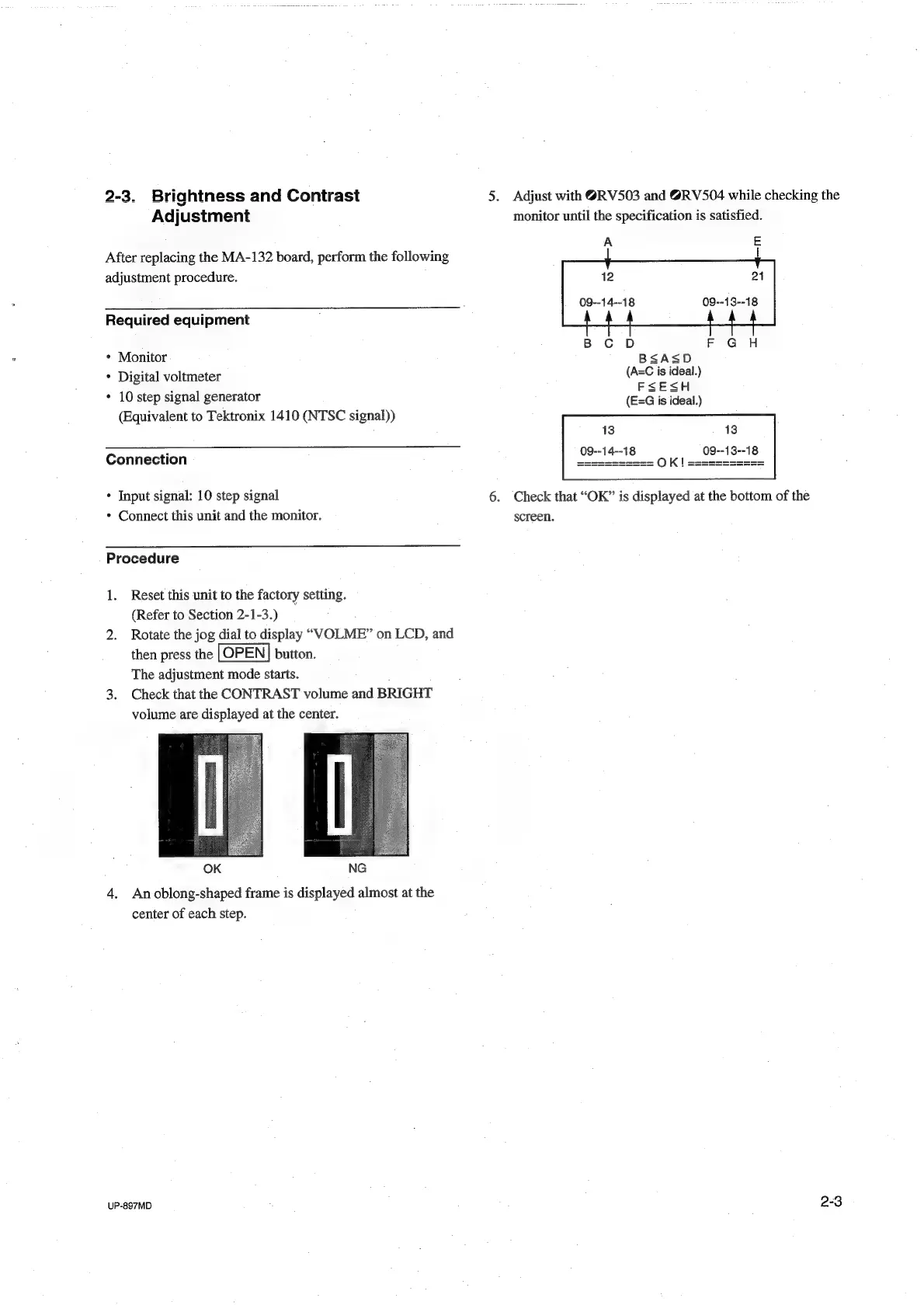
3.
Check
that
the
CONTRAST
volume
and
BRIGHT
volume
are
displayed
at
the
center.
OK
NG
4.
An
oblong-shaped
frame
is
displayed
almost
at
the
center
of
each
step.
UP-897MD
5.
Adjust
with
@RV503
and
@RV504
while
checking
the
monitor
until
the
specification
is
satisfied.
A
E
12
09--14--18
B
CD
F
GH
BSASD
(A=C
is
ideal.)
FSESH
(E=G
is
ideal.)
13
13
09--13--18
09--14--18
6.
Check
that
“OK”
is
displayed
at
the
bottom
of
the
screen.
2-3

Table of Contents

Other manuals for Sony UP-897MD

Related product manuals