EasyManua.ls Logo

Sony UP-897MD - Platen Roller

Sony UP-897MD
68 pages
Print Icon
To Next Page IconTo Next Page
To Previous Page IconTo Previous Page
Loading...
1-4-6.
Pinch
Arm
Assembly
When
replacing
the
pinch
arm
subassembly,
be
extremely
careful
not
to
touch
it
with
bare
hands
or
dirty
gloves.
If
the
pinch
arm
subassembly
is
contaminated,
clean
it
with
the
ethyl
alcohol.
1.
Remove
the
top
cover.
(Refer
to
Section
1-3-1.)
Remove
the
front
panel
assembly.
(Refer
to
Section
1-3-2.)
3.
Remove
the
mechanical
deck
assembly.
(Refer
to
Section
1-4-2.)
4.
Remove
the
thermal
head.
(Refer
to
Section
1-4-3.)
5.
Remove
the
paper
holder
assembly.
(Refer
to
step
4
of
Section
1-4-7.)
6.
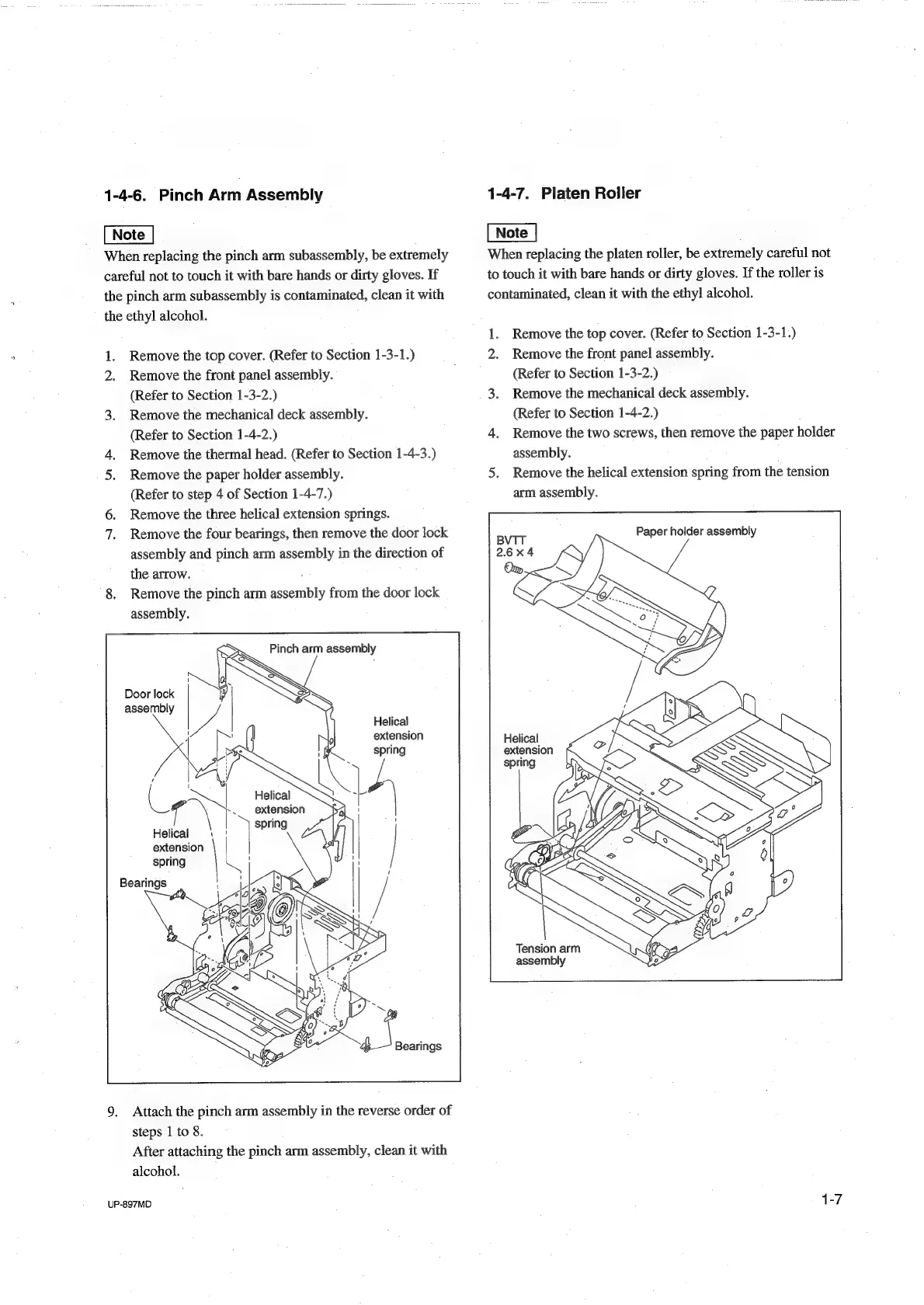
Remove
the
three
helical
extension
springs.
7.
Remove
the
four
bearings,
then
remove
the
door
lock
assembly
and
pinch
arm
assembly
in
the
direction
of
the
arrow.
8,
Remove
the
pinch
arm
assembly
from
the
door
lock
assembly.
Pinch
arm
assembly
Door
lock
i
}
assembly
Be
Helical
4
extension
¢
asa
Helical
e
\
..
extension
Helical
5
!
=o
|
spring
Bearings
9.
Attach
the
pinch
arm
assembly
in
the
reverse
order
of
steps
1
to
8.
After
attaching
the
pinch
arm
assembly,
clean
it
with
alcohol.
UP-897MD
1-4-7.
Platen
Roller
|
When
replacing
the
platen
roller,
be
extremely
careful
not
to
touch
it
with
bare
hands
or
dirty
gloves.
If
the
roller
is
contaminated,
clean
it
with
the
ethyl
alcohol.
1.
Remove
the
top
cover.
(Refer
to
Section
1-3-1.)
Remove
the
front
panel
assembly.
(Refer
to
Section
1-3-2.)
3.
Remove
the
mechanical
deck
assembly.
(Refer
to
Section
1-4-2.)
4.
Remove
the
two
screws,
then
remove
the
paper
holder
assembly.
5.
Remove
the
helical
extension
spring
from
the
tension
arm
assembly.
Paper
holder
assembly
e7
Helical
extension
Tension
arm
assembly

Table of Contents

Other manuals for Sony UP-897MD

Related product manuals