EasyManua.ls Logo

Sony UP-897MD - Main Parts Replacement Procedures

Sony UP-897MD
68 pages
Print Icon
To Next Page IconTo Next Page
To Previous Page IconTo Previous Page
Loading...
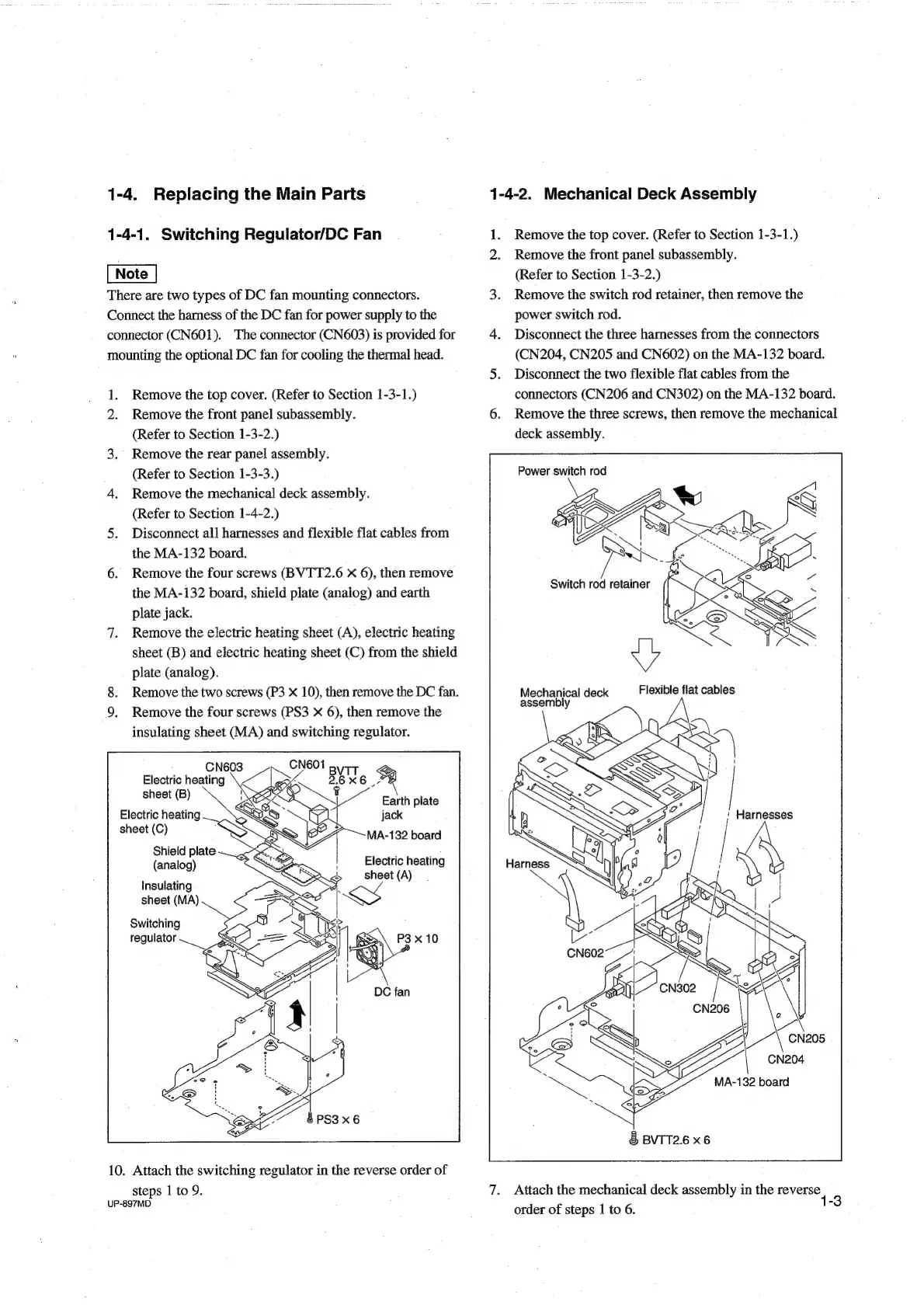
1-4.
Replacing
the
Main
Parts
1-4-1.
Switching
Regulator/DC
Fan
There
are
two
types
of
DC
fan
mounting
connectors.
Connect
the
harness
of
the
DC
fan
for
power
supply
to
the
connector
(CN601).
The
connector
(CN603)
is
provided
for
mounting
the
optional
DC
fan
for
cooling
the
thermal
head.
1.
Remove
the
top
cover.
(Refer
to
Section
1-3-1.)
2.
Remove
the
front
panel
subassembly.
(Refer
to
Section
1-3-2.)
3.
Remove
the
rear
panel
assembly.
(Refer
to
Section
1-3-3.)
4.
Remove
the
mechanical
deck
assembly.
(Refer
to
Section
1-4-2.)
5.
Disconnect
all
harnesses
and
flexible
flat
cables
from
the
MA-132
board.
6.
Remove
the
four
screws
(BVTT2.6
X
6),
then
remove
the
MA-132
board,
shield
piate
(analog)
and
earth
plate
jack.
7.
Remove
the
electric
heating
sheet
(A),
electric
heating
sheet
(B)
and
electric
heating
sheet
(C)
from
the
shield
plate
(analog).
8.
Remove
the
two
screws
(P3
X
10),
then
remove
the
DC
fan.
9.
Remove
the
four
screws
(PS3
X
6),
then
remove
the
insulating
sheet
(MA)
and
switching
regulator.
wags
BVTT
2.6X6_-
rf
dee
Earth
plate
Electric
heating
;
jack
sheet
(C)
MA-132
board
Shield
plate
(analog)
Electric
heating
sheet
(A)
Insulating
A.
sheet
(MA)
PROS
Os
Switching
Ss
10.
Attach
the
switching
regulator
in
the
reverse
order
of
steps
1
to
9.
UP-897MD
1-4-2.
Mechanical
Deck
Assembly
°
Remove
the
top
cover.
(Refer
to
Section
1-3-1.)
Remove
the
front
panel
subassembly.
(Refer
to
Section
1-3-2.)
Remove
the
switch
rod
retainer,
then
remove
the
power
switch
rod.
Disconnect
the
three
harnesses
from
the
connectors
(CN204,
CN205
and
CN602)
on
the
MA-132
board.
Disconnect
the
two
flexible
flat
cables
from
the
connectors
(CN206
and
CN302)
on
the
MA-132
board.
Remove
the
three
screws,
then
remove
the
mechanical
deck
assembly.
Power
switch
rod
Mechanical
deck
Flexible
flat
cables
assembly
&
BVTT2.6
x6
Attach
the
mechanical
deck
assembly
in
the
NE
order
of
steps
|
to
6.
7

Table of Contents

Other manuals for Sony UP-897MD

Related product manuals