EasyManua.ls Logo

Sony UP-897MD - LED Lighting Check; Front Panel Volume Calibration Oc; Log Printing

Sony UP-897MD
68 pages
Print Icon
To Next Page IconTo Next Page
To Previous Page IconTo Previous Page
Loading...
5-6.
LED
Lighting
Check
5-9.
Log
Printing
Check
if
the
backlight
of
the
LCD
is
lit.
The
print
count
or
error
log
is
printed.
Set
the
printing
paper
in
the
paper
tray.
LIGHT
LI:RCV.
(LCD
lights
in
green.)
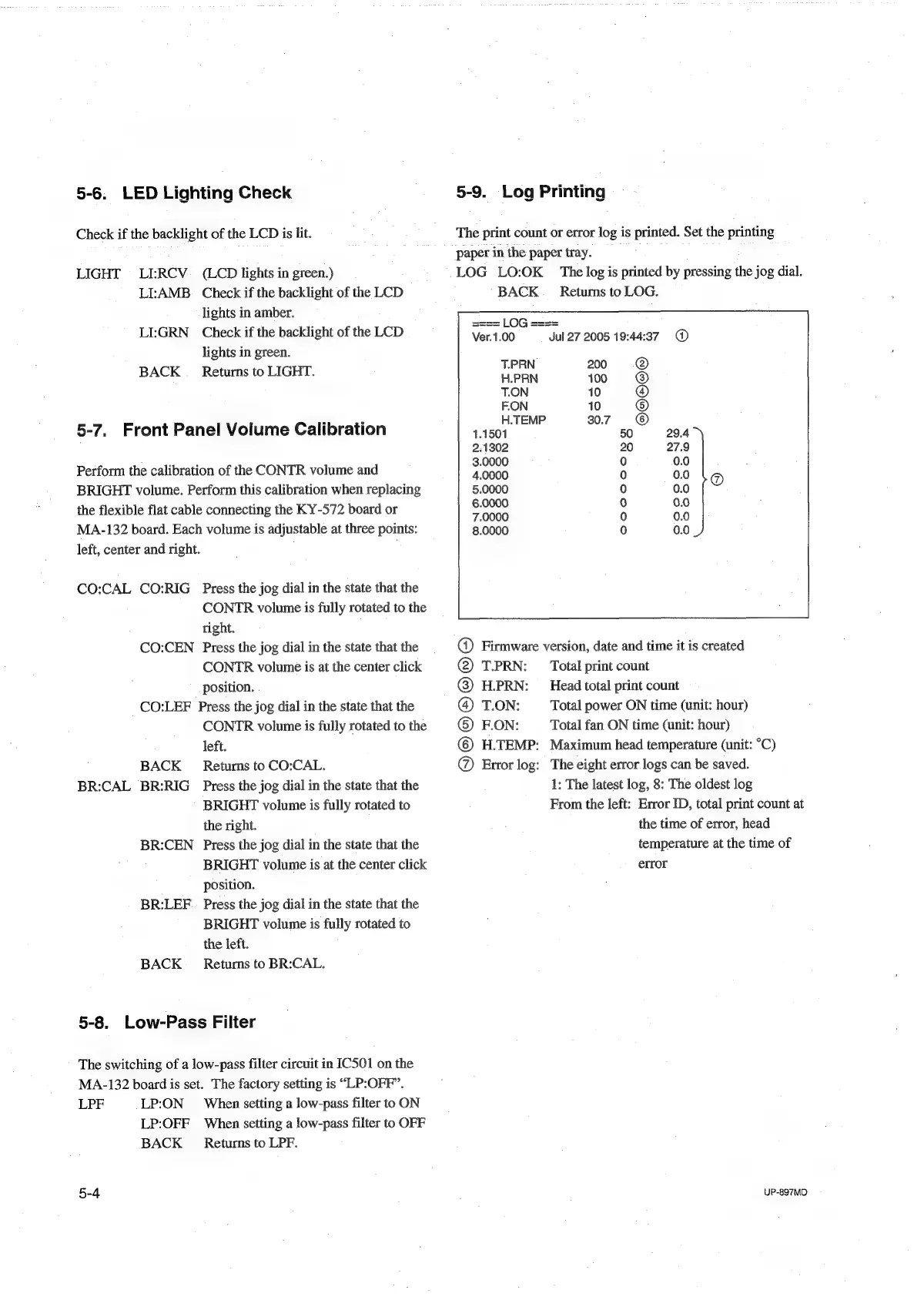
LOG
LO:OK
The
log
is
printed
by
pressing
the
jog
dial.
LI:AMB.
Check
if
the
backlight
of
the
LCD
BACK
_
Returns
to
LOG.
lights
in
amber.
LI:GRN_
Check
if
the
backlight
of
the
LCD
as
eaeasaaee
lights
in
green.
BACK
_
Returns
to
LIGHT.
ooh
res
T.ON
10
F.ON
10
5-7.
Front
Panel
Volume
Calibration
14
see
a
2.1302
Perform
the
calibration
of
the
CONTR
volume
and
renee
BRIGHT
volume.
Perform
this
calibration
when
replacing
5.0000
the
flexible
flat
cable
connecting
the
KY-572
board
or
pies
MA-132
board.
Each
volume
is
adjustable
at
three
points:
8.0000
left,
center
and
right.
CO:CAL
CO:RIG
Press
the
jog
dial
in
the
state
that
the
CONTR
volume
is
fully
rotated
to
the
right.
CO:CEN
Press
the
jog
dial
in
the
state
that
the
@
Firmware
version,
date
and
time
it
is
created
CONTR
volume
is
at
the
center
click
@
T.PRN:
Total
print
count
position.
@
H.PRN:
Head
total
print
count
CO:LEF
Press
the
jog
dial
in
the
state
that
the
@
T.ON:
Total
power
ON
time
(unit:
hour)
CONTR
volume
is
fully
rotated
to
the
©
FON:
Total
fan
ON
time
(unit:
hour)
left.
©
H.TEMP:
Maximum
head
temperature
(unit:
°C)
BACK
_
Returns
to
CO:CAL.
@
Error
log:
The
eight
error
logs
can
be
saved.
BR:CAL
BR:RIG
Press
the
jog
dial
in
the
state
that
the
1:
The
latest
log,
8:
The
oldest
log
BRIGHT
volume
is
fully
rotated
to
From
the
left:
Error
ID,
total
print
count
at
the
right.
the
time
of
error,
head
BR:CEN
Press
the
jog
dial
in
the
state
that
the
temperature
at
the
time
of
BRIGHT
volume
is
at
the
center
click
error
position.
BR:LEF
|
Press
the
jog
dial
in
the
state
that
the
BRIGHT
volume
is
fully
rotated
to
the
left.
BACK
_
Returns
to
BR:CAL.
5-8.
Low-Pass
Filter
The
switching
of
a
low-pass
filter
circuit
in
IC501
on
the
MA-132
board
is
set.
The
factory
setting
is
“LP:OFF’.
LPF
LP:ON
When
setting
a
low-pass
filter
to
ON
LP:OFF
When
setting
a
low-pass
filter
to
OFF
BACK
_
Returns
to
LPF.
5-4
;
UP-897MD

Table of Contents

Other manuals for Sony UP-897MD

Related product manuals