EasyManua.ls Logo

Sony UP-897MD - 1-4-5, Cam Shaft Assembly

Sony UP-897MD
68 pages
Print Icon
To Next Page IconTo Next Page
To Previous Page IconTo Previous Page
Loading...
1-4-5.
Cam
Shaft
Assembly
Removal
1.
2.
Remove
the
top
cover.
(Refer
to
Section
1-3-1.)
Remove
the
front
panel
assembly.
(Refer
to
Section
1-3-2.)
Remove
the
mechanical
deck
assembly.
(Refer
to
Section
1-4-2.)
Remove
the
thermal
head.
(Refer
to
Section
1-4-3.)
Remove
the
paper
holder
assembly.
(Refer
to
step
4
of
Section
1-4-7.)
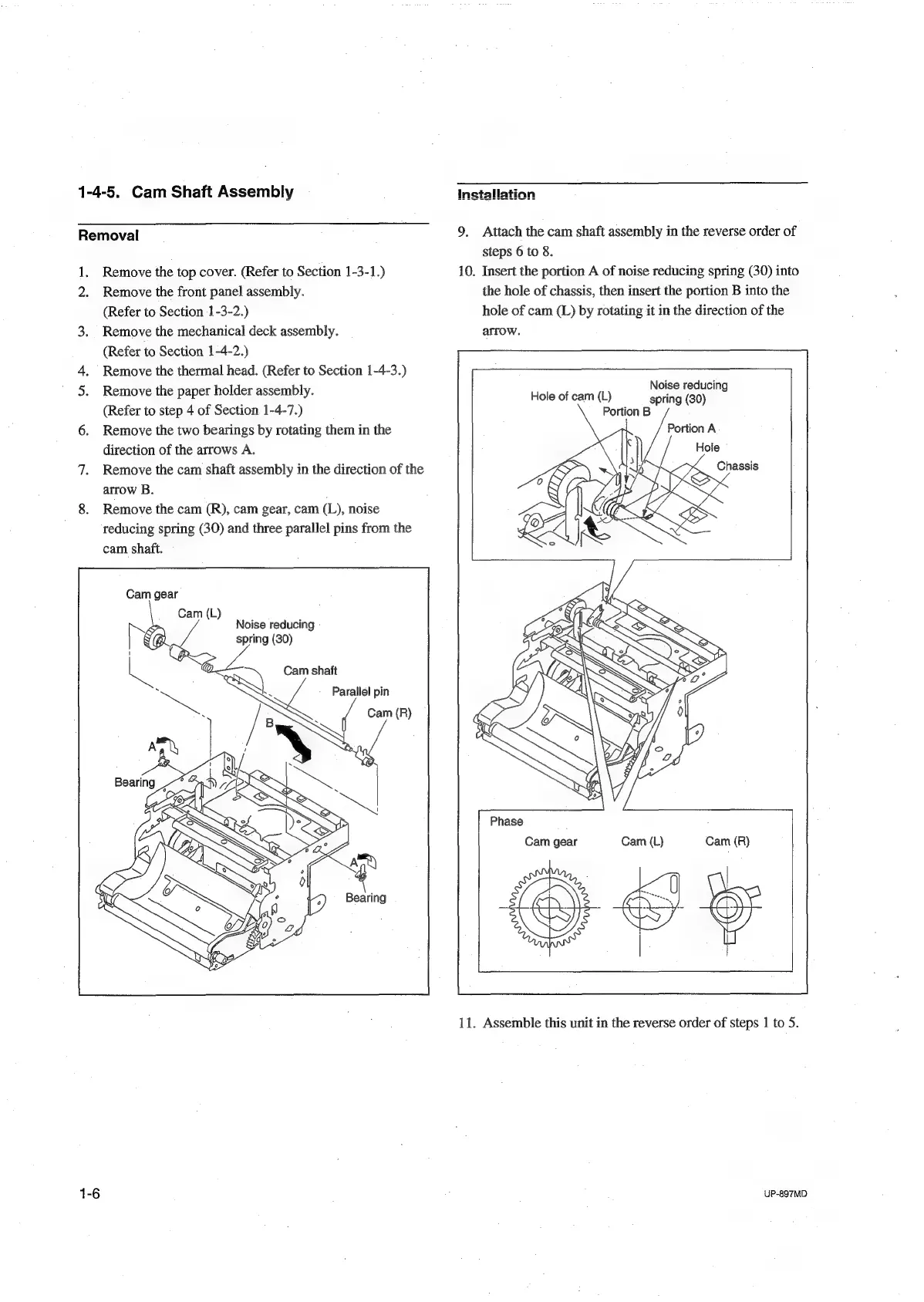
Remove
the
two
bearings
by
rotating
them
in
the
direction
of
the
arrows
A.
Remove
the
cam
shaft
assembly
in
the
direction
of
the
arrow
B.
Remove
the
cam
(R),
cam
gear,
cam
(L),
noise
reducing
spring
(30)
and
three
parallel
pins
from
the
cam
shaft.
Cam
gear
Cam
(L)
Noise
reducing
spring
(30)
~)
Cam
shaft
RS
Parallel
pin
Cam
(R)
9.
Attach
the
cam
shaft
assembly
in
the
reverse
order
of
steps
6
to
8.
10.
Insert
the
portion
A
of
noise
reducing
spring
(30)
into
the
hole
of
chassis,
then
insert
the
portion
B
into
the
hole
of
cam
(L)
by
rotating
it
in
the
direction
of
the
arrow.
Noise
reducing
Hole
of
cam
(L)
spring
(30)
Portion
B
Portion
A
Chassis
Cam
(L)
Cam
(R)
Cam
gear
11.
Assemble
this
unit
in
the
reverse
order
of
steps
1
to
5.
UP-897MD

Table of Contents

Other manuals for Sony UP-897MD

Related product manuals