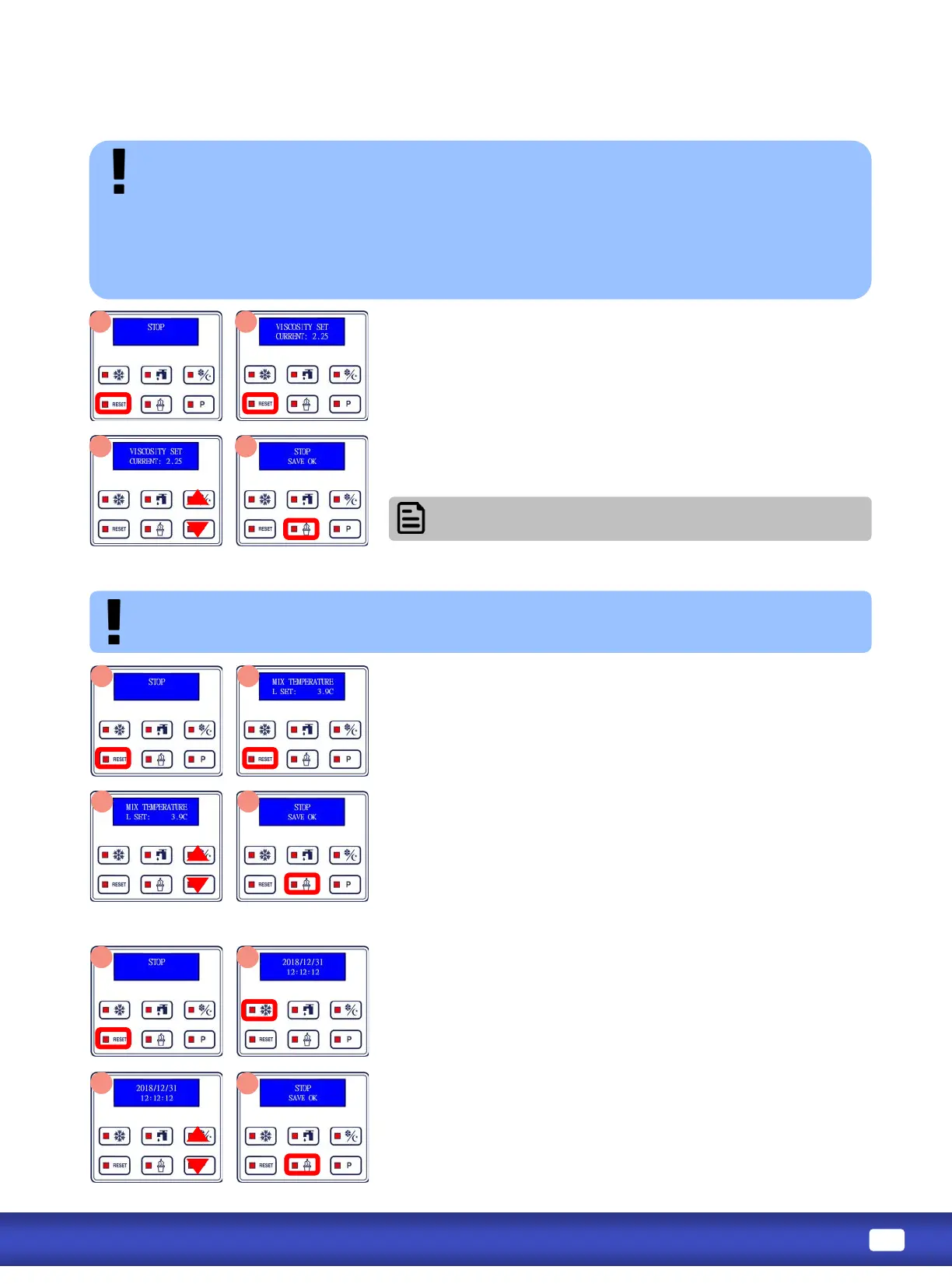
1. Viscosity controls how hard ice cream will be. Slightly adjust viscosity during inial setup and for
each avor/brand change.
2. Start with lower viscosity and gradually increase. Allow at least 2 freezing cycles to verify. Adjust
maximum 0.3A at a me.
3. Once desirable viscosity is set, DO NOT adjust again unless product (mix) is changed.
4. So and icy product in the aernoon requires more frequent dispense or a re-prime. Adjust viscosity
will result in FREEZE UP and/or DAMAGE to the machine.
1. Press RESET to stop machine funcons.
2. Press and hold RESET unl display shows sengs (viscosity is the
rst seng shown). If you scroll past the viscosity seng, connue
pressing RESET unl it comes back around.
3. Press STANDBY to increase viscosity (more rm).
Press P to decrease viscosity (less rm).
4. Press and hold ICE CREAM buon for 3 seconds to save changes.
If temperature seng is too cold, product will freeze around the sides of the hopper and
potenally cause damage. Hopper temperature should be set above freezing at 3°C to 4°C (37°F to 40°F).
1. Press RESET to stop machine funcons. Press and hold RESET unl
display shows sengs.
2. Viscosity is the rst seng shown; press RESET again (without
holding), temperature will be next. If you scroll past the
temperature seng, connue pressing RESET unl it comes back
around.
3. Press STANDBY to increase temperature (warmer).
Press P to decrease temperature (cooler).
4. Press and hold ICE CREAM buon for 3 seconds to save changes.
1. Press RESET to stop all machine funcons. Press and hold RESET
unl display shows sengs. Press RESET twice (without holding)
to reach the date/me seng. If you scroll past the date/me
seng, connue pressing RESET unl it comes back around.
2. Press FREEZE to toggle cursor between date/me elds. Once
highlighted, a eld can be changed.
3. Press STANDBY to increase highlighted number.
Press P to decrease highlighted number.
4. Press and hold ICE CREAM buon for 3 seconds to save changes.
Refer to viscosity range (page 18) for detailed viscosity
seng value.



 To Next Page