8999151EN: v1 11/03/2021
92
Original instructions (ENGLISH)
Website: www.spearheadmachinery.com
7 Spare Parts
7.1 How To Obtain The Correct Spare Part Numbers
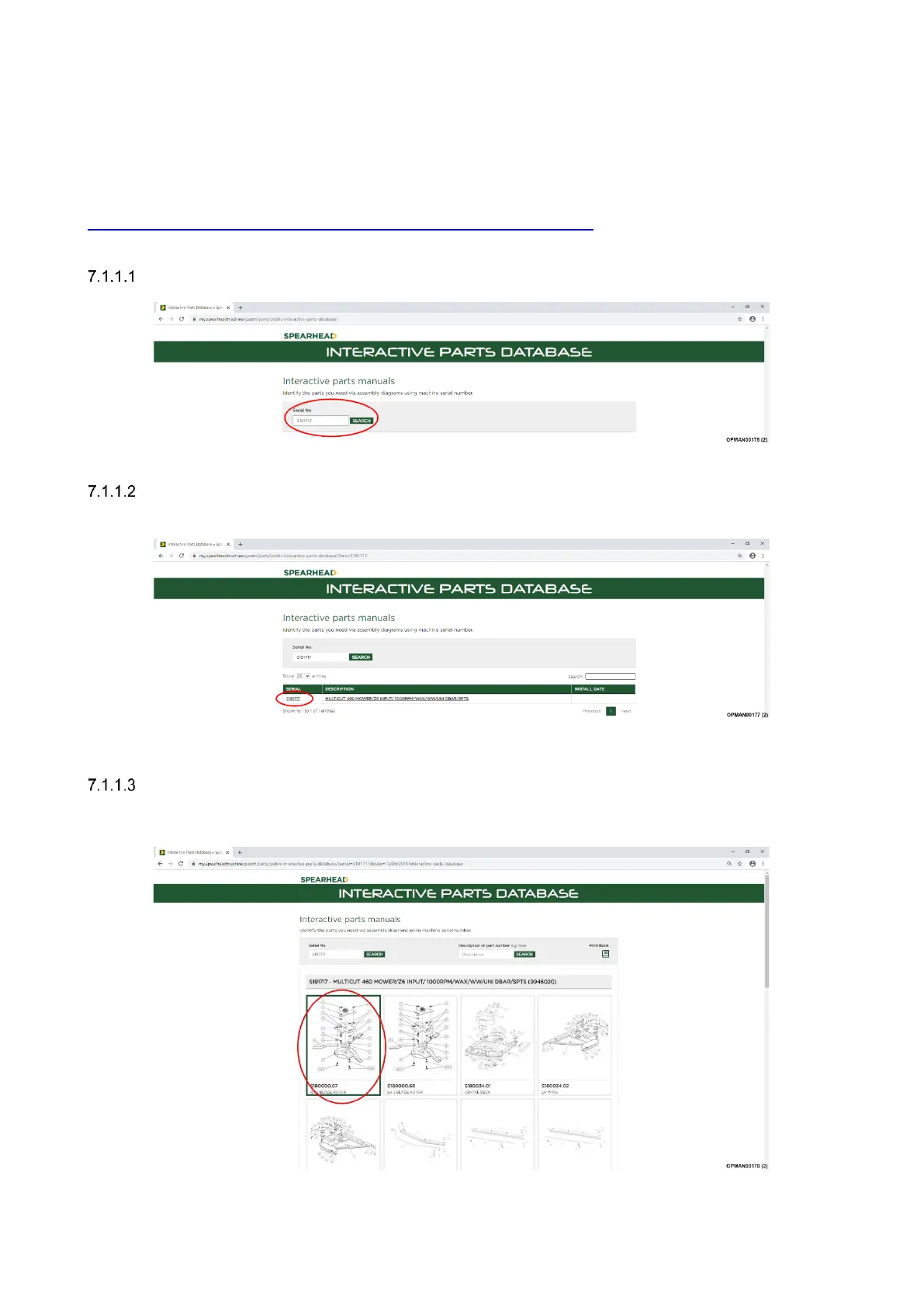
For correct part numbers; use the Spearhead interactive online parts books. These are available at
https://my.spearheadmachinery.com/parts/public-interactive-parts-database/
You will need to enter the machine serial number; see Figure 1.4.
Enter the serial number.
Figure 7.1 – Type In Serial Number
After entering the serial number a specification for the machine will appear. Click on the serial number;
see Figure 7.2.
Figure 7.2 – Click On Serial Number
After clicking on the serial number a full parts breakdown, specific to the machine serial number will
appear showing the various parts and assemblies of the machine. Click on the specific assembly
picture required; see Figure 7.3.
Figure 7.3 – Click On Assembly


 To Next Page