13
Assembly & Product Model Setup
ASSEMBLY
To install the Embedded Display on an E-TRe or E-TRxe, refer to document 620-7854.
To install the Embedded Display on an E-UBe, E-RBe, E-TBTe or E-STe, refer to document 620-7855.
SETUP
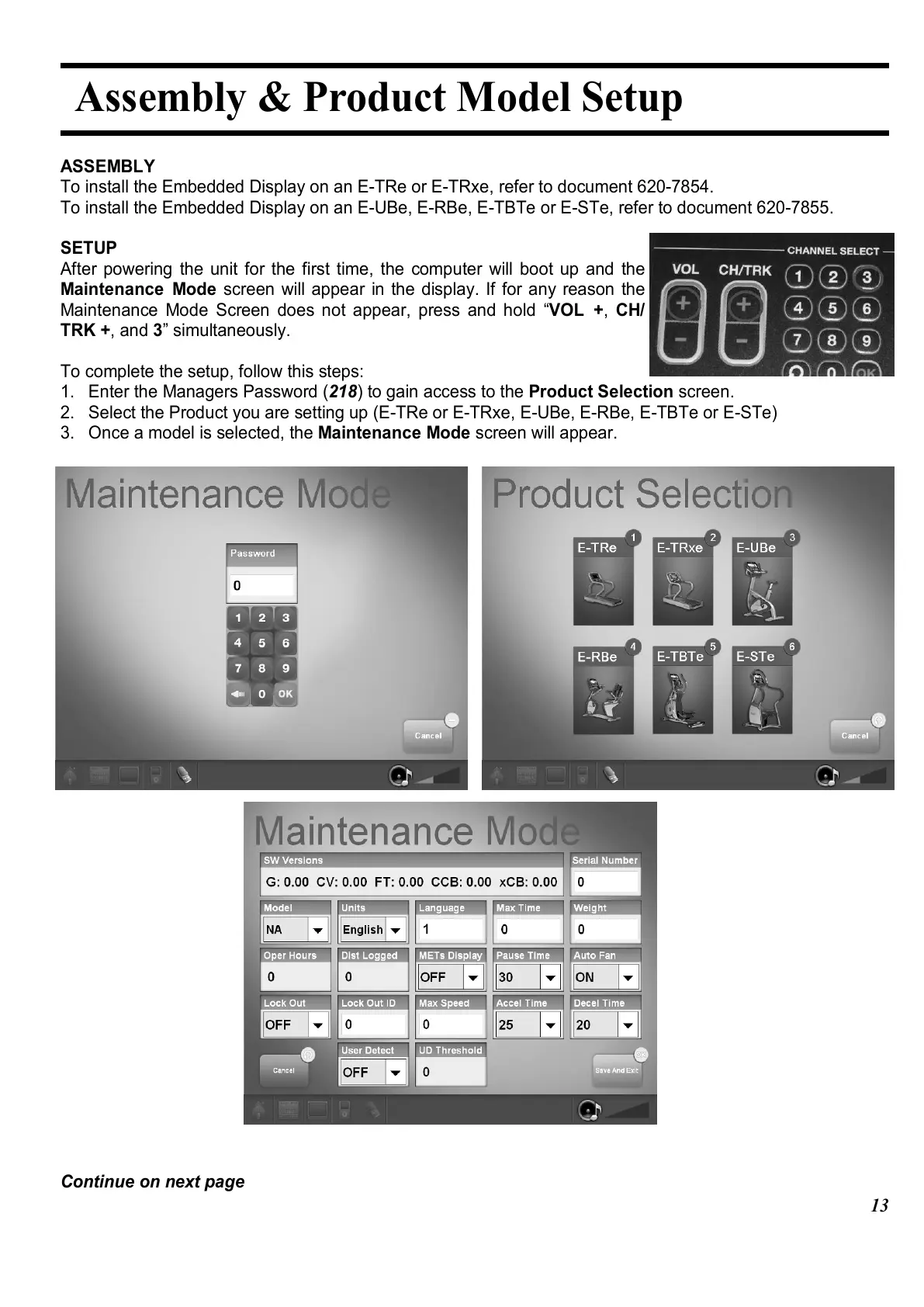
After powering the unit for the first time, the computer will boot up and the
Maintenance Mode screen will appear in the display. If for any reason the
Maintenance Mode Screen does not appear, press and hold “VOL +, CH/
TRK +, and 3” simultaneously.
To complete the setup, follow this steps:
1. Enter the Managers Password (218) to gain access to the Product Selection screen.
2. Select the Product you are setting up (E-TRe or E-TRxe, E-UBe, E-RBe, E-TBTe or E-STe)
3. Once a model is selected, the Maintenance Mode screen will appear.
Continue on next page















 To Next Page