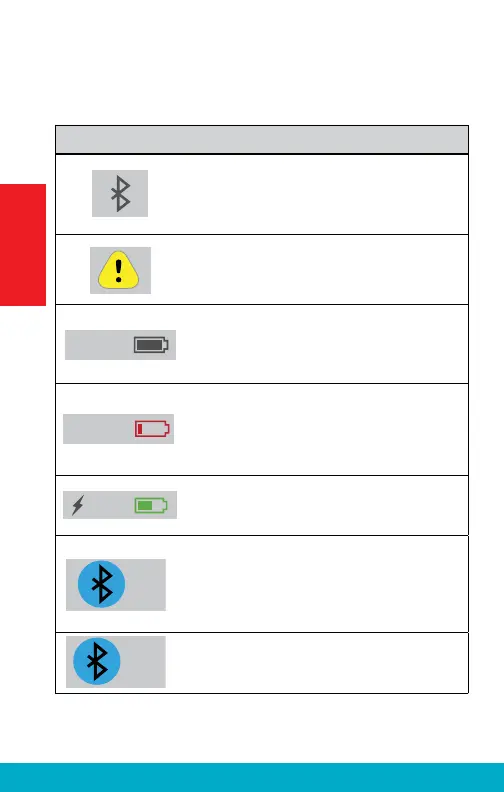
The taskbar at the top of the display provides status
information:
Indicator
Notes
When the SurfLink Mobile 2 Bluetooth
antenna is on, indicator will display on the
left side of the taskbar. When the Bluetooth
antenna is off, no indicator will display.
If an advisory message is available, an
indicator will display in the center of the
taskbar.
100%
The SurfLink Mobile 2 battery status is
shown on the right side of the taskbar. For
example, a fully-charged SurfLink Mobile 2
shows 100% battery charge.
10%
If less than 20% battery charge remains,
a low battery warning message appears.
SurfLink Mobile 2 should be promptly
recharged.
60%
When properly recharging, indicator will
display next to battery status.
When exactly one Hands-Free Profi le
Bluetooth device (typically, this would be
your cell phone) is connected, then the
Bluetooth icon will be surrounded by a
blue circle.
When two Hands-Free Profi le Bluetooth
devices are connected, then “x2” will be
added to the circled Bluetooth icon.
12
Getting Started



 To Next Page