117
Appendix B: Diamante Utilities
© 2012 Stenograph, L.L.C.
c. Write a stroke on the steno machine.
d. In the TrueView dialog box, select Connect Realtime. The Save As dialog box displays.
Navigate to where you want to save the realtime file. Type a file name and select Save.
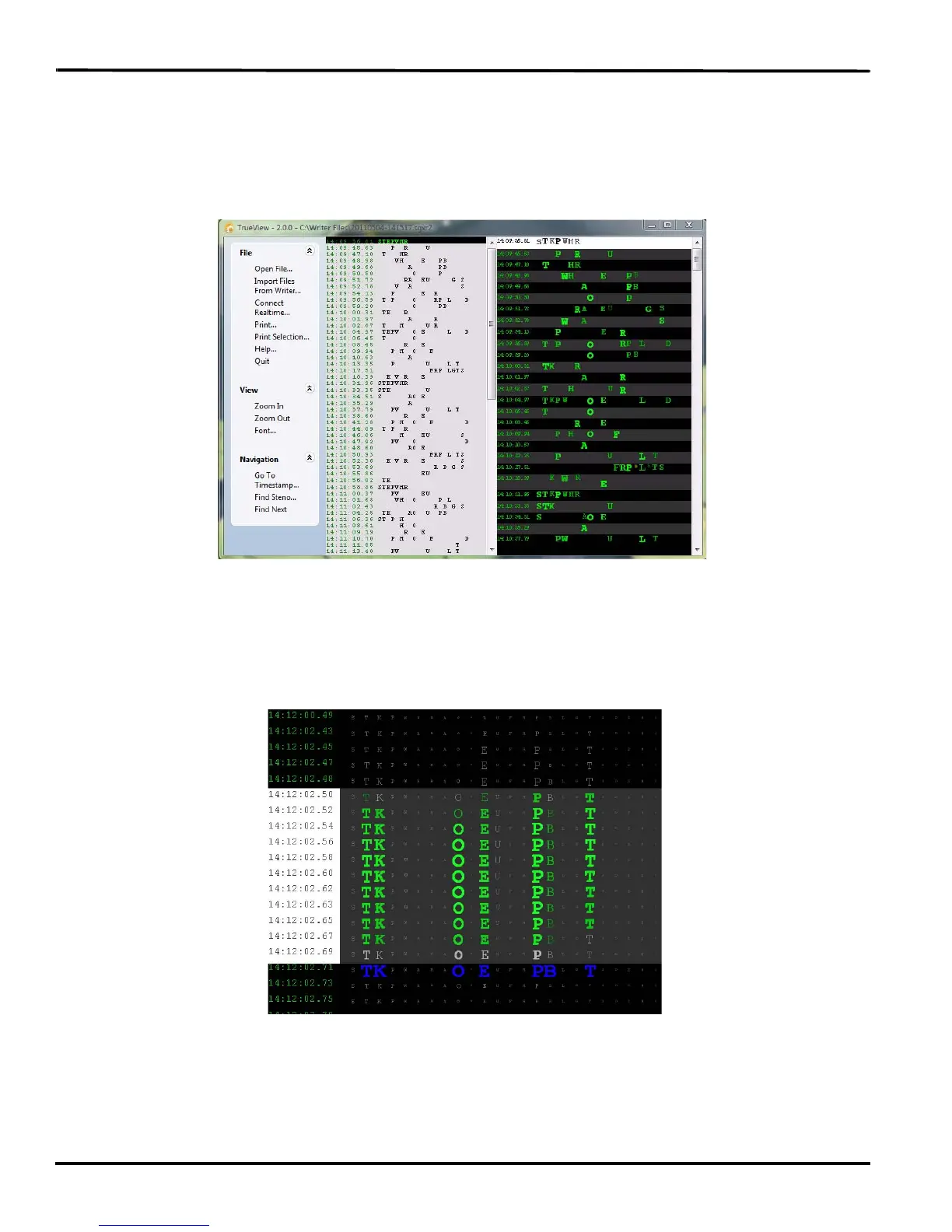
5. The selected file displays with the steno note file in the middle column and the TrueStroke data, in
Compact view, in the right column.
Vertical Notes with TrueStroke Data in Compact View
6. Double click the TrueStroke data column to toggle the view, from Compact to Expanded. Expanded
view shows the TrueStroke details for each stroke. The details reveal the timing, direction of travel,
depressed or released, and velocity of the steno keys in a stroke. See Understanding the TrueStroke
Data on page 118 for more information on data interpretation.
TrueStroke Data in Expanded View
7. Additional TrueView features allow you to search, zoom, modify the font and print the TrueStroke
data. See TrueView Menu Features on page 120 for feature details.



 To Next Page