Diamante User Guide
48
© 2012 Stenograph, L.L.C.
If you are using the Brief It feature on your Diamante with Case CATalyst V13 or higher, selecting to
Undo a global, Undo Last Global or delete a global in Case CATalyst does not remove the definition from
dictionary in Diamante memory or the job dictionary for the file on the Diamante. To remove J-Defines
from the Diamante, it is necessary to clear them from the dictionary stored in memory. See J-Defines on
page 60 for more information.
Managing Briefs
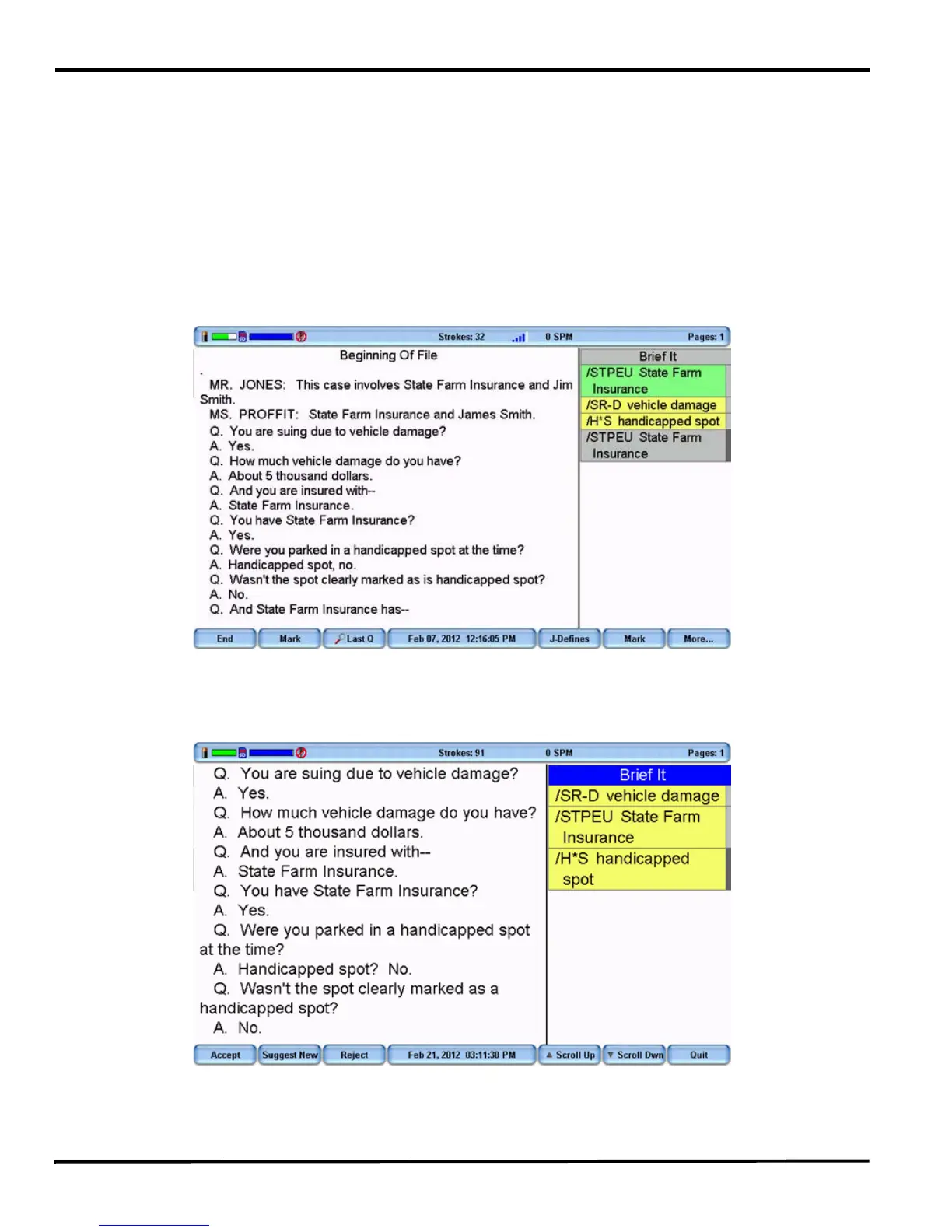
Diamante Suggested and Reminder briefs along with used briefs display in the Brief It pane in a color
coded background. The newest and last used briefs display at the bottom of the list. Suggested briefs
have a yellow background, used briefs a gray background and Reminder briefs a green background.
To manage briefs during a job, press More, More, Brief It. The title bar of the Brief It pane turns blue,
indicating it has cursor focus. Use the Scroll Up and Scroll Dwn buttons to position the cursor on the
desired brief. The cursor location is indicated with a dark grey color on the edge of the Brief It pane.



 To Next Page