4-6
P129391-130 Operator/Maintenance Manual Installation
Adjust Dock Locking Function
After height adjustments above have been made, check for dock
locking operation, and adjust as follows:
STEP 1: Remove transfer carriage from sterilizer completely and
then push it toward dock.
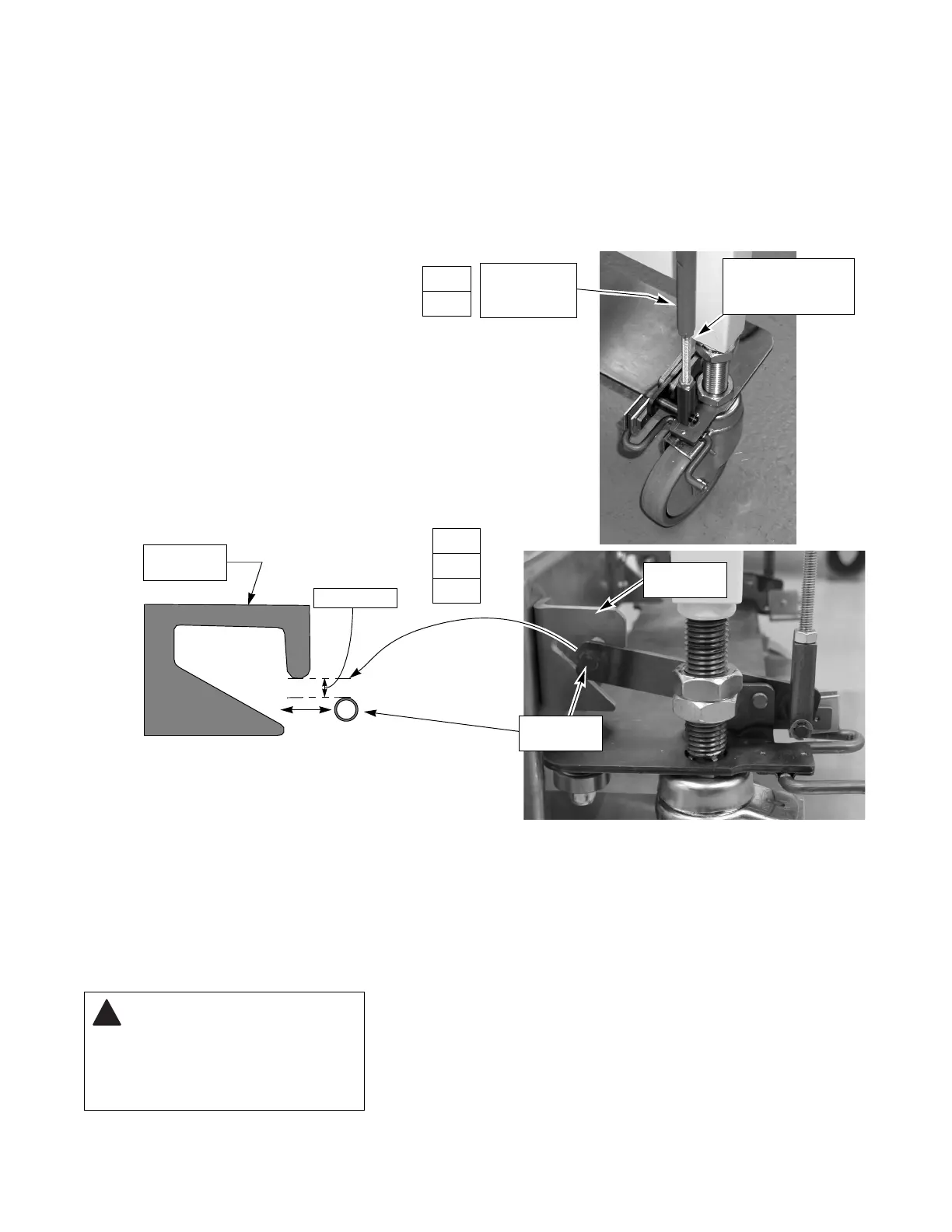
STEP 2: The latching rollers must be ¼" (6 mm) below the top of the
dock cam entrance (180° semicircle) just as the rollers
enter.
• If not, loosen the nuts on the clevis adjusting barrels
(note, top is left-hand thread) and uniformly turn barrel
until rollers ¼" (6 mm) below entrance.
• Tighten nuts on barrel.
STEP 3: Continue to push transfer carriage into chamber.
• The latching rollers must be at or just below the top of
the cam slot without binding.
STEP
2
3
Engagement
Cam
Tighten or Loosen to
Adjust Latching Roller
Height
STEP
2
1/4" (6 mm)
Engagement
Roller
Engagement
Cam
Clevis
Adjustment
Barrel
CAUTION – POTENTIAL
EQUIPMENT DAMAGE
HAZARD: After setting all
height adjustments, ensure all
nuts are tight and transfer
carriage is level.











 To Next Page