5 Operation
Digicode
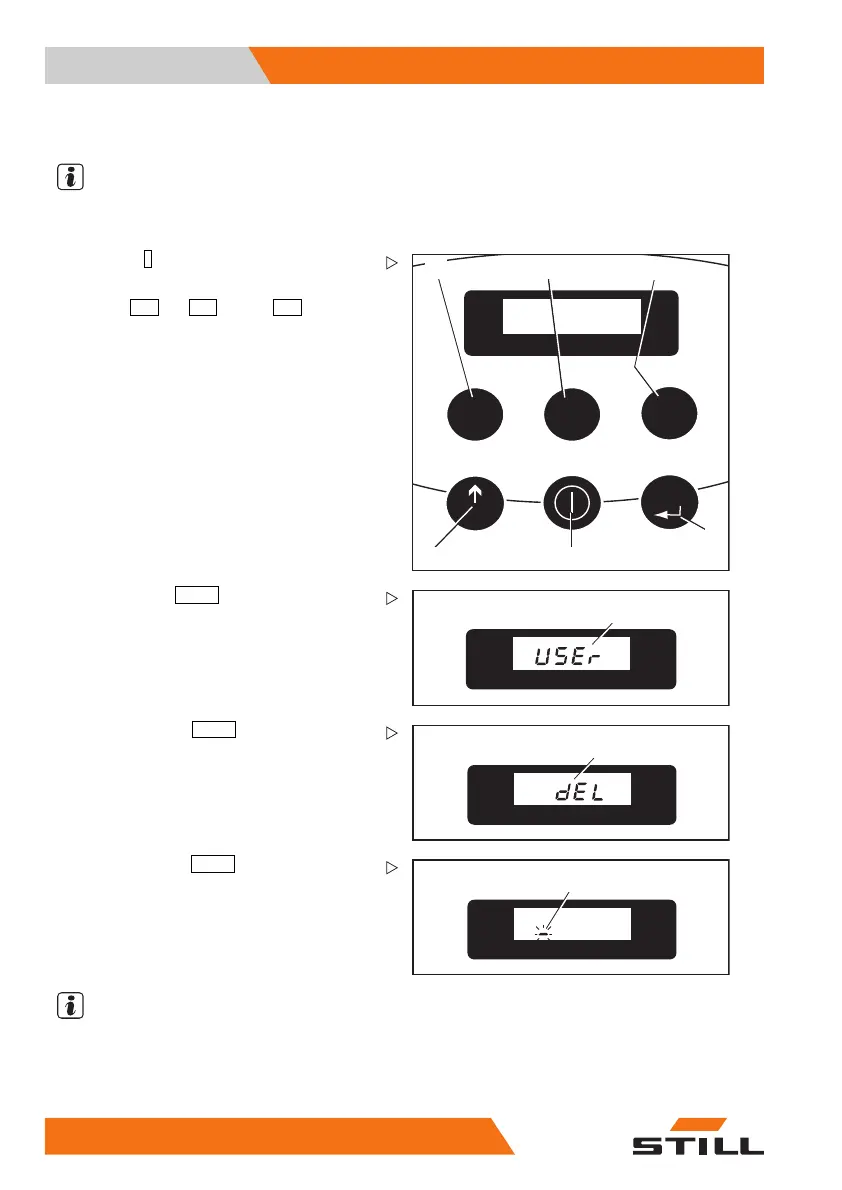
Deleting a driver’s code
NOTE
The truck is turned off, the battery is connec-
ted.
123
456
789
PRG
PRG
1044_505-009
1 2
3
4
5
6
–Pressthe
I
(ON) button (5).
– Enter the valid 4-digit master code with the
buttons
123
(1),
456
(2) and
789
(3).
7
1044_505-016
– Scroll with the
PRG ↑
(
scrolling) button (6)
until
USEr (7) ap
pears in the display.
10
1044_505-015
–Confirmwiththe
PRG ↲
(enter) button (4)
until
dEL (10) appears in the display.
8
1044_505-012
– Confirm with the
PRG ↲
(enter) button (4).
A flashing line cursor (8) will appear in the
display.
– Enter the 4
-digit driver’s code to be deleted
with the bu
ttons (2), (3) or (3) as described
above.
NOTE
If one att
empts to delete an erroneous driver’s
code,
Err
will appear in the display.
10
2 50108043033 [EN]


 To Next Page