5 Operation
Commissioning
8
1044_505-002
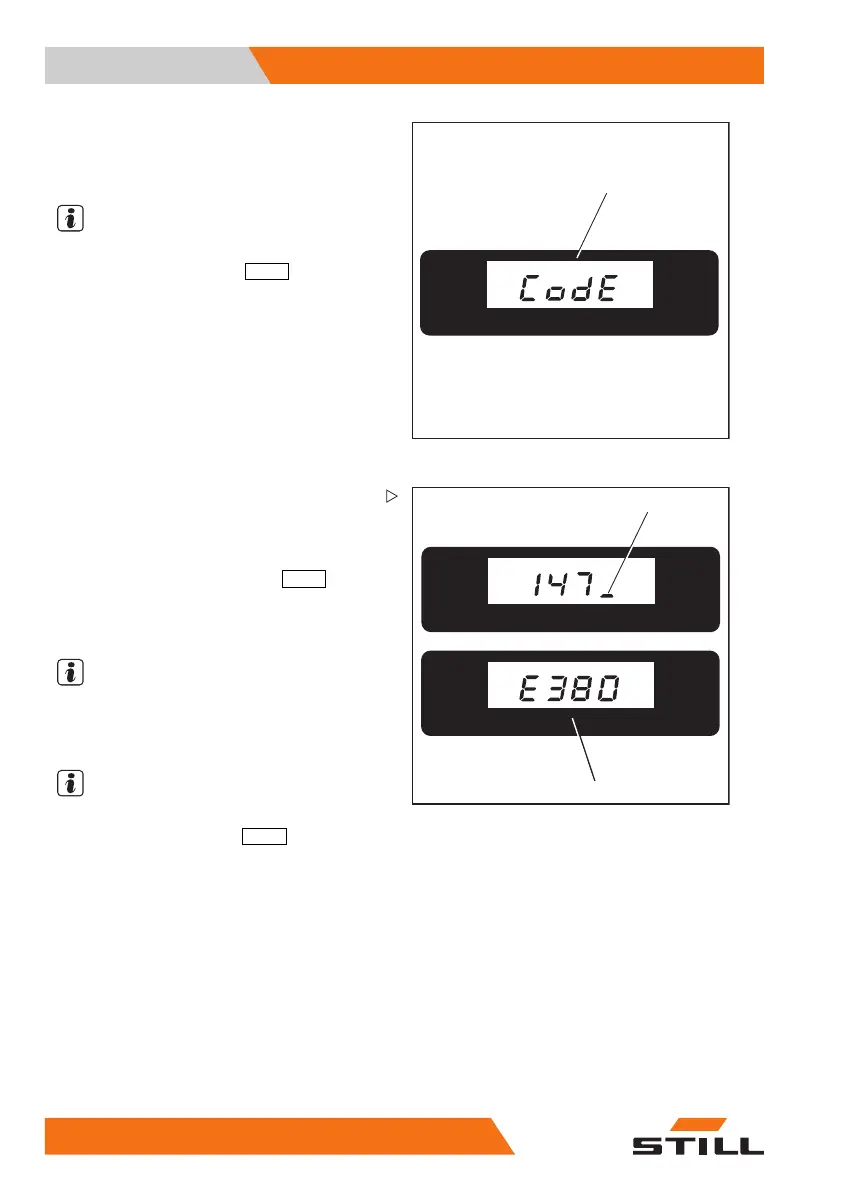
After entering a digit, the disp
lay moves to the
next position. The display show
s a flashing
line (9) (the illustration show
s an example).
NOTE
If the digit entered is wrong, it is possible to
cancel it by depressing the
PRG ↑
key (scroll)
(7).
9
1044_505-017
%
10
– The digit will be deleted and the flashing line
(9) will reappear. It is now possible to enter
digits again.
– After the fou
rth digit has been entered,
confirm this c
ode by pressing
PRG ↲
(5).
The name of th
e truck manufacturer is
displayed. I
t is now possible to activate
the truck.
NOTE
If an error c
ode is displayed, e.g.
E380
(10),
stop the tr
uck by pressing the key (6) and carry
out the act
ivation procedure again.
NOTE
It is possible to show the following displays by
repeatedly depressing the
PRG ↑
key (scroll)
(7).
• Hour met
er ⇒ Chapter "Hour meter", P. 5-64
• Battery charging ⇒ Chapter "Battery
charge", P. 5-64
• Servicing interval management ⇒ Chap-
ter "Maintenance interval manage-
ment", P. 5-65
62
50108043033 [EN]


 To Next Page