17
StingerElectronics.com
SiriusXM
Satelite Radio
Parental Control
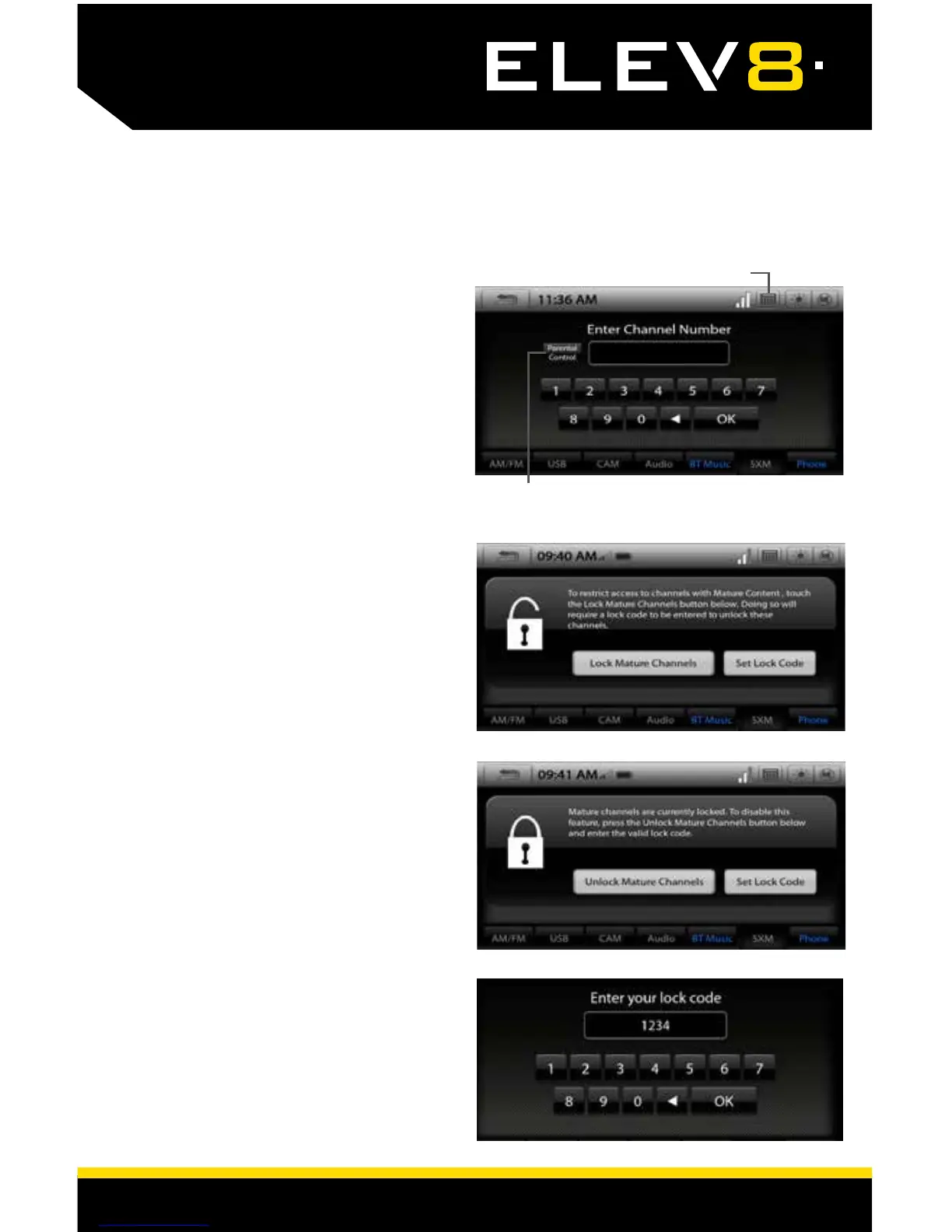
The SiriusXM Parental Control feature
allows you to prevent access to
inappropriate mature content for a
younger listener. When enabled, the
Parental Control feature requires you
to enter a passscode to access the
channels that are rated as Mature
Channels.
By default, all channels are Unlocked
and the Lock Code is 1234
Lock Mature Channels:
1. Touch the Numeric Keypad Icon
on the Information Bar.
2. Touch the Parental Control button.
3. Select Lock Mature Channels
4. Enter 4 digit lock code.
Unlock Mature Channels:
1. Touch the Numeric Keypad Icon
on the Information Bar.
2. Touch the Parental Control button.
3. Select Unlock Mature Channels
4. Enter 4 digit lock code.
Set/Change Lock Code:
Select Set Lock Code, enter old
code and then enter new code.
Reset Lock Code:
To reset the Lock Code to default
code (1234)
Go to MENU > Settings > Load Defaults
* The reset process takes 3-4 minutes
and will reset ALL saved settings to
factory default.
Numeric Keypad Icon
Parental Control














 To Next Page