9
StingerElectronics.com
BT PHONE
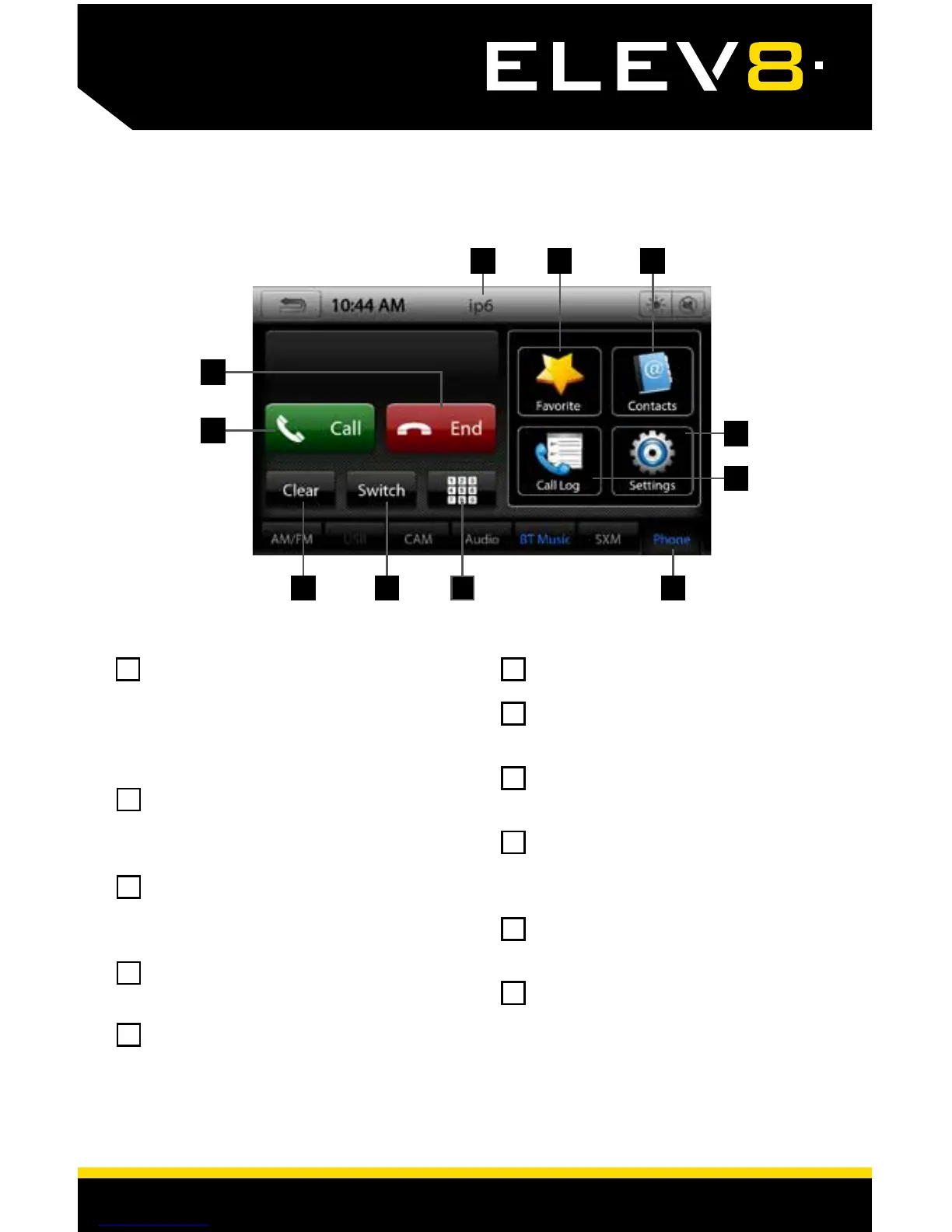
Touch the Phone Tab or press the
HOME BUTTON > Phone to select
the Phone source. Pressing the
Phone Tab repeatedly will cycle
through the Phone options.
Number Pad - Touch to launch
the number pad for dialing phone
numbers.
Switch - Switches phone calls
between the car speakers and the
phone handset.
Clear - Clear/delete last number
entered.
Call Button - Dials the number
entered on the phone or on the
number pad. Answers incoming
call.
End - Press to end call.
Phone Name - Displays the name
of the currently paired phone.
Favorite - Customizable list of
favorite contacts.
Contacts - List of contacts from
paired phone. Not supported by
all phones.
Settings - List of devices and
settings. Add or Delete devices.
Call Log - Recent Dialed,
Received and Missed calls.
1234
7 8 9
11
10
1
5
2
6
3
7
4
8
10
9
11
5
6














 To Next Page