25
StingerElectronics.com
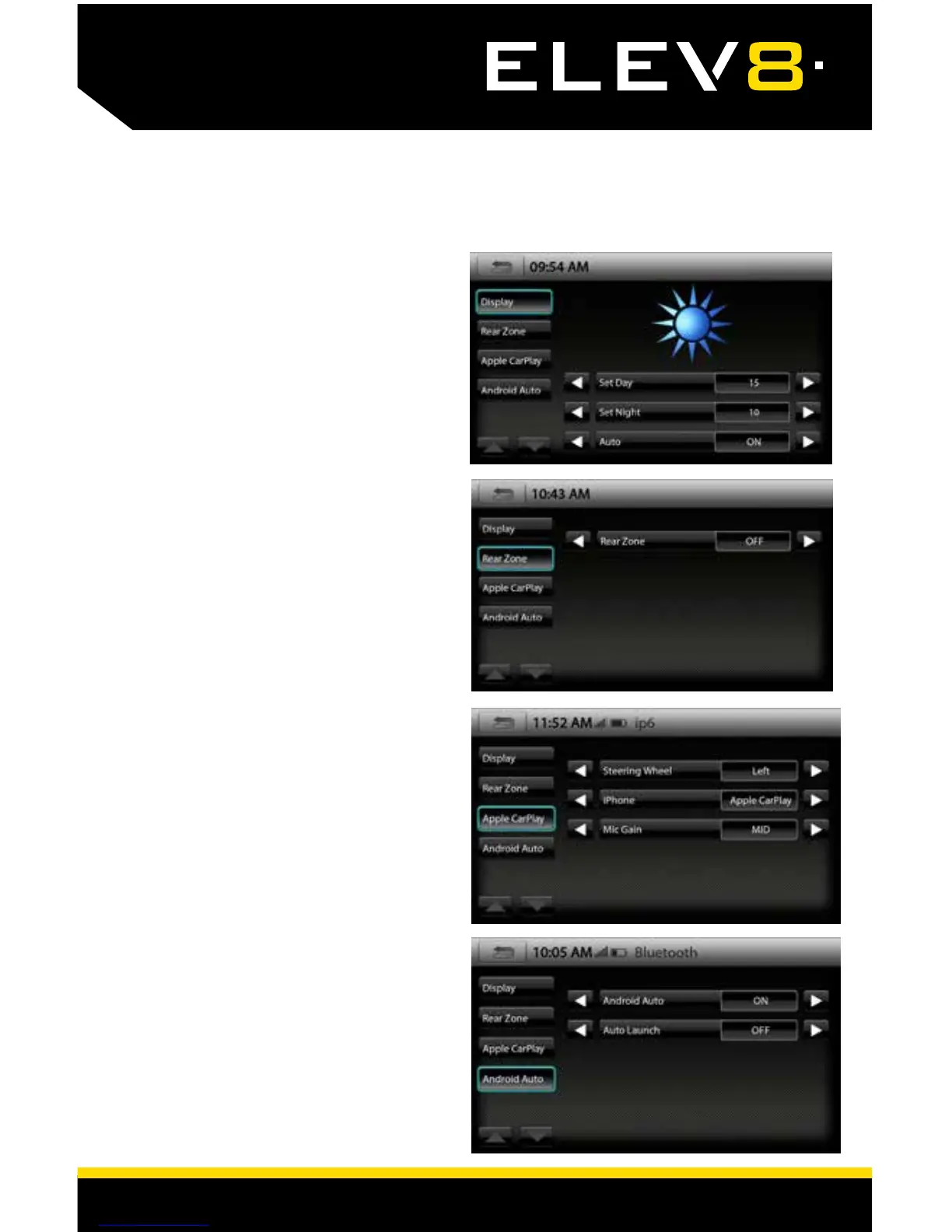
DISPLAY SETTINGS
Touch MENU > Display or press the
HOME BUTTON > Display to access
the display settings.
Display
Set Day
[1-20]
This is the brightness of the display in daylight.
Set Night [1-20]
This is the brightness of the display at night.
Auto [ON-OFF-MANUAL]
If set to Auto, the display will automatically
change to the Night setting when the vehicle's
lights are ON.
Display > Rear Zone
Rear Zone
[OFF-USB-AV]
This selects the Source to send to the AV OUT.
For example, a rear seat entertainment system.
Display > Apple CarPlay
Steering Wheel
[LEFT-RIGHT]
This adjusts the Apple CarPlay side menu.
iPhone [Apple CarPlay-iPod Only-OFF]
Determines how iPhone will be used when
plugged into USB port.
Mic Gain [LOW-MID-HIGH]
Adjusts the microphone sensitivity for Apple
CarPlay.
Display > Andriod Auto
Android Auto
[ON-OFF]
Auto Launch [ON-OFF]














 To Next Page