8
StingerElectronics.com
AM/FM RADIO
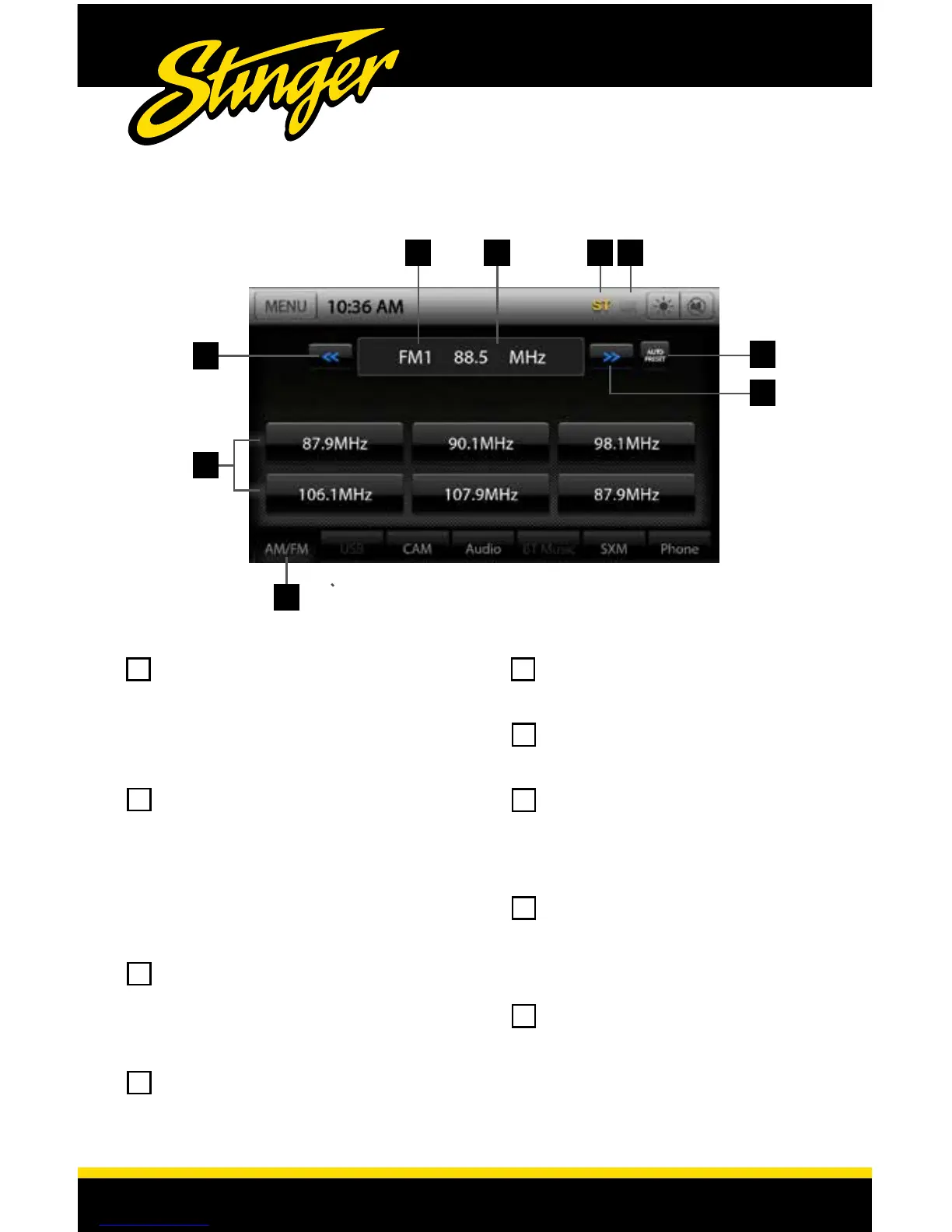
Touch the AM/FM Tab or MENU
> Radio to select the Radio
source. Pressing the AM/FM Tab
repeatedly will cycle through FM1-
FM2-FM3-AM1-AM2
Preset Stations - A total of 18 FM
and 12 AM stations can be stored
in memory. To assign a preset, go
to desired station, press and hold a
preset location until preset button
highlights and station frequency
appears.
Tune/Seek Down - Press and
release to Tune Down. Press and
hold to Seek the next available
radio station.
Preset Bank Number - Displays
current set of presets (FM1-FM2-
FM3-AM1-AM2).
Station Display - Displays current
frequency.
ST Indicator - Indicates when
current radio station is in Stereo.
DX/LOC - changes the radio
tuner sensitivity. Touch to toggle
between Distant (DX) and Local
(LOC).
Auto Preset - Touch to
automatically set the 6 presets
with current location radio
stations.
Tune/Seek Up - Press and release
to Tune Up. Press and hold to
Seek the next available radio
station.
2
4
1
65 7
1
5
2
6
3
7
4
8
9
3
9
8














 To Next Page