22
StingerElectronics.com
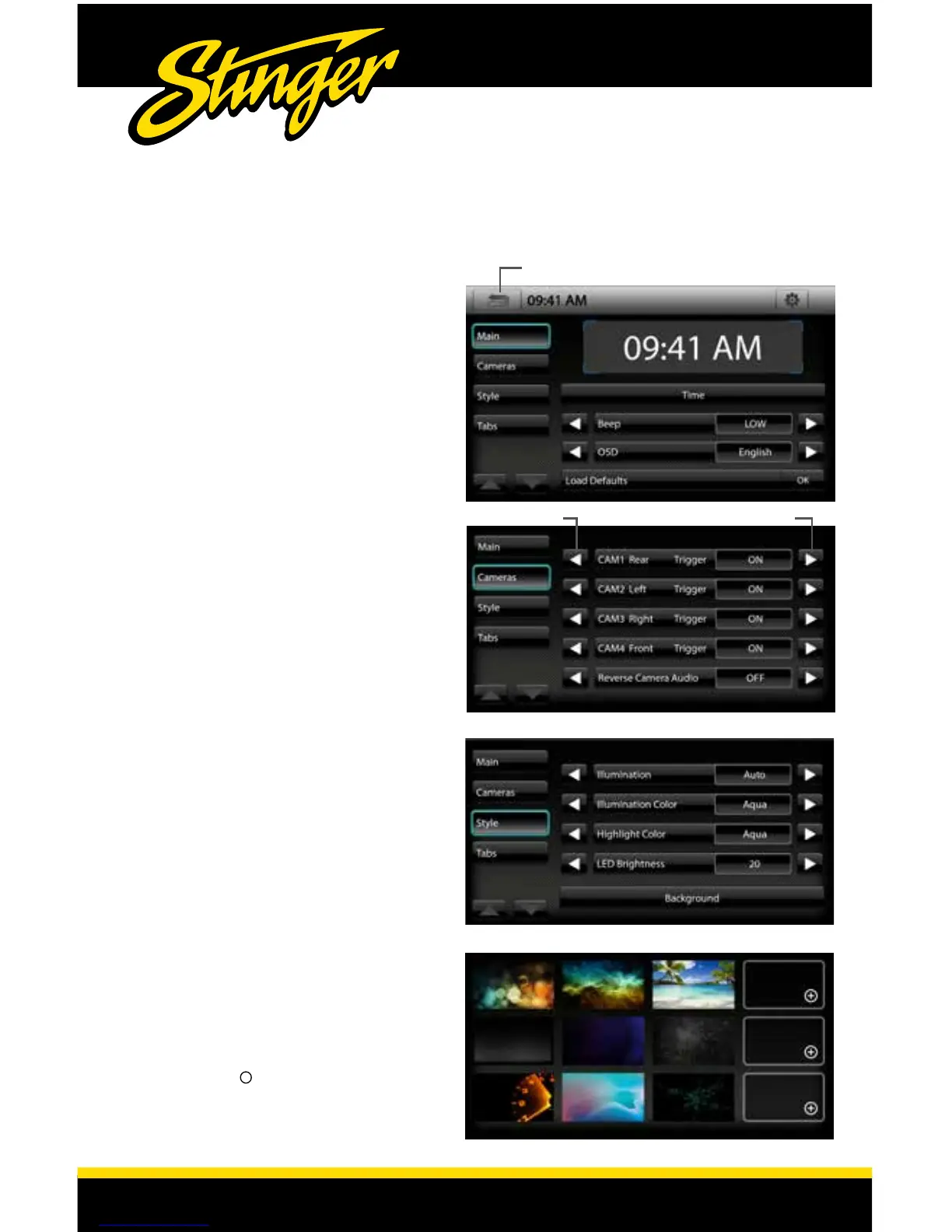
Back Button to Exit and Save Changes
Change Name
Trigger On/Off
MAIN SETTINGS
Settings > Main
Time (Touch to change time)
Beep [OFF-LOW-MID-HIGH]
OSD [English-French-Spanish]
Load Defaults [OK]
Settings > Cameras
The default Camera Names are Rear,
Left, Right and Front. You can change
the names using the arrow icon on the
left [OUTSIDE-AUX-INSIDE-BED-TRAILER]
Trigger [ON-OFF]
Reverse Camera Audio [OFF-MUTE-ON]
Settings > Style
Illumination[AUTO-ON-OFF]
Illumination Color
[AQUA-BLUE-RED-GOLD-GREEN-WHITE]
Highlight Color
[AQUA-BLUE-RED-GOLD-GREEN-WHITE]
LED Brightness [0-20]
Settings > Background
Allows you to change the background
image. You can upload up to 3 of your
own images. To upload an image(s),
copy images onto a USB thumb drive
and connect drive to one of the USB
ports. Touch the + symbol and select
image. Background images should be
1024*600 resolution and .BMP format.
Size is not limited.
Touch MENU > Settings or press the
HOME BUTTON > Settings to access
the Settings. Use Arrows to change
values and the Back Button to save
changes.














 To Next Page