®
®
stingersolutions.com
stingersolutions.com
18
19
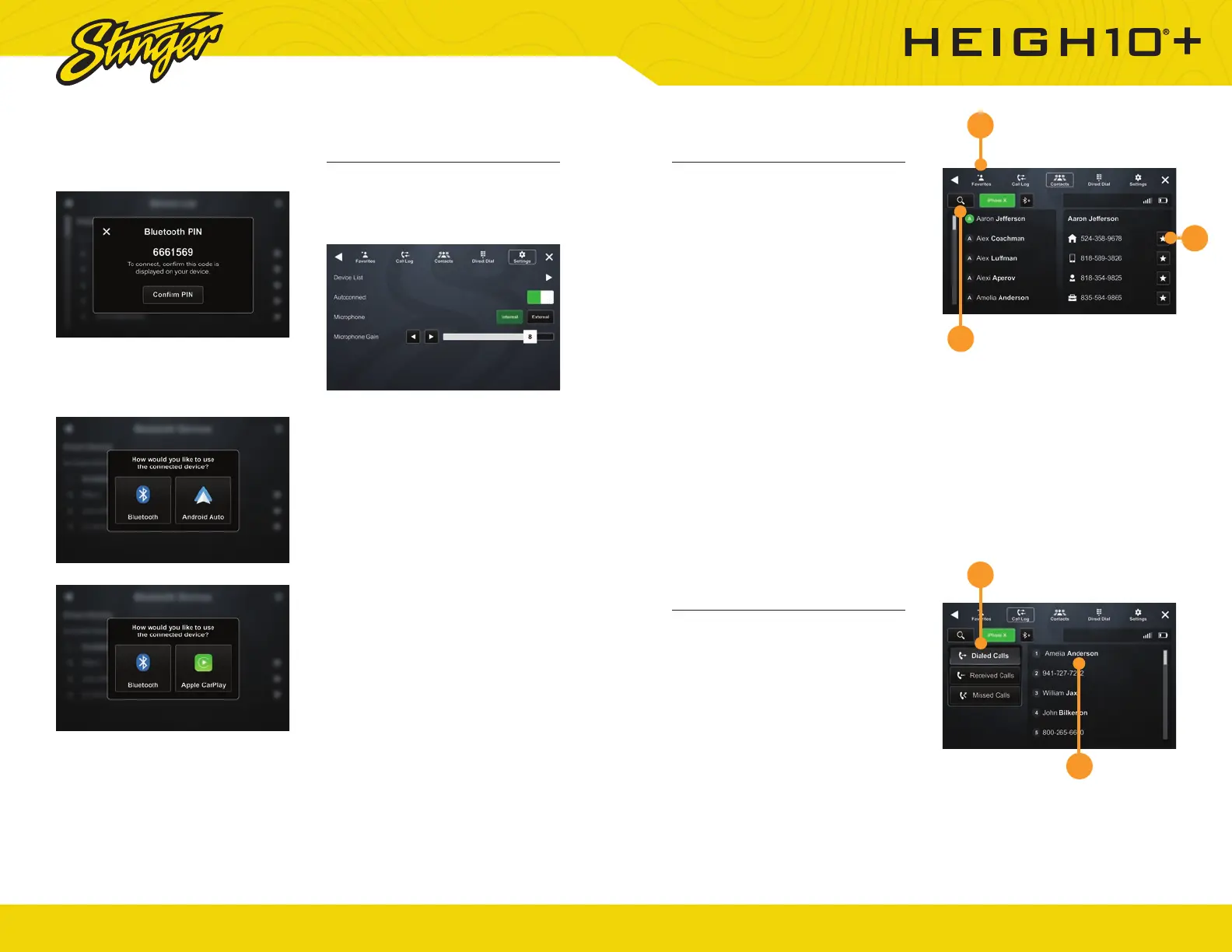
BT Device Settings
Once a device is paired and
connected, you can adjust its
settings from the Phone settings
menu item.
Device List
Access a list of all devices in
memory, connect, add, and delete
devices from this menu.
Autoconnect
Once a device has been paired,
it will automatically connect
whenever the system is turned on
and the device is within range. You
can disable this feature by toggling
Autoconnect OFF
Microphone
Set control to external if an external
microphone is installed. Set to
Internal to use the microphone
located on the front of the display.
Microphone Gain
Adjusts the volume (sensitivity) of
the microphone when using hands-
free phone.
4. Confi rm PIN Code on the head
unit screen and the device.
5. Select the connection type
you want to use with your device
(bluetooth / phone projection).
If you choose phone projection,
your phone will be accessible
through your phone projection
application (Apple CarPlay /
Android Auto).
Contacts
While a device is paired, Contacts
can be accessed by selecting
Contacts from the Phone main
menu. It may take several minutes
to load all contacts. When a
contact is selected from the list, all
associated numbers (Home/Work/
Mobile, etc.) will be displayed on the
right side of the screen. Touch the
number you want to dial.
1. Favorites
The Favorites list can be accessed
from the Phone main menu.
2. Setting Favorites
To add a contact number to the
Favorites list, touch the STAR button
to the right to the desired phone
number.
3. Search Contacts
To Search your contact list, select
the SEARCH icon on the Phone
Selector area.
Call Log
The Call Log lists recently dialed,
received, and missed calls.
1. Call Type Filter
You can select which type of call
you want to browse by tapping
Dialed, Receieved, or Missed Calls
on the left.
2. Dialing a Number From Call Log
Tap the contact or phone number
to dial a number.
1
1
2
3
2













 To Next Page