®
®
stingersolutions.com
stingersolutions.com
10
11
settings.
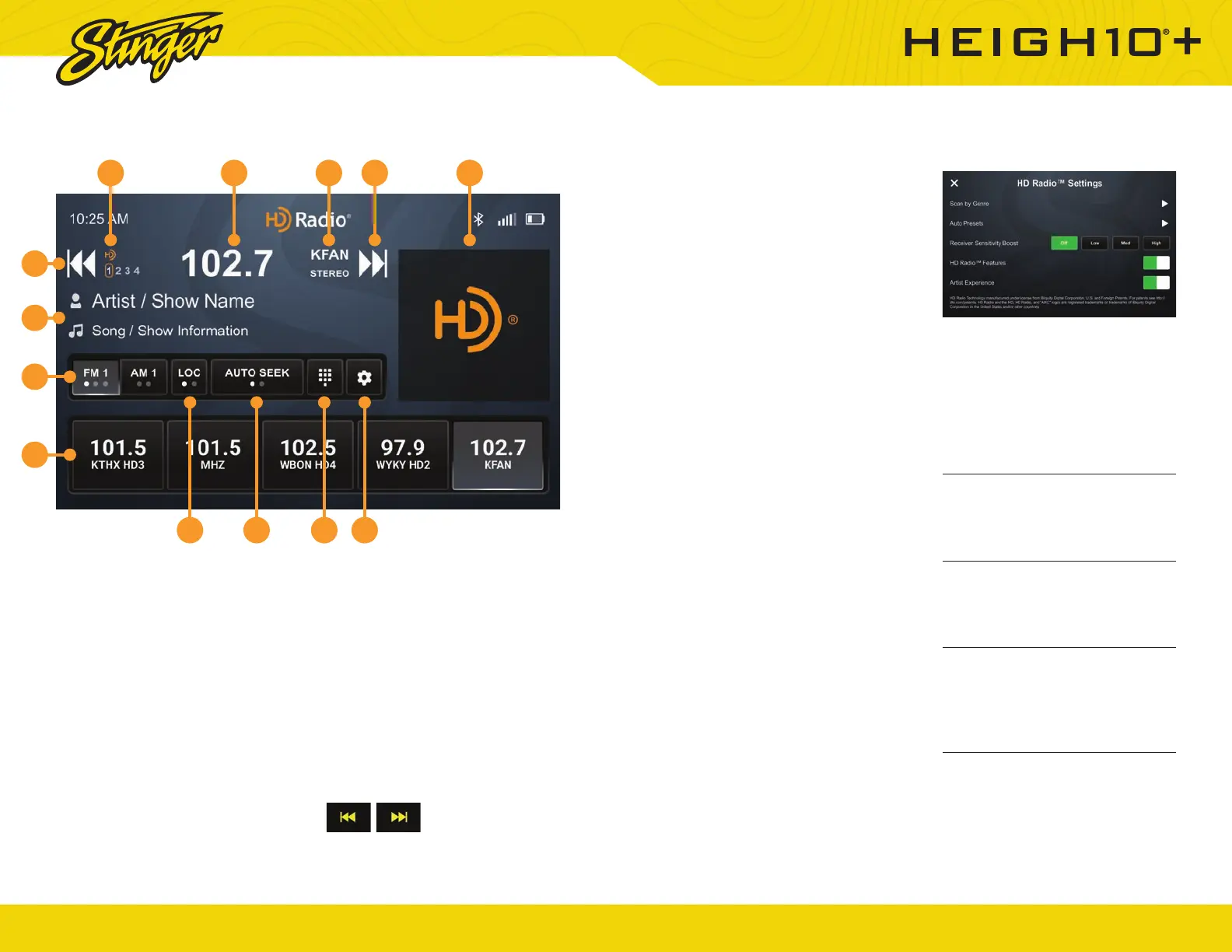
Scan By Genre
Tap to select a genre. The head unit
will display the HD Radio screen
and scan for the next available
station whose PTY genre listing
matches the selected option.
Auto Presets
Tap to automatically program
channel presets. This will
reprogram all existing presets.
Receiver Sensitivity Boost
Tap the desired level of sensitivity.
Higher sensitivity levels may result
in undesired noise.
HD Radio™ Features
Toggle on/off to enable/disable
HD Radio features like SPS sub-
stations, station metadata, artist
experience, and more.
Artist Experience
Toggle on/off to enable/disable HD
Radio Artist Experience.
Press the HOME BUTTON > HD Radio to select the HD Radio source.
1. Station Presets
To assign a preset, go to desired
channel, press and hold a preset
button for 2 seconds to store the
station. A total of 15 FM & 10 AM
stations can be stored in memory.
2. AM/FM
Press to cycle through AM/FM
Presets.
3. Station Information Display
These two lines display Show /
Artist / Track Name for current
station.
4. Tune / Seek Down
Tap to tune frequency down. If you
are tuned to an HD Radio Station,
press to tune to the next available
SPS station. Press and hold to seek
the next available radio station.
Note: When browsing SPS stations, hold to
seek is disabled.
5. HD Station Identifi cation
Displays currently tuned MPS & SPS
channel.
6. Station Frequency Display
Displays currently tuned frequency.
7. Station Identifi er / Audio Info
Indicates Station Call Numbers
& Current audio mode (Mono /
Stereo)
8. Tune / Seek Up
Tap to tune frequency up. If you
are tuned to an HD Radio Station,
press to tune to the next available
SPS station. Press and hold to seek
the next available radio station.
9. Album Art
Displays album art for currently
playing track.
10. DX/LOC
Changes radio tuner sensitivity.
Touch to toggle between distant
(DX) and Local (LOC).
11. Seek Type
Touch to toggle between auto &
analog seek modes.
12. Direct Tune
Touch to tune directly in the current
band (FM/AM). Once the desired
frequency is entered, tap go to
tune.
13. HD Radio™ Settings
Tap to access HD Radio application
3
4
2
1
10 11 12 13
5 6 7 8 9
HD RADIO™
Face buttons: Tap to cycle
through presets, hold to seek.













 To Next Page