®
®
stingersolutions.com
stingersolutions.com
22
23
Press the HOME BUTTON > Acc. Control to launch the Accessory Control app.
Accessory Control allows you
to assign buttons to control
compatible hardware without
installing physical controls. For
instructions refer to your HEIGH10+
installation guide.
*Recommended Hardware
https://stingersolutions.com/products/
switchhub-4-channel-100-amp-solid-
state-relay
Once your accessories are
installed according to the HEIGH10+
Installation guide, you’re ready to
set up your accessories.
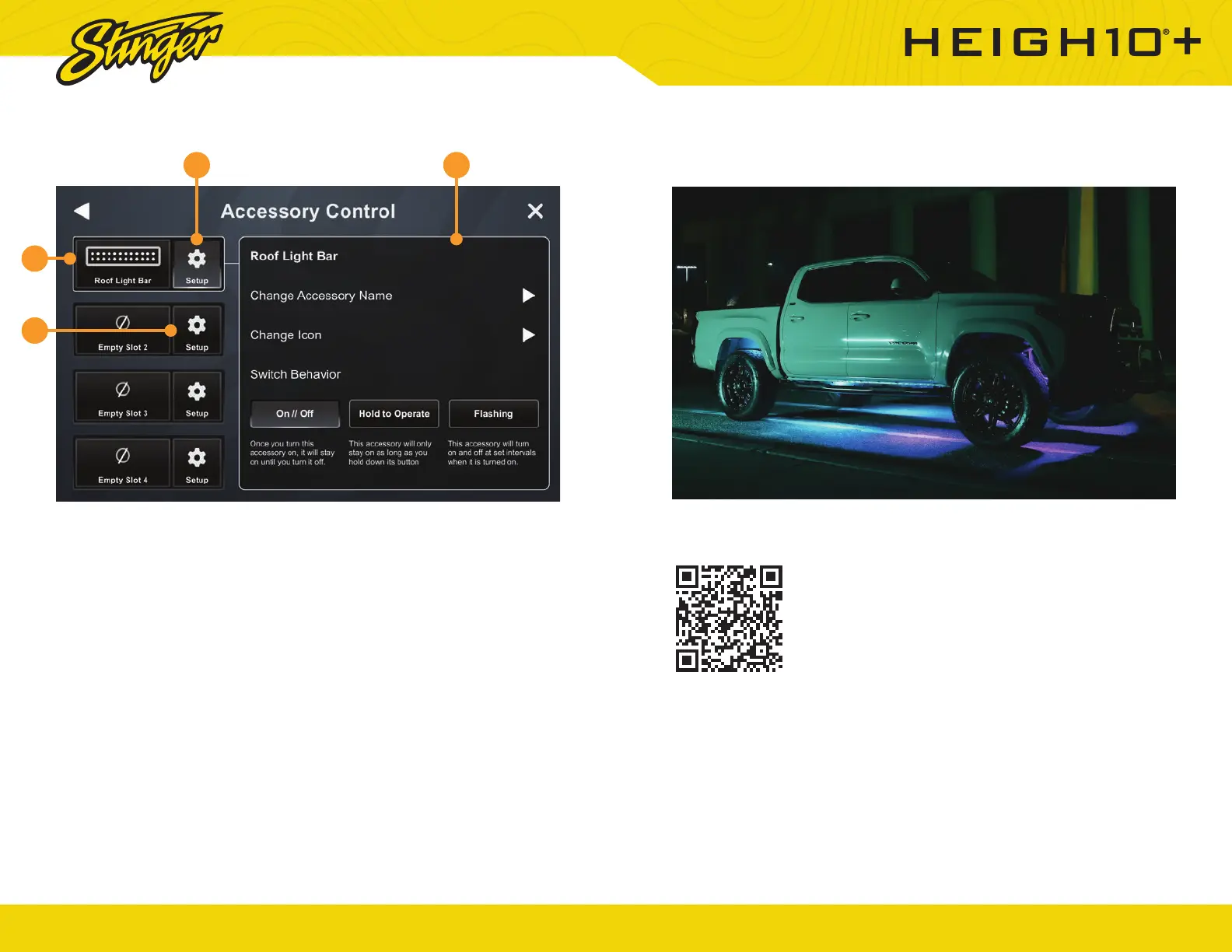
1. Setup
Tap the setup button to begin
setting up your new accessory.
Assign a name and an icon to your
accessory and confi rm.
2. Accessory Control Button
Touch to turn accessory ON/OFF.
3. Accessory Settings Button
Touch to access accessory
settings.
4. Accessory Settings
Change accessory name, icon and
button behavior
We know that the best time for adventure is after the
sun goes down. That’s why we’ve got a wide selection
of Dynamic LED lighting to help you see and be seen
when the ride gets dark.
Illuminate your ride and benefi t from superior visibility
with enLIGHT10.
Learn more at https://stingersolutions.com/pages/
enlight10
ACCESSORY CONTROL ENLIGHT10 RGB LIGHTING
1
2
3 4













 To Next Page