®
®
stingersolutions.com
stingersolutions.com
34
35
CHECKING FIRMWARE VERSION
Checking and updating the Sytem Firmware and PAC Integration is an
important step for proper operation. This should be done fi rst before
setting any system and vehicle settings as well, as those settings may
be lost after an update.
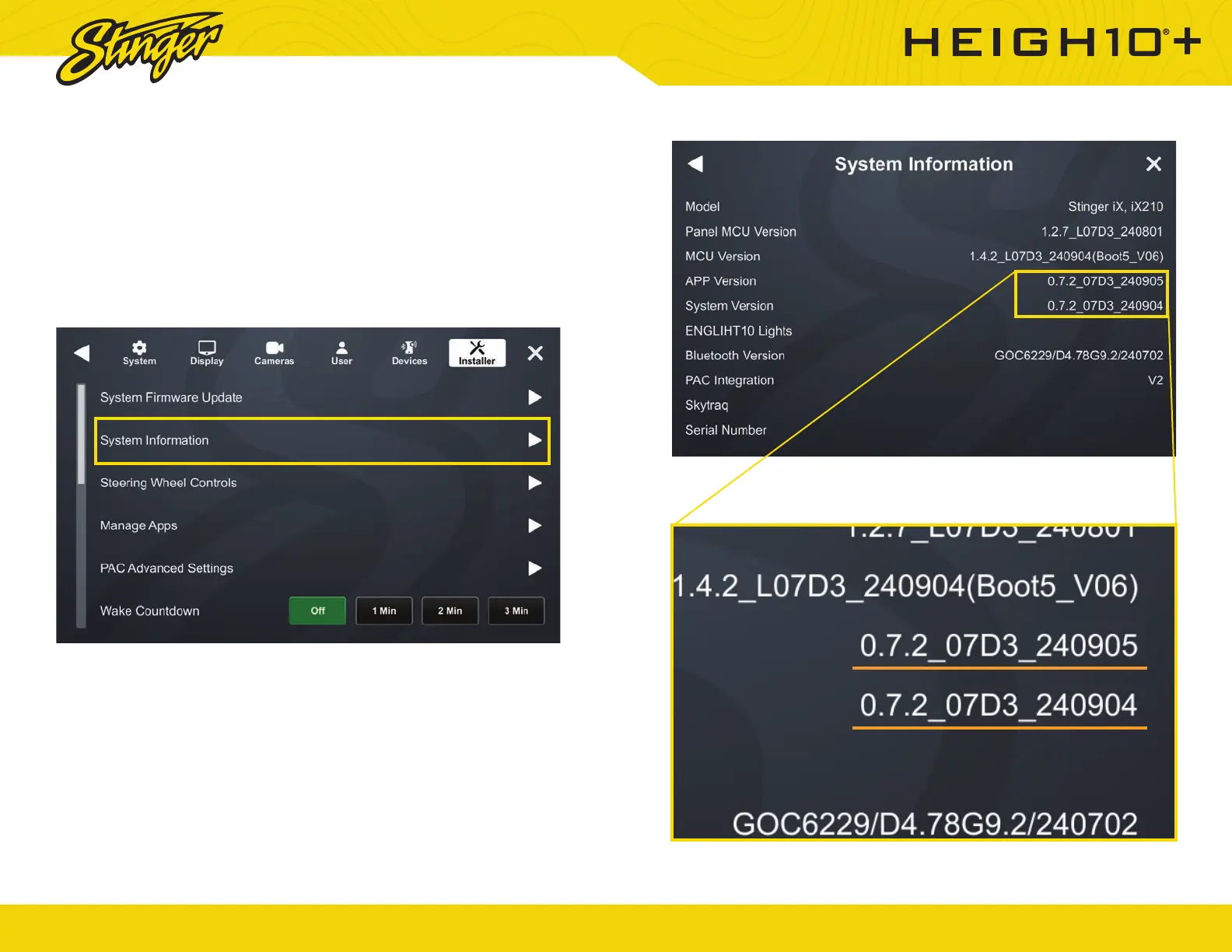
2. Note the APP and System Versions and head over to the HORIZON10
product page on stingerelectronics.com.
Select the New Firmware Tab on the product page. The most current
fi rmware will be listed with a date. The 8 digits of the APP Version is the
APP Version date code (YYYYMMDD). The 6 digits of the System Version is
the version date (YYMMDD). If the date code of either the APP or System
fi rmware is older than the current fi rmware on the website, proceed to
Updating System Firmware.
Check your fi rmware version fi rst by navigating to SETTINGS > SYSTEM >
INSTALLER > System Information and tap the control.













 To Next Page