®
®
stingersolutions.com
stingersolutions.com
30
31
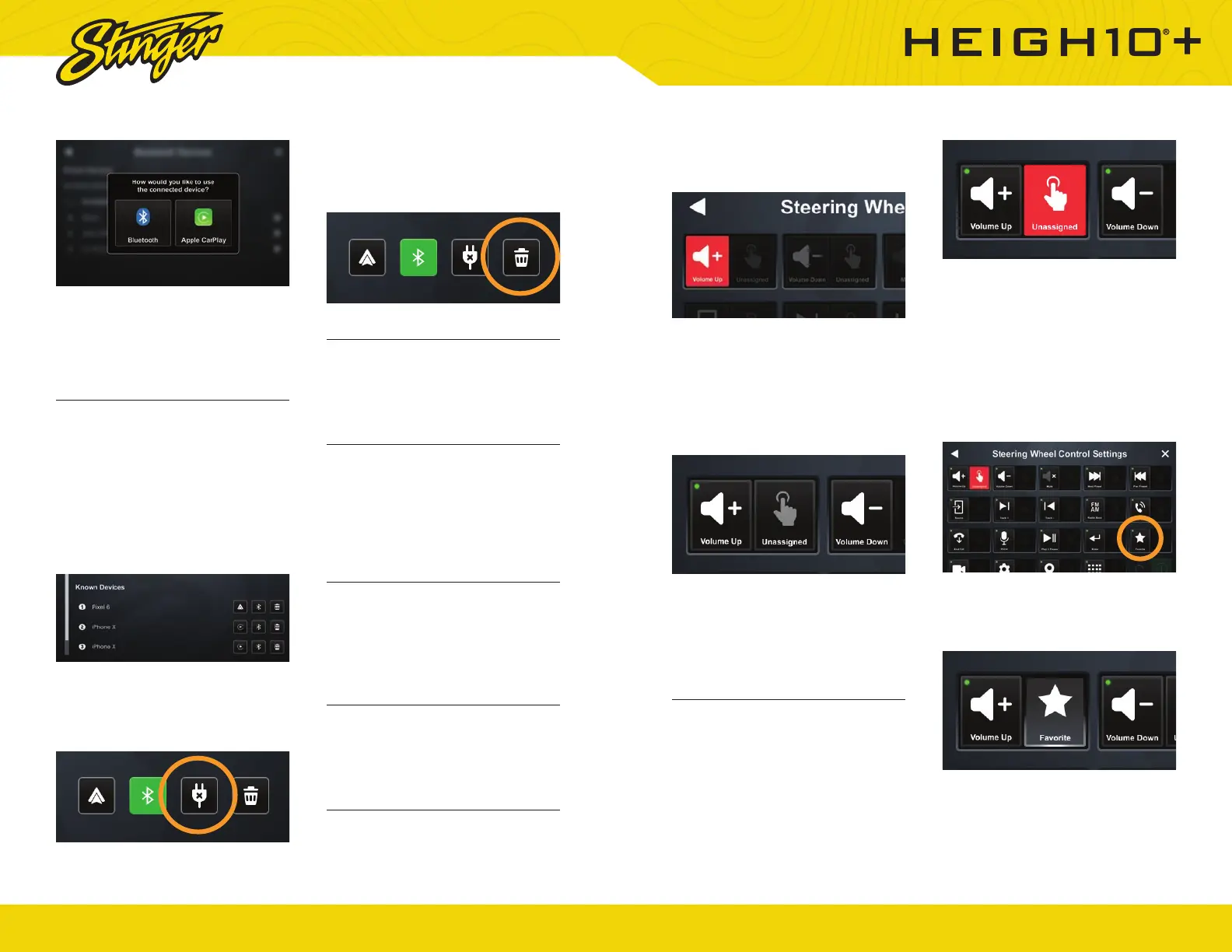
assign to a steering wheel column
button.
The button will turn red for ~10
seconds. This indicates it is ready
to be programmed.
2. Touch the button on the steering
wheel that you want to assign to
the chosen function.
When your function is programmed
successfully, its short press
button will have a small green
programmed indicator.
Assign a Function to Long Press on
a Steering Wheel Column Button
You can assign a long press
behavior to any programmed
steering wheel button.
1. Touch the long press button
for the steering wheel button
you want to create a long press
action for.
In this case, the function you assign
the long press to will use the button
you assigned Volume Up to.
2. Touch the function you want to
assign to your long press action.
In this example, we are going to
assign the favorite function to long
press on our assigned volume up
button.
When successfully programmed,
your long press function will be
highlighted and active.
Note: You can only assign a long
press function for a button you’ve
already programmed. Any function
If you choose phone projection,
your phone projection application
(Apple CarPlay/Android Auto) will
launch automatically.
Connect to a Saved Device
A list of previously connected
devices is available under Known
Devices.
1. Make sure bluetooth is enabled
on your mobile device.
2. Press the phone projection or
bluetooth button to connect to
your device.
Disconnect a Device
Tap the DISCONNECT button to
disconnect a connected device.
Delete a Device
Tap the DELETE button to delete a
known device.
Apple CarPlay Options
You can change the orientation
of Apple CarPlay’s interface by
toggling the Steering Wheel control
left or right.
USB-C Settings
You can set your head unit’s USB
-C connection to charge only or
enable Apple CarPlay / Android
Auto through the USB-C port.
6. INSTALLER
Master Reset
Touch the Master Reset item to
restore your head unit to factory
settings. This action will reset
isntaller settings, user settings, and
PAC Integrations.
Steering Wheel Control
Your IX210 can reassign any of
your steering wheel buttons to any
available head unit from this menu.
Assign a Function to Steering
Wheel Column Button
1. Touch the function you want to













 To Next Page