SatLink VSAT User Guide
Publication no. 101557
Copyright © 2009 – STM Group, Inc.
Page 148 (160)
K.5 List of events that may be logged
The following are the most common events that may be shown in the log from the STM SatLink VSAT.
Use the CLI command
log show to display the list of events stored in memory and the CLI command
type activeLog.txt
to display the list of events stored on the flash file system.
Events of type Major will normally cause disruption in the data transfer, while events of type Critical
normally will require user intervention in order to restore the data communication with the DVB-RCS
Hub.
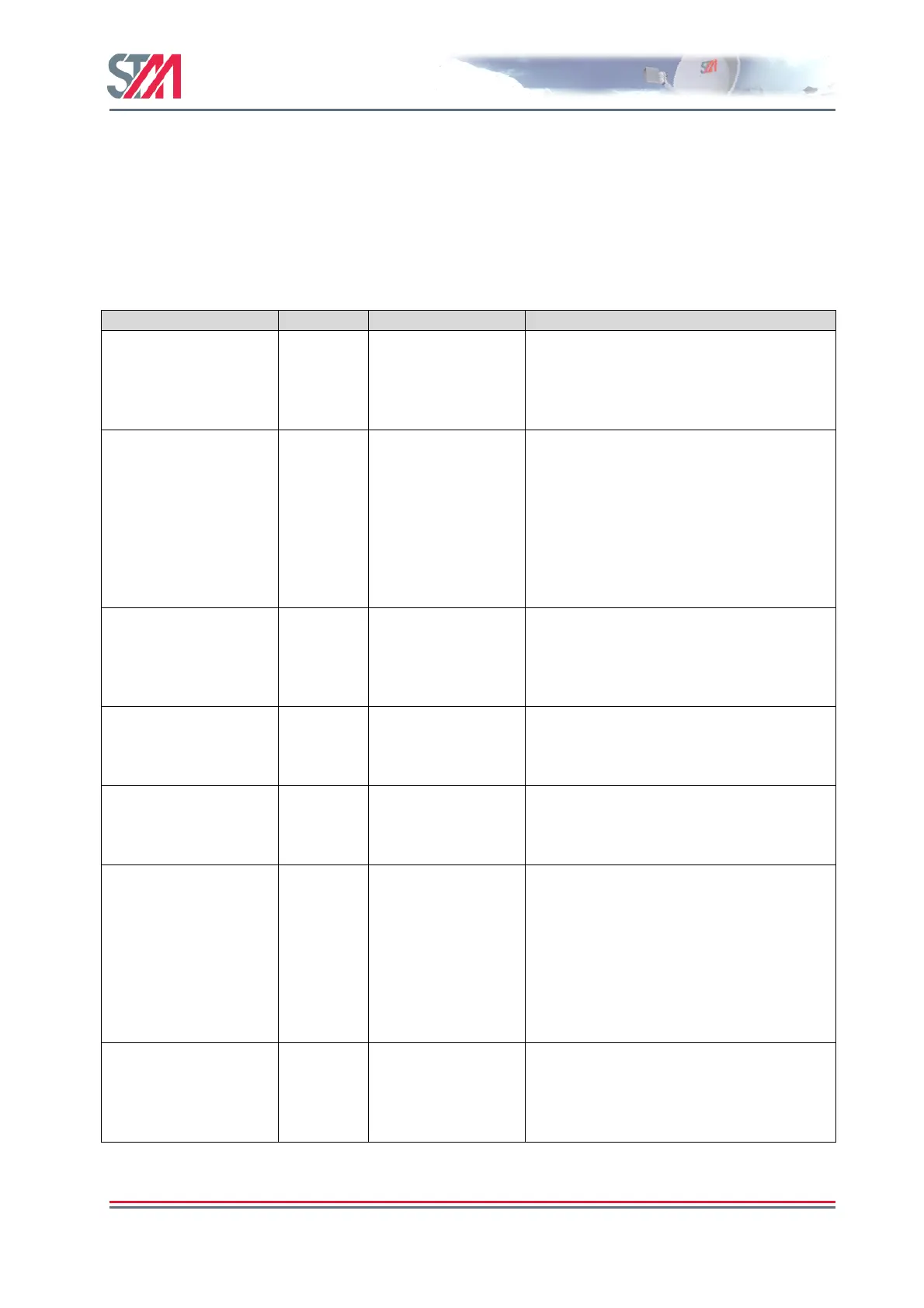
Event Severity User action required Comment
NCR lock lost Major None The STM SatLink VSAT must log off, but
will automatically try to reacquire the
forward link and log on again. If the
problem persists, please contact the Hub
operator.
DVB-S/S2
Demodulator lost lock
Major None The STM SatLink VSAT has lost the
forward link from the Hub. All 2-way IP
communication will be broken. This is
normally caused by a fade event caused by
rain or snow. If the problem persists also
after the weather improves, please check
that the VSAT antenna has not been put
out of its correct position before
contacting the Hub operator.
DVB-S/S2
Demodulator Re-
synchronisation
Minor None There was a short interrupt to the
reception of the forward link from the
Hub. Normally this happens during rain
fades. Normally no or only 1-2 IP packets
are lost during such an event.
CMT not received Major None The STM SatLink VSAT must log off, but
will automatically try to log on again. If
the problem persists, please contact the
Hub operator.
Logon retry timeout Minor None The STM SatLink VSAT was not able to
log on to the Hub. After a timer has
expired the STM SatLink VSAT will retry
to log on to the Hub.
Logon failure Major None The STM SatLink VSAT was not able to
log on to the Hub. Please check that
correct GPS position and population ID
has been configured.
After a timer has expired the STM SatLink
VSAT will retry to log on to the Hub. If
the problem persists, please contact the
Hub operator.
GW Busy Major None The Hub does not allow the STM SatLink
VSAT to log on. After a timer has expired
the STM SatLink VSAT will retry to log
on to the Hub. If the problem persists,
please contact the Hub operator.



 To Next Page