20
Multi-way Loudspeaker Setup
During the initial Theater Definition setup, you
have the option of defining any speaker as
multi-way. Doing so will assign 2 to 4 output
channels to each speaker instead of 1. In this
configuration, more than 1 amplifier channel will
be used per loudspeaker, and the ISP will perform
the crossover function for each loudspeaker.
All settings detailed in section “Individual
Channel Adjustments” on page 18 also apply
and will not be covered again here. This section
only describes the differences notable for multi-
way loudspeaker configuration.
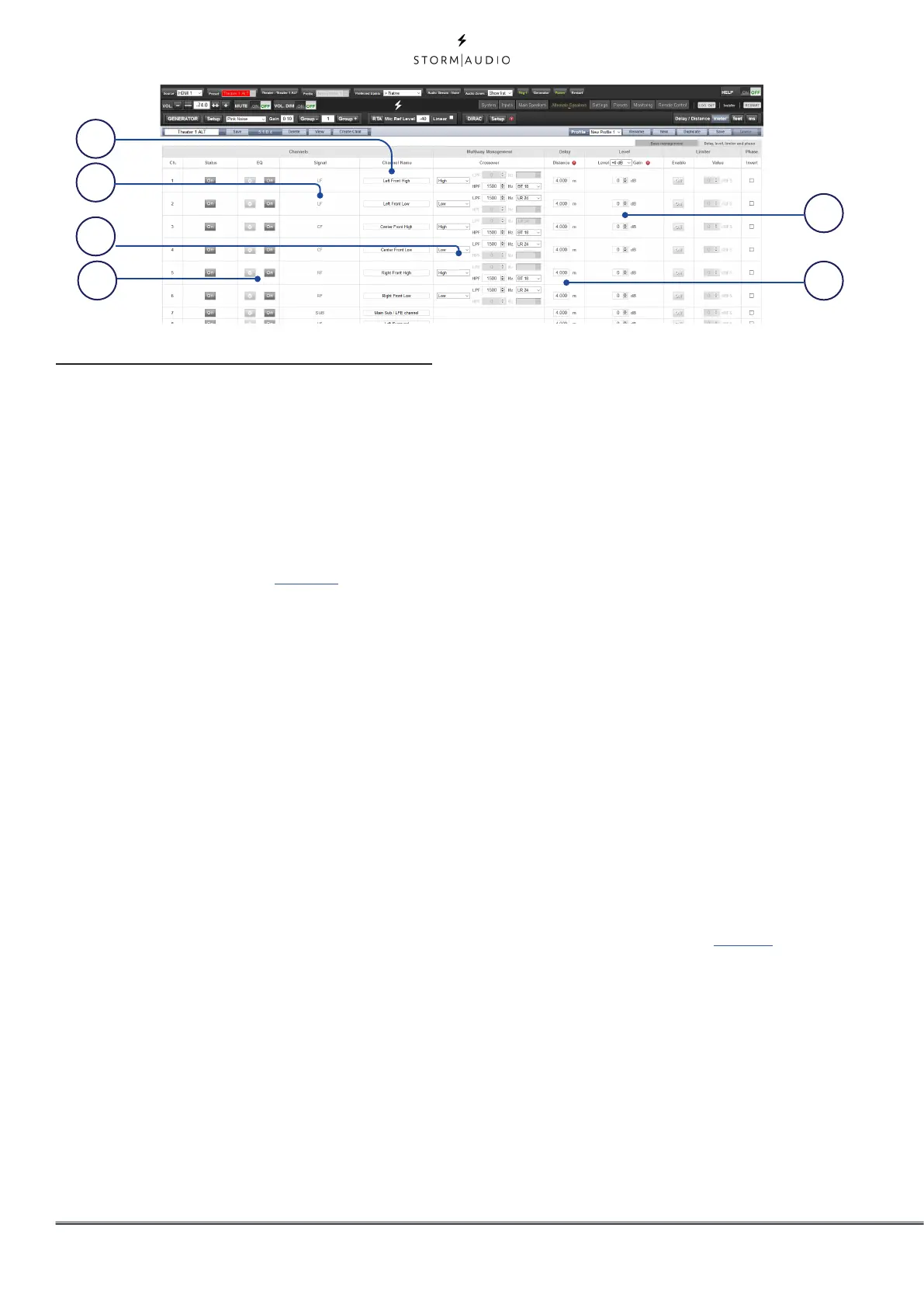
1. Channel Name
By default, the channel names are named by
the signal they receive. For clarity, you may
wish to rename these according to the signal
they reproduce e.g. Left Front High, Left Front
Mid, Left Front Low. Use Latin-1 character
table with no special character.
2. Signal
Note that in this example (Left Front is a
2-way active loudspeaker), Each of the first 2
channels receives the same Left Front signal.
3. Multi-way Management
Use this section to filter the signal for each
section.
• Section: Choose whether each channel
reproduces Full Range, Low Pass Filtered, Middle
(band pass), or High Pass Filtered audio. Two-way
speakers will not have Middle option.
• Crossover Frequency: When the section is
chosen as anything other than Full Range, set the
crossover frequency for the Low and High Pass
filters for each section.
• Slope: For each filter, select a slope. Options are
Butterworth (6dB / oct, 12dB / oct, 18dB / oct, 24dB
/ oct and 48dB / oct), Linkwitz Riley (12dB / oct,
24dB / oct, 36dB / oct and 48dB / oct).
4. Channel EQ
For each channel, you can adjust EQ by
selecting the Wheel. EQ can be bypassed
to compare with and without equalization
selecting On or Off.
5. Delay
Set the delay of each section. For active
multi-way loudspeakers, it may be helpful to
do this in milliseconds and measure time-
of-arrival differences at the crossover point
when using LR or BT6 filters to time align each
section of a multi-way loudspeaker.
6. Level
Active multi-way loudspeakers almost
certainly have different sensitivities per
module. Set the relative level of each here.
When possible, use 0 as the maximum
figure and attenuate other channels to
match the loudest channel. You can also set
global makeup gain for the entire theater as
described in “8. Level” on page 18.
Note that after making any changes, you must press the
SAVE button near the top right of the screen or you will loose
your changes.
1
6
5
2
3
4



 To Next Page